











Sorting Material List
Hi,
First off, great plugin. I've been using it and it's been very helpful.
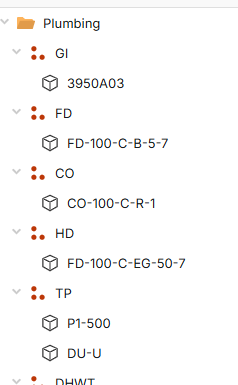
I do have one small suggestion regarding the section sorting. As shown below, it would be great if the sections could be sorted in the same order as they appear in the ZZTakeoff report. Currently, I don't see an option available to match the report's section order.
I’d also like to request a feature enhancement: the ability to create and manage multiple company profiles. This would allow coworkers using their own logins to maintain separate company settings and profiles rather than sharing a single configuration.
Thanks for the great work, and I appreciate your consideration of these suggestions.
Best regards, Marc Cormier
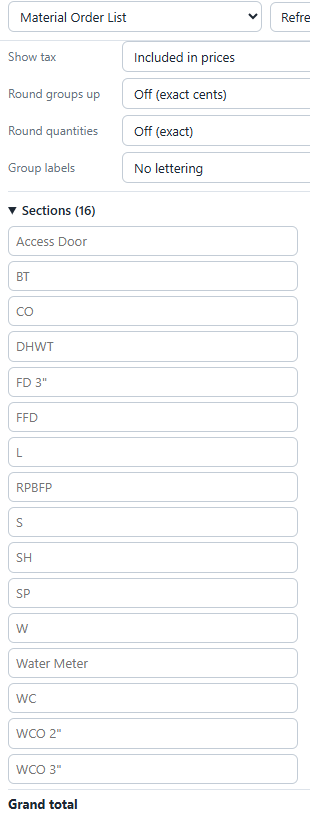
 Report Creator Tool
Hi Marc,
Thank you those are great suggestions, I will revisit this plugin and see how or if this is possible. So to confirm, same workspace just different users and each user would have there own profile.
As you know, with the MCP these are most likely doable. I will keep you posted!
%22%2F%3E%3Ctext%20x%3D%2232%22%20y%3D%2233%22%20text-anchor%3D%22middle%22%20dominant-baseline%3D%22central%22%20font-family%3D%22Arial%2C%20sans-serif%22%20font-size%3D%2226%22%20font-weight%3D%22600%22%20fill%3D%22%23fff%22%3EMC%3C%2Ftext%3E%3C%2Fsvg%3E "Marc Cormier")
"same workspace just different users and each user would have there own profile" this is exactly what I need.
👍1Marc, two questions, in the sections, is an A-Z or Z-A sort acceptable, and does each user have their own set of reports? and do they need to be password protected and allowed by an admin with the code?
It would be nice to have an option to keep the sorting from the actual reports.
Below is the same project and for your plugin to sort the way I wanted was to add the numbers in front. If you can have an option to not sort and keep the sorting as per report that would be awesome.
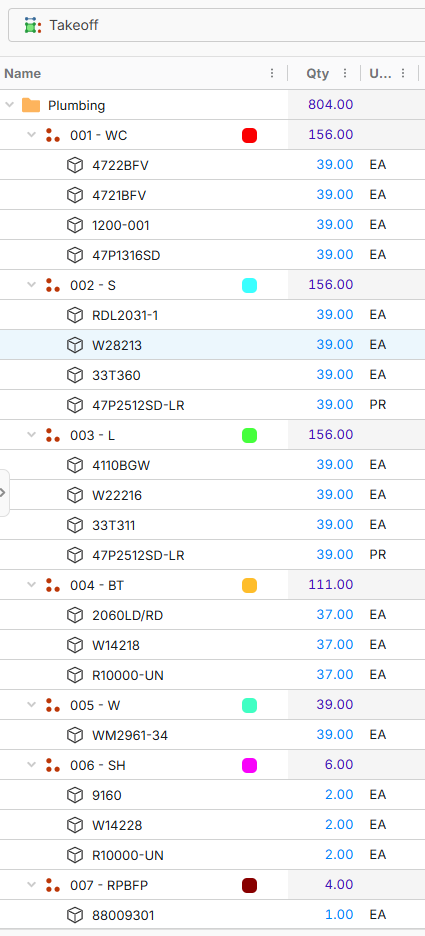
I have it sorting A-Z, Z-A now and match takeoff, I have no way of connecting to specific report sequences. I also have the individual profiles set up. It may take a day or tow to get it released in the plugin store, but I will post it here when is done. You will just have to update the plugin in the store.
So the sorting work within the Group but doesn't sort the Group's header and that is what I am looking for.
What I would like is the Counts to not be sorted.
As you can see the first is GI but on the plugin the CO is first.
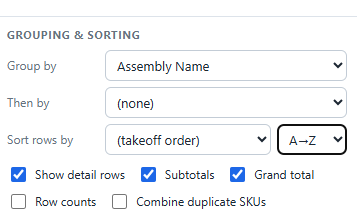
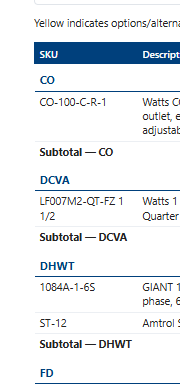
Hey Marc, I made the changes to the best of my ability. Currently the idea behind these tools is we have allowed the user to modify the plugin scripts as needed. By using the MCP and a good AI agent you should be able to get what you are looking for if it is possible. Let me know if you would like my Claude Skill set, it will give you a great head start.
The newest version of the plugin will land later today, be sure and check for an update in the plugin store.
🙂1The only problem I have with MCP is I am only allowed to use M365 Copilot and I am trying to get away from AI to produce my quote. I had a system going on but this plugin made me convert back to not using AI. I will be waiting for the update to see if this will fix what I need.
Hey Todd, this worked. You are awesome thank you.
I am very glad to hear that Marc, there are so many great and amazing things ahead of us, the dev team has been working non stop and forward thinking. I am sure the reports sections will be even better soon!