










 Project Showcase
Dynamic Margin-to-Markup Conversion
For those who prefer working in Margin instead of Markup, I’ve found a way to apply multiple adjustable margin rates directly through the Markup % field.
This allows different components (Profit, Fixed OH, Variable OH, etc.) to be adjusted on the fly — either at the item level or directly within reports.
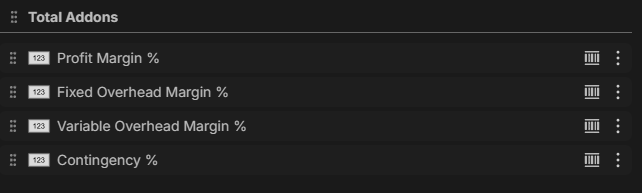
Margin → Markup Conversion Formula
For my setup, I convert Margin % into Markup % using the following formula:
(([Profit Margin %] + [Fixed Overhead Margin %] + [Variable Overhead Margin %]) / 100)
/
(1 - (([Profit Margin %] + [Fixed Overhead Margin %] + [Variable Overhead Margin %]) / 100))
* 100
+ [Contingency %]
Explanation:
- Profit + Fixed OH + Variable OH are treated as Margin components
- The formula converts the combined Margin % into Markup %
- Contingency % is added afterward because I treat it as Markup for my use case.
Implementation
- The custom properties are applied at the Product level
- The formula is inserted directly into the default Markup % property
- When a Product is inserted into an Item:
- The Item inherits the formula and margin fields from the product
- All Margin % values can be adjusted per item
- Adjustments can also be made directly in the Reports tab
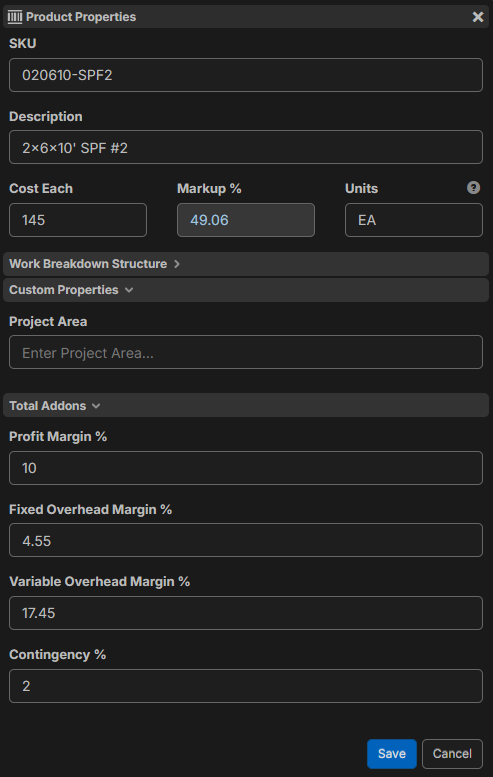
This makes the markup dynamic while maintaining a margin-based pricing structure.
Result
You can adjust Profit, Fixed OH, Variable OH, and Contingency independently at:
- Product level
- Item level
- Report level
All while keeping the pricing mathematically consistent.


You're a wizard Sam. Is there a way to batch insert a formula into your items or do you have to open each one individually so you can enable formula mode?
I have been using reports tab to improve my templates because im finding it faster to edit them as takeoffs then save them as new templates. Looking forward to having the ability to open up existing lists and batch edit though.
👍1%22%2F%3E%3Ctext%20x%3D%2232%22%20y%3D%2233%22%20text-anchor%3D%22middle%22%20dominant-baseline%3D%22central%22%20font-family%3D%22Arial%2C%20sans-serif%22%20font-size%3D%2226%22%20font-weight%3D%22600%22%20fill%3D%22%23fff%22%3ESC%3C%2Ftext%3E%3C%2Fsvg%3E "Samuel C.")
I don't think there's currently a way to batch insert formulas yet, not even through the Reports tab, so +1 on that batch edit feature.
I’ll try your approach of using the Reports tab along with a template project to handle batch editing of templates though!
actually I know you can batch edit cost each even switch to formula mode within reports tab, I assume you could do the same with markup% , it won’t update your lists but you can use it if you’re fine with overriding the list properly on your takeoff. Just be sure to remember that if you change an item within a takeoff from a product list it will revert to whatever was on your list.
you can also batch edit formulas within reports. I made a custom view in reports for helping me tweak my takeoffs to save as templates.