










 Documentation
Workspace Roles & Permissions
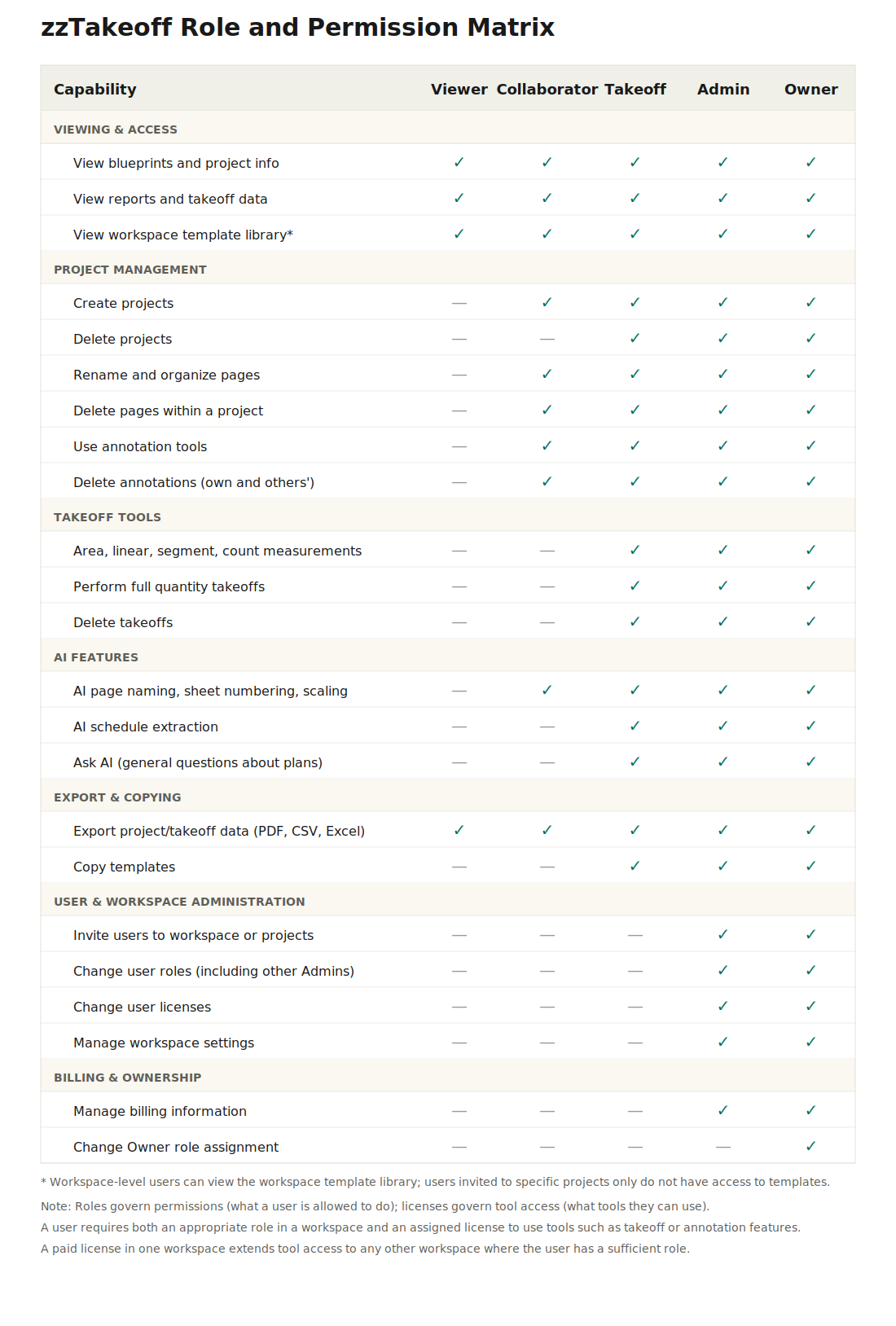
Workspace Roles & Permissions in zzTakeoff control what each team member can see and do inside a workspace. Assigning the right roles helps keep projects organized, protects important data, and ensures team members only access the tools they need.
This article explains the different roles and how permissions work.
What Are Workspace Roles?
A workspace role defines a user's level of access within a workspace. Each role determines what actions a user can perform, such as creating projects, editing plans, inviting users, or managing settings.
Roles help you:
- Control who can manage projects
- Protect workspace settings and data
- Organize teams efficiently
- Prevent accidental changes
- Maintain clear responsibility across users
Available Workspace Roles
Admin
Admins have full control over the workspace.
Permissions include:
- Invite and remove users
- Assign and change roles
- Create and delete projects
- Upload and manage plans
- Use all takeoff tools
- Manage workspace settings
- Access all projects and data
Best for:
- Company owners
- Managers
- Team leaders
- System administrators
Member
Members can work on projects and perform takeoffs but have limited administrative control.
Permissions include:
- Create and work on projects
- Upload and manage plan sheets
- Use takeoff tools
- Access assigned projects
- Collaborate with team members
Restrictions:
- Cannot manage workspace settings
- Cannot assign roles
- Cannot remove users
Best for:
- Estimators
- Project managers
- Engineers
- Designers
- Team members performing takeoffs
Viewer (Optional Role)
Viewers can see workspace content but cannot make changes.
Permissions include:
- View projects and plans
- Review takeoff data
- Monitor progress
Restrictions:
- Cannot edit projects
- Cannot upload plans
- Cannot use takeoff tools
- Cannot manage users
Best for:
- Executives
- Clients
- External partners
- Review-only team members
How Permissions Work
Permissions are applied at the workspace level and affect all projects inside the workspace.
This means:
- Admins can access everything
- Members can work on assigned projects
- Viewers can only view content
- Role changes apply immediately
- Access updates automatically across all projects
This structure ensures consistent control and collaboration across the entire workspace.
Assigning Roles to Users
To assign or change a role:
- Open your workspace
- Go to Workspace Settings
- Select Users or Members
- Find the user
- Choose their role
- Save changes
The new permissions will apply immediately.
Best Practices for Roles & Permissions
Keep Admins Limited
Only assign Admin access to trusted team members who manage the workspace.
Use Members for Daily Work
Most users should be Members so they can work on projects without changing system settings.
Assign Viewers for Oversight
Use Viewer roles for executives or clients who only need visibility.
Review Permissions Regularly
Periodically review workspace roles to ensure proper access and security.
When to Update Roles
You should update roles when:
- A new employee joins
- A team member changes responsibilities
- A contractor needs temporary access
- A project is completed
- Someone leaves the company
Keeping roles updated ensures your workspace stays secure and organized.
Summary
Workspace Roles & Permissions in zzTakeoff help you control access, protect data, and organize collaboration.
- Admins manage the workspace
- Members work on projects
- Viewers monitor progress
- Permissions apply across the entire workspace
- Roles can be updated at any time
Using roles correctly ensures smooth and secure teamwork inside zzTakeoff.