











 Feature Requests
A few annotations/notes enhancements/tweaks [Low Priority]
Always appreciate the annotations features. I find myself frustrated that I have to use one tool to perform QTO and another tool to do markups and annotations and feel if there were just a few tweaks to the annotations section of QTO software the markup/annotation tool would be required less.
In this screenshot, there were a few items:
- Would be nice to have more control over dimension arrow thickness or graphic or somehow scale???
- I noticed that I created a custom note background color and font size/color and when I clicked the notes tool again to create another the tool defaulted to out the box color font size/color
- Wondering if there could be custom library of markup/notes/annotations tools that are custom to user???
- Also, wondering if there may be a future annotation note with a leader line arrow?
- Same for bubble defaulting to thick lines and big bubbles. Just wondering if a user could set a certain line thickness/color/bubble size that could stay that user's default?
- Also, wondering about just a corner to corner square/rectangle box drag, instead of multiple clicking for the times that a simple box works (I use both frequently in another tool and would love to in zz)
- Would love to see future alpha/transparency contrast color stippling/gradient/hatching within bubble. Again, doesn't really do a lot for the QTO purposes, but for markups along the way for developing feasibility/constructability/communicating during QTO process I think would be really awesome


Thanks for the input. Lots of good suggestions. We will work to improve these tools as you suggest. We are very interested in the idea of combining the collaboration (particularly on the plans) to all happen in zzTakeoff instead of multiple tools. It does seem quite silly that users often need 2, 3, 4, or even 5 different apps to view their plans. Hopefully we can help consolidate at least takeoff + collaboration (with annotations).
We will for sure be adding annotation "presets" of some kind with an ability to choose a default preset. I think this will solve what you're after.
The "callout tool" (note with leader arrow) is done in our local development version, and will be released with the next release. Currently the callout tool just has 2 points, the tip of the arrow (or end of the line) and the start point of the text box. The box size currently auto-sizes based on the text content. Hopefully this solves what users are after. If not, we can add to it.
We're planning to implement a "box mode" at some point that applies to multiple tool types, such as area, linear, cloud, etc. I would see this as a mode that the user could toggle between "point to point mode" and "box mode".
Thanks for posting all the ideas and input. Our goal is to build this product based on what you guys ask for, so it really helps us in prioritizing to make zzTakeoff the best it can be 🙂


Really exciting stuff - Can't wait to see what rolls out every day/week/month
Most of the original goals/intent of opening this up have been addressed through the ongoing development of layers, reporting, and annotation capabilities.
IMO remaining improvements now fall under normal incremental tweaks or feature additions.
👍1
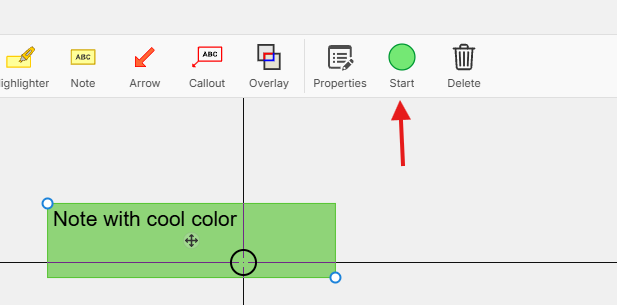
Just wanted to follow up on this to say that with our latest release, I think we have solved most of the things here. After you have customized how a note (or any annotation looks like) then you can simply select it and click "Start" in the toolbar to create a new note (or annotation) with the same customizations.
We've also implemented presets & save as default so you can change the default line thickness, color, etc.
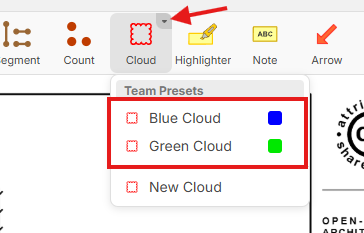
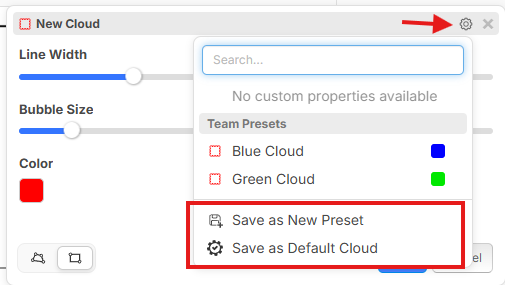
Cloud tool also has box mode with auto box mode if you click and drag in point to point mode.
🔥1👀1This is exciting! I may get to soon have one software handle all my estimating and precon needs. Can’t wait to check it out
👍1🚀1%22%2F%3E%3Ctext%20x%3D%2232%22%20y%3D%2233%22%20text-anchor%3D%22middle%22%20dominant-baseline%3D%22central%22%20font-family%3D%22Arial%2C%20sans-serif%22%20font-size%3D%2226%22%20font-weight%3D%22600%22%20fill%3D%22%23fff%22%3EJS%3C%2Ftext%3E%3C%2Fsvg%3E "Jordan Sinner")
Super happy to see that you guys addressed these requests. I also have a minor request that I'd appreciate, along similar lines. Can you make an option to add multiple leader lines to a callout box? In some cases on other programs it's just a right-click and "add leader"
Thank you!
👍2