Feature Requests
Extracting Schedules
Hey Team,
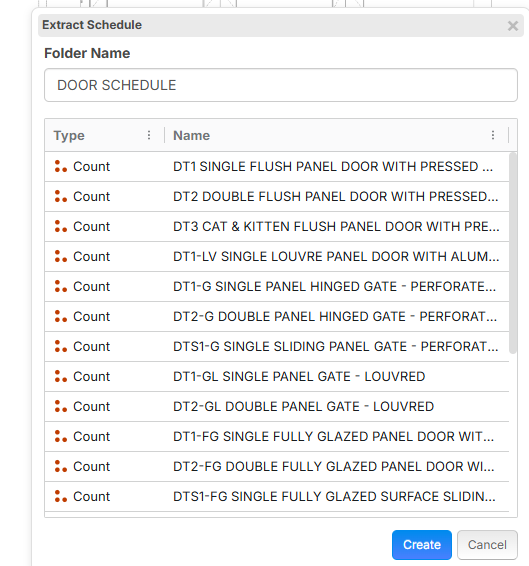
When extracting schedules, is there a way to break up the name?
As example below with the door schedule, i dont want the whole name, but it would be great if i could split it between Name and Description
E.g Name: DT1. Description: Single Flush Panel Door etc etc
%22%2F%3E%3Ctext%20x%3D%2232%22%20y%3D%2233%22%20text-anchor%3D%22middle%22%20dominant-baseline%3D%22central%22%20font-family%3D%22Arial%2C%20sans-serif%22%20font-size%3D%2226%22%20font-weight%3D%22600%22%20fill%3D%22%23fff%22%3EDJ%3C%2Ftext%3E%3C%2Fsvg%3E "Doug Jones")
@Thomas, I have been successful doing this using the "Ask AI" tool rather than the "Extract Schedule" tool. Note, for my purpose I pull schedules into Excel then into our in-house systems.
Try something like this:
"show comma delimited results for name and description total counts"
or
"show counts by name and description"
Ask AI has turned my frustration with schedule extraction into an action that saves me a lot of data manipulation in Excel.
🚀1
@Thomas using Batch Insert Takeoffs allows tons of workflows and customization. We have the Ask AI/Copy as Text will allow you to get a grid of data and paste it into excel to cleanup, then copy and paste into Batch Insert Takeoffs to create takeoffs!
%22%2F%3E%3Ctext%20x%3D%2232%22%20y%3D%2233%22%20text-anchor%3D%22middle%22%20dominant-baseline%3D%22central%22%20font-family%3D%22Arial%2C%20sans-serif%22%20font-size%3D%2226%22%20font-weight%3D%22600%22%20fill%3D%22%23fff%22%3EJ%3C%2Ftext%3E%3C%2Fsvg%3E "Jes")
@Stephen If there isn't an eta yet on when the Extract Schedule feature will be revamped, what about adding more columns to the Batch Insert Takeoff tool in the meantime so that we can plug in the width, length, wall height/depth to counts & linear takeoffs that are created through Batch Insert?
I love it, thanks for the feature request, I have shared with the dev team!
Any progress on this? Extract Schedule/inability to batch insert width/length/height still a chronic pain point for me

@Jes, no updates for this yet, but it is something we are planning to tackle soon.