











 Feature Requests
Fill in area after cutout
Would love a feature in the future that could fill in the area for you after you cutout a portion of an existing area box on the takeoff.
The tool would automatically fill in the cutout space for you with another area box so that you wouldn't have to spend time manually redrawing another area box inside of the exact space you cut out.
And you would have the option to have it either create a brand new area object, or add a section to an existing area object on the takeoff (like stairs in the example below)
You could even call it "Cutout & Replace" or something like that and make the entire feature seamless so that it would instantly fill in the cutout section with a separate area object if the user desires.
Some estimators draw around the portions that shouldn't be included in their original area objects, and then they go back and fill in the other portions, so perhaps a separate "Fill in" function may also be useful to them.


Good idea. We'll be adding lots of copy/paste, move to another takeoff item, duplicate capabilities as well 🙂 Thanks for the screenshot also, it always helps to visualize ideas like this.
%22%2F%3E%3Ctext%20x%3D%2232%22%20y%3D%2233%22%20text-anchor%3D%22middle%22%20dominant-baseline%3D%22central%22%20font-family%3D%22Arial%2C%20sans-serif%22%20font-size%3D%2226%22%20font-weight%3D%22600%22%20fill%3D%22%23fff%22%3ETL%3C%2Ftext%3E%3C%2Fsvg%3E "Tim Lotterhand")
Is this one still in planning? I do alot of ceiling/flooring takeoffs, so I'm hoping this one is in the works 😂
If we do "Duplicate As", does this do what you're after? This is done in local development and coming soon. You can duplicate the cutout as a new area, linear, count, or pick from a template.
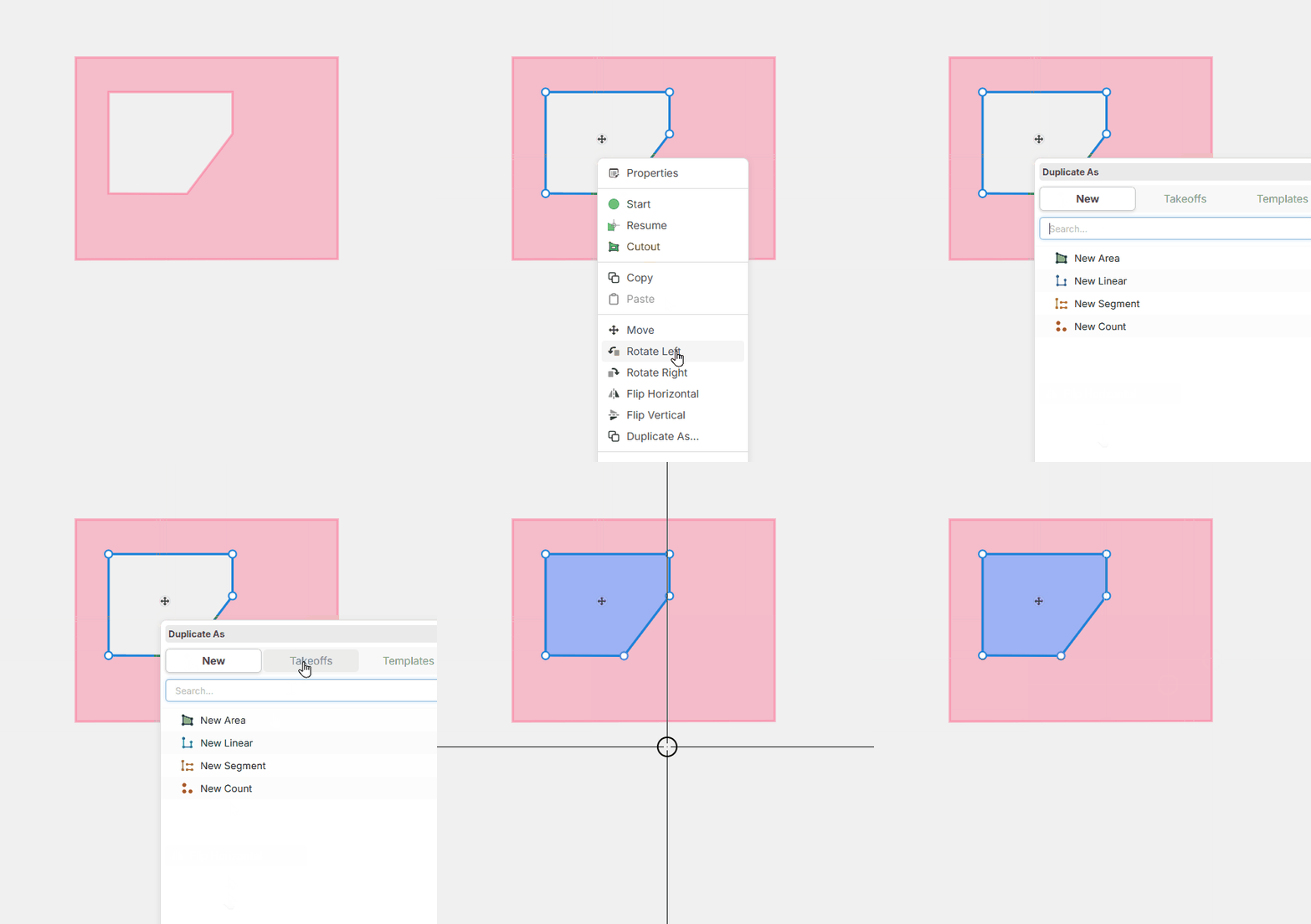
Yes that should work! How does the linear and count takeoff work within a cutout an area? Would the linear trace the perimeter of the cutout?
%22%2F%3E%3Ctext%20x%3D%2232%22%20y%3D%2233%22%20text-anchor%3D%22middle%22%20dominant-baseline%3D%22central%22%20font-family%3D%22Arial%2C%20sans-serif%22%20font-size%3D%2226%22%20font-weight%3D%22600%22%20fill%3D%22%23fff%22%3EJ%3C%2Ftext%3E%3C%2Fsvg%3E "Jes")
Oh wow! I forgot about this old feature request of mine from last year. This was way back before you guys added snap and ortho to the platform.
Heber that duplicate feature looks like it would do the trick for me. I also like how you can convert the cutout to a linear object if you had to measure walls in the cut out space. Looks very cool.
👍1Yes, duplicating an area as a linear would trace the perimeter. Also, converting an area to a counts would just do dots at each corner (not super useful in most cases, but we figured we'd add it just in case someone wants it).
🔥1