Feature Requests
Improvements to convert feature
- Allow users to choose between converting one section to another section or duplicating/copying a section to another section.
- Enable conversion between different section types, such as from Area to Linear or vice versa.
I currently use a custom plugin in PlanSwift to achieve this, and I find it particularly valuable in the following scenario: After completing a flooring takeoff, I can convert or copy it to a linear takeoff for the wall base of the rooms. This functionality saves significant time.
%22%2F%3E%3Ctext%20x%3D%2232%22%20y%3D%2233%22%20text-anchor%3D%22middle%22%20dominant-baseline%3D%22central%22%20font-family%3D%22Arial%2C%20sans-serif%22%20font-size%3D%2226%22%20font-weight%3D%22600%22%20fill%3D%22%23fff%22%3EJ%3C%2Ftext%3E%3C%2Fsvg%3E "Jes")
For #1 you are talking about being able to copy & paste something as a new item, instead of duplicating it, like in PlanSwift right? Yes I definitely would like to see that functionality added.
As for the converting to different takeoff object types, that's interesting. So you have a plugin in PlanSwift where you can draw an area, and then when you are done, you can convert the perimeter of the area into a linear wall? That sounds pretty nifty actually

Thank you for your response.
For question #1 you can highlight an area, then hit Control "C" on your keypad then Control "V" to paste the new section where you would like it.
Question #2 is in review by our development team. We will update you on the status. Thank you!

Hey Arturo,
I believe both of these are possible with our latest release.
We now have a few different paths to copy/paste/duplicate/move takeoff
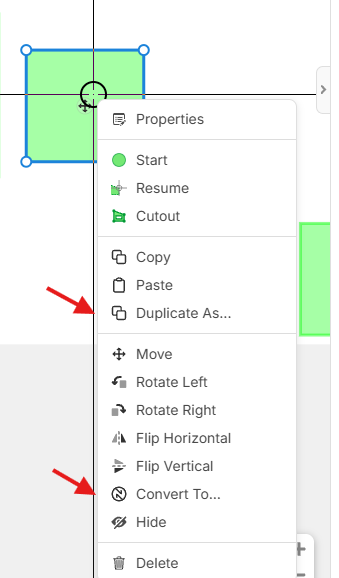
- You can do the normal copy + paste, either with hotkeys or copy and paste in the right-click menu, to duplicate a section to the same takeoff
- You can also take existing sections and, using the convert to, you can switch which takeoff they are a part of.
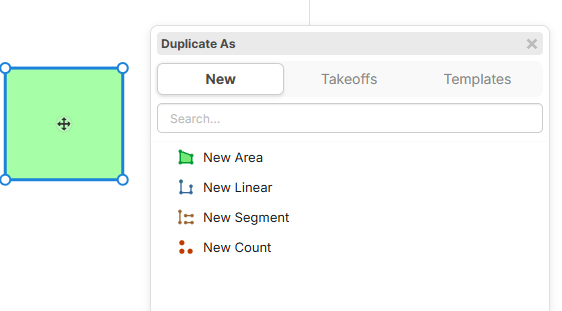
- Once you've copied a takeoff, you can now do CTRL + Shift + V to duplicate the copied sections to a new takeoff (Duplicate As New Takeoff)
- With the new Duplicate As button in the right-click menu, you can now duplicate existing sections to a new or existing area, linear, segment, or count.