











 Feature Requests
Items minimized by default
Hello,
Could the option be added to minimize "Items" by default? I have set "Default Expand Level" to "None" which minimizes all the folders but when I add a new takeoff then all the items for that new takeoff is automatically displayed. (I prefer to see those items in the reports, not at the Takeoffs level). I realize that we "click" all day and what is one more to minimize? but....... 😄
Would appreciate any input on this.
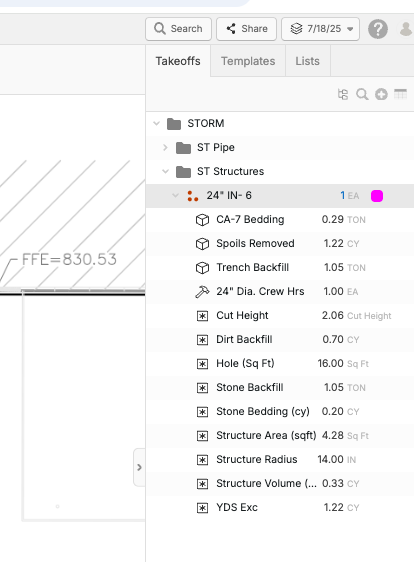

I will want to be able to do this too once we have the ability to reference skus from our items in the title of the takeoff level. For now I need a way to confirm my items
👍1
Thanks for the input here. Do you think we should add a separate setting that controls whether it's minimized when you "Add to Takeoffs", or do you think we should make it keep collapsed if the Default Expand Level is "None"? If you want we could just make so that it watches for the setting that controls the default expand level.
👍1I think the current functionality is great being able to expand or collapse, but also have a default setting in general settings for default preference
👍1
I do not use the "Add to Takeoffs" option, so not sure about that, I like to see my Takeoff items, but just do not need to see all the items within.

Sorry i think I misunderstood your request Bryan, didn’t mean to sway the discussion.
👍1No prob Luke, I love the option to expand and collapse as well, just wondering if we could collapse just a little bit more 😄
👍1I have some plans to add a lot more items and formulas to items that I would love to be "working in the backround", hence the request. 😊
👍1This is fixed in local development and will go out with the next release 👍🏻
Thanks for all your support and feedback Bryan! We have an awesome team here pushing to make it better based on the feedback you guys send us. 🙂
🚀1Your teams support and commitment to your customers is absolutely unmatched in this day and age!!! 😊
❤️2