











Sorting Overlay Sheets
Hello Team,
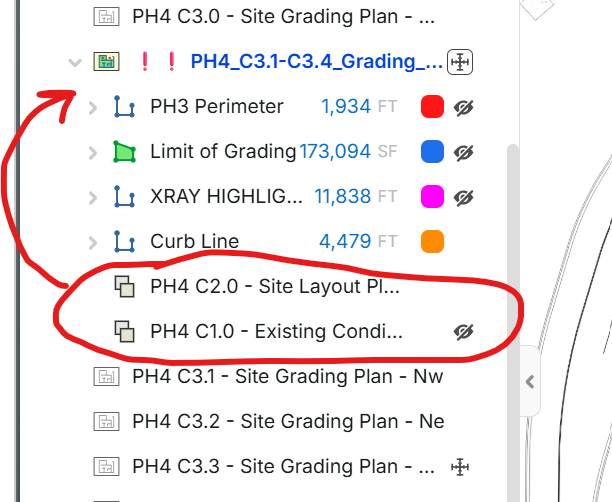
Would it be possible to have the ability to sort our overlay sheets in the Pages tab? Been using the Opaque overlays a lot more in order to have a lot of sheets in one place, but in using it this way I need to adjust the Opacity often. Would be nice to have the overlay sheets right at the top under the main sheet name instead of scrolling down to bottom.

Hey Bryan! Thanks for the feature request. I'll mention this to the team.
Edit: You can change the order of the overlays (which overlay is on top when viewing the image) with drag/drop, but the overlay rows are pinned below the takeoffs in the pages sidebar.
👍1
If the overlays are going to continue to be subitems of a plan page, I couldn't agree more. But this is also why I suggested takeoffs on overlays instead of pages. In the current setup, maybe have the takeoffs live on layers and have the required pages as subitems of a layer. In effect, layers would be folders for pages.
👍1Another interesting option would be to show the overlays on the pages dropdown when the sidebars are collapsed.

@Bryan Do you use my hotkeys bookmarklet for overlays at all? It lets you cycle through your overlays by holding the shift key. I could add the ability for you to be able to hold down a key to increase/decrease opacity...once my usage limit restores in a couple hours of course😅

@ Jes, I have not tried your hotkeys, is that a tool you have made?
Well it's not a plugin...it's a bookmarklet I made via Claude. You just launch the bookmark from the same Chrome tab you have zztakeoff running in and it injects the code into your current session. I have to test it first to make sure I can tweak it to do what you want and didn't have a chance yesterday
@Bryan Create a bookmark in Chrome, name it 'Overlay Hotkeys' or something of that nature, and then for the URL, copy and paste the code below. Launch the bookmark while you are in your zz session. I binded the [ and ] bracket keys to adjust the opacity. The longer you hold down the bracket key, the faster it adjusts the opacity. You use Shift+Q to cycle through your overlays. (There are also some other hotkeys in there, like H for hide, I to isolate/hide all takeoffs except the one you've currently selected, Alt+M to hide those little midpoint squares that come up that zz added in a recent update)
javascript:!function(){window.__zzHide&&document.removeEventListener("keydown",window.__zzHide,!0);window.__zzHideUp&&document.removeEventListener("keyup",window.__zzHideUp,!0);var e="zzHotkeys:ov:";function t(e,t){try{"function"==typeof window[e]&&window[e](t)}catch(e){}}function n(){return takeoffPage.pageId}function r(e){var t=e.properties||{};return t.name&&(t.name.value||t.name.formatted)||e.name||e.fileName||"Overlay "+String(e._id).slice(-4)}function i(t){var r=null;try{r=localStorage.getItem(e+n())}catch(e){}var i=t.filter(function(e){return e._id==r})[0];if(i)return i;var o=t.filter(function(e){return!e.hidden});return o.length?o[0]:t[0]}function o(t){try{localStorage.setItem(e+n(),t._id)}catch(e){}}function a(e,t){mutations.setDrawObjectVisible({drawObjectId:e,visible:t})}function zB(e){return"BracketLeft"==e.code||"BracketRight"==e.code||"["==e.key||"]"==e.key}function zH(s){var d=document.getElementById("zz-op-hud");if(!d){d=document.createElement("div");d.id="zz-op-hud";d.style.cssText="position:fixed;left:50%25;top:70px;transform:translateX(-50%25);z-index:2147483647;background:rgba(0,0,0,.78);color:white;font:600 15px/1 system-ui,sans-serif;padding:9px 16px;border-radius:6px;pointer-events:none;transition:opacity .3s";document.body.appendChild(d)}d.textContent=s;d.style.opacity="1";clearTimeout(d.__t);d.__t=setTimeout(function(){d.style.opacity="0"},1200)}function zF(){var Z=window.__zzOp;if(!Z)return;clearTimeout(Z.tm);Z.tm=0;if(Z.v==Z.sent||!Z.ids)return;Z.sent=Z.v;var U;try{U=getAllScriptCommands().DrawObjects.functions.update}catch(x){}if(!U)return void t("notifyError","Opacity: DrawObjects.update not available");Z.ids.forEach(function(id){try{Promise.resolve(U.execute(id,{properties:{opacity:{value:Z.v}}})).catch(function(x){t("notifyError","Opacity: "+(x&&x.message||x))})}catch(x){t("notifyError","Opacity: "+x.message)}})}var fU=function(e){zB(e)&&window.__zzOp&&window.__zzOp.tm&&zF()};var f=function(e){if(!e.ctrlKey&&!e.metaKey&&!function(e){if(!e)return!1;var t=(e.tagName||"").toUpperCase();return"INPUT"==t||"TEXTAREA"==t||"SELECT"==t||e.isContentEditable}(e.target)&&"undefined"!=typeof takeoffPage&&takeoffPage){var f=(e.key||"").toLowerCase();if(e.altKey&&!e.shiftKey&&"KeyM"==e.code){e.preventDefault(),e.stopPropagation();var M=document.getElementById("zz-hide-midpoints");M?(M.remove(),t("notifySuccess","Midpoint squares ON")):(M=document.createElement("style"),M.id="zz-hide-midpoints",M.textContent=%27[data-nodekey^="midPoint"]{display:none!important}%27,document.head.appendChild(M),t("notifySuccess","Midpoint squares OFF"));return}if(!e.altKey&&!e.shiftKey&&zB(e)){e.preventDefault(),e.stopPropagation();var pg=n(),L=(drawObjectsSub.getRecords()||[]).filter(function(x){return"overlay"==x.type&&x.pageId==pg&&!x.hidden});if(!L.length)return void(e.repeat||t("notifySuccess","No overlay showing on this page"));var Z=window.__zzOp||(window.__zzOp={}),ids=L.map(function(x){return x._id});if(!e.repeat||Z.pg!=pg||String(Z.ids)!=String(ids)){var p0=L[0].properties&&L[0].properties.opacity;Z.v=p0&&null!=p0.value?+p0.value:100;Z.sent=Z.v;Z.pg=pg;Z.ids=ids}var dir="BracketRight"==e.code||"]"==e.key?1:-1;Z.v=Math.max(5,Math.min(100,Math.round(Z.v+dir*(e.repeat?2:5))));zH("Overlay opacity "+Z.v+"%25"+(ids.length>1?" ("+ids.length+" overlays)":""));Z.tm||(Z.tm=setTimeout(zF,90));return}if(!(e.altKey&&"q"!=(f="KeyQ"==e.code?"q":f)||"h"!=f&&"q"!=f&&"i"!=f)){e.preventDefault(),e.stopPropagation();try{if("i"==f){var P=takeoffPage.pageId,K="zzHotkeys:iso:"+P,W=window.__zzIso||(window.__zzIso={});if(W[K]&&W[K].length){var B=W[K];W[K]=null;a(B,!0);return void t("notifySuccess","Showing everything again ("+B.length+")")}var S=takeoffPage.getSelectedDrawObjectIds()||[];if(!S.length)return void t("notifySuccess","Select a takeoff object first, then press I");var R=drawObjectsSub.getRecords()||[],TK={};R.forEach(function(x){S.indexOf(x._id)>=0&&x.takeoffId&&(TK[x.takeoffId]=1)});var O=R.filter(function(x){return x.pageId==P&&x.takeoffId&&!x.hidden&&"overlay"!=x.type&&!TK[x.takeoffId]}).map(function(x){return x._id});if(!O.length)return void t("notifySuccess","Nothing else to hide on this page");W[K]=O;a(O,!1);return void t("notifySuccess","Isolated: hid "+O.length+" other object(s) - press I again to bring them back")}if("q"==f){var d=(h=n(),(drawObjectsSub.getRecords()||[]).filter(function(e){return"overlay"==e.type&&e.pageId==h}).sort(function(e,t){return String(r(e)).localeCompare(String(r(t)))||(e._id<t._id?-1:1)}));if(!d.length)return void t("notifySuccess","No overlay on this page");if(e.altKey){var c=d.some(function(e){return!e.hidden});return a(d.map(function(e){return e._id}),!c),void t("notifySuccess",(c?"All overlays off (":"All overlays on (")+d.length+")")}if(e.shiftKey){if(d.length<2)return void t("notifySuccess","Only one overlay on this page");var l=i(d),s=d[(d.indexOf(l)+1)%25d.length];return o(s),void(l.hidden?t("notifySuccess","Q now toggles "+r(s)):(a([l._id],!1),a([s._id],!0),t("notifySuccess","Showing "+r(s))))}var u=i(d);o(u);var y=!!u.hidden;return a([u._id],y),void t("notifySuccess",d.length>1?(y?"On: ":"Off: ")+r(u)+" ("+(d.indexOf(u)+1)+"/"+d.length+")":y?"Overlay on":"Overlay off")}if(e.shiftKey){var v=(drawObjectsSub.getRecords()||[]).filter(function(e){return e.hidden&&e.pageId==takeoffPage.pageId&&"overlay"!=e.type});if(!v.length)return void t("notifySuccess","Nothing hidden on this page");a(v.map(function(e){return e._id}),!0),t("notifySuccess","Restored "+v.length+" object(s)")}else{var g=takeoffPage.getSelectedDrawObjectIds();g&&g.length&&takeoffPage.hideSelectedDrawObjects()}}catch(e){t("notifyError","Hotkey: "+e.message)}var h}}};window.__zzHide=f,window.__zzHideUp=fU,document.addEventListener("keydown",f,!0),document.addEventListener("keyup",fU,!0),t("notifySuccess","Hotkeys armed - H hide, Shift+H restore, I isolate selected takeoff, Q overlay, Shift+Q next overlay, Alt+Q all overlays, Alt+M midpoint squares, [ / ] overlay opacity (hold)")}();