











 Feature Requests
Verified Scale Check (Trust Indicator)
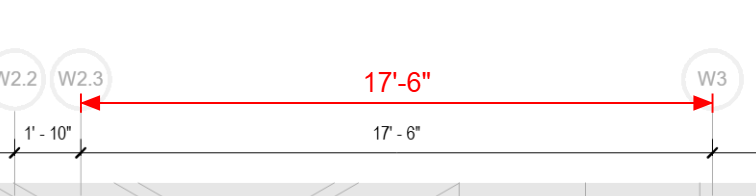
Scale accuracy is foundational to estimator trust. Too often a drawing lists a scale (e.g., 1/4" = 1'-0") but real dimensions don’t match.
Request:
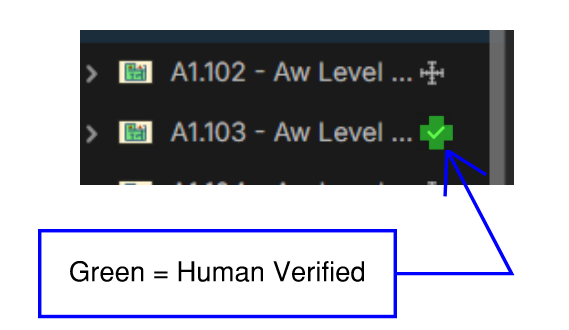
Allow an estimator to verify scale by clicking a known dimension on a drawing, then display a small persistent “Verified” indicator on the page (and across all layers).
One person verifies once → everyone can trust the page.
This supports training good habits, reinforces trust in AI auto-scaling, and prevents silent takeoff errors.
Cheers to the future.


I agree; I never trust a scale without verifying it. I was overlaying grading plans the other day, but they wouldn't line up. The engineer's scale was wrong, and there were only contours to set the correct scale. Was not a fun task.
💯1
I totally agree. We'll do it. I think this general concept of clearly showing human verified vs AI will start to become a common trait of software apps.
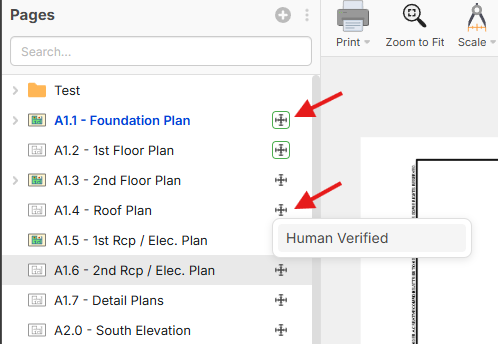
🎯2We're testing with clicking on this scaled icon, and a little menu shows for "Human Verified". Then if it's human verified, it shows a green border. We were considering just changing the color of the scale icon, but we will likely use a different color of scale icon as a "Scaled in Metric" indicator so the box around it keeps those 2 things distinct.

@ Heber,
Wow you don't mess around. I don't like it yet tho. Here is my 1min video on my "dream" workflow. LINK
Love the Symbol tho!
👍2
Not sure if the auto can scan the page and find a measurement, and do a check. And if it finds a wrong, to have it flagged. (Of course have a +/- threshold)
👍3@Casey That would be ideal long term. I believe we will get there at some point.