Q & A
Q & ACan I reference a custom variable name
I made a custom variable with value and name for rebar sizes:
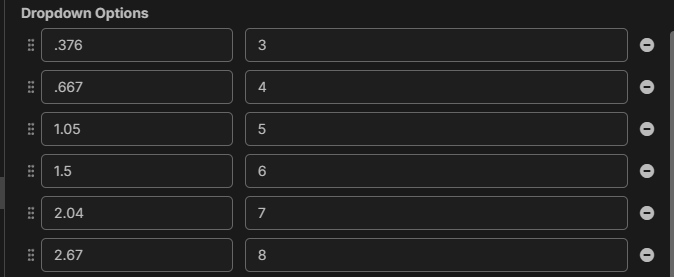
When using it in a formula in can use the variable [Rebar Size] to pull the value out of the drop down list and do math on it.
However in the item description I would like to pull the [Rebar Size:Name] out so the description with a tag will show the name
For example:
The Item name will show "#4 Rebar @ 24" O.C." --> [Rebar Size:Name] Rebar @ [Rebar Spacing]
But the formula uses the value for the [Rebar Size] .667 to calculate the total pounds or tons for rebar.

Hey David, not quite yet, but it is coming. In this example, though, it would be "[Rebar Size.Name]" using "." instead of ":". Mostly because the "." is used to access metadata properties, whereas the ":" is used to convert values.
Here is a similar post where I replied with more information.
🙂1