











 Q & A
Q & AHow do I copy-past my takeoffs In a new section like planswift?
Good afternoon. Im new to this estimate program, Ive recently switched from planswift and using ZZ for a new project. As of now Ive attempted to copy-paste my takeoffs to create a new section like in planswift and have found that ZZ does not have this feature. Is there a workaround for this? Or is this not a feature in this program.
%22%2F%3E%3Ctext%20x%3D%2232%22%20y%3D%2233%22%20text-anchor%3D%22middle%22%20dominant-baseline%3D%22central%22%20font-family%3D%22Arial%2C%20sans-serif%22%20font-size%3D%2226%22%20font-weight%3D%22600%22%20fill%3D%22%23fff%22%3EDJ%3C%2Ftext%3E%3C%2Fsvg%3E "Doug Jones")
Does right-click > Duplicate As work for your need?
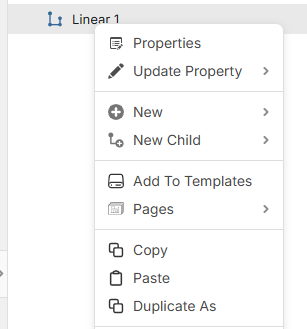

Kinda. All it really does is copy the templates into the same section; it doesn't really create a duplicate copy of the takeoff itself.

Hi Carlos, when you paste, try Ctrl + Shift + V. That should post into a new takeoff (if you have specific objects on the page selected). Does that do what you're after?
👍1%22%2F%3E%3Ctext%20x%3D%2232%22%20y%3D%2233%22%20text-anchor%3D%22middle%22%20dominant-baseline%3D%22central%22%20font-family%3D%22Arial%2C%20sans-serif%22%20font-size%3D%2226%22%20font-weight%3D%22600%22%20fill%3D%22%23fff%22%3EDB%3C%2Ftext%3E%3C%2Fsvg%3E "Doug Burwell")
Thanks! This saved us time and effort Heber! You guys think of everything! Context: We received a new set of plans very similar to an old set. We just want to copy over the takeoff and make minimal changes to save time rather than do overlays on every page and figure out what we need to do differently.
Much appreciated!
🚀1