











 Q & A
Q & A90d 23h
Scaled Plan region
Is there any way to apply a separate scale to different areas on the same sheet? Often times, we work with plan sheets that have detail areas, or "blowups" on the same sheet. Ideally, we need to be able to drag a box around an area of the plans and call this a "scaled region," and a separate scale would apply to that area. If this is already available, can someone let me know how it's done? Thanks.

Lorin Allred zzTakeoff90d 23h
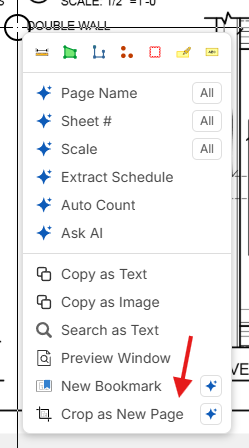
Hey Luke! Right now, we don't have a way to scale regions of the page (just the whole page). As a workaround, we have the "Crop as New Page" option if you select the detail on the page.
%22%2F%3E%3Ctext%20x%3D%2232%22%20y%3D%2233%22%20text-anchor%3D%22middle%22%20dominant-baseline%3D%22central%22%20font-family%3D%22Arial%2C%20sans-serif%22%20font-size%3D%2226%22%20font-weight%3D%22600%22%20fill%3D%22%23fff%22%3EDJ%3C%2Ftext%3E%3C%2Fsvg%3E "Doug Jones")
Doug Jones 90d 22h
Hey Luke, I duplicate that page and then set the scale for each page separately to do takeoffs only in the area for the given scale of that page.

You must be logged in to post replies. If you don't have an account you can signup here.