











Sorting Project List
Two questions. Can I archive a project? Some jobs get bid several times, over several years, before they gets built. Even if we don't do the project I keep the takeoffs, in case there's a phase II. In planswift I could zip it then come back to it if if came back up.
Also, is there a way to make folders in the company project list so I can have it set up like my computer? Current Projects, Bids, then sorted by Contractor, Current or Completed, etc.? It's a pain scrolling around to find what I'm looking for, and I've only been using this for a couple months. I can't imagine what it will look like in a few years.
Thanks. My guess is these are possible and I'm just not seeing it.

Hey Bryan! We currently don't have an archive project, but we do have the ability to lock a project.
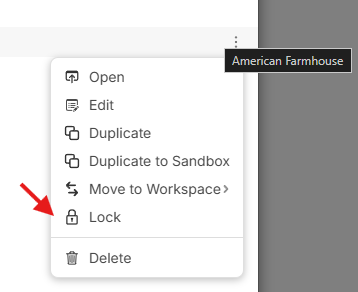
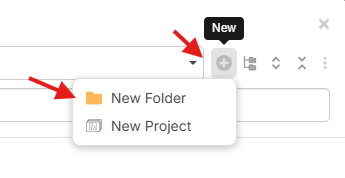
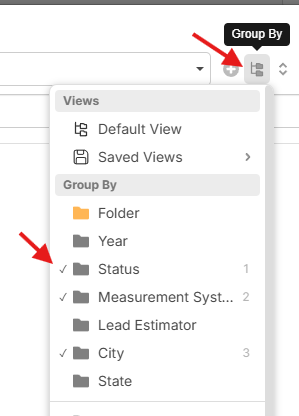
You should also be able to create folders in the open project menu and then drag/drop the projects into those folders. In addition to this, if you add custom properties to your projects, you can use the "Group By" option to dynamically group your projects.
%22%2F%3E%3Ctext%20x%3D%2232%22%20y%3D%2233%22%20text-anchor%3D%22middle%22%20dominant-baseline%3D%22central%22%20font-family%3D%22Arial%2C%20sans-serif%22%20font-size%3D%2226%22%20font-weight%3D%22600%22%20fill%3D%22%23fff%22%3EBB%3C%2Ftext%3E%3C%2Fsvg%3E "Bryan Brown")
Thanks, that will help. Archiving, or even zipping to my own cloud, would be a good feature to have in the future
👍1%22%2F%3E%3Ctext%20x%3D%2232%22%20y%3D%2233%22%20text-anchor%3D%22middle%22%20dominant-baseline%3D%22central%22%20font-family%3D%22Arial%2C%20sans-serif%22%20font-size%3D%2226%22%20font-weight%3D%22600%22%20fill%3D%22%23fff%22%3EDJ%3C%2Ftext%3E%3C%2Fsvg%3E "Doug Jones")
Hi Lorin!
Rather than create folders and manually drag projects to them, for sorting and organizing projects is there a plan to add properties or options for custom properties at the time of creating a new project?
I would fill out certain properties once on every project at the time of creation that would save significant time to sort and navigate our project lists later. Date is there already, but I cannot sort my project list by it.
Examples of project organizational properties that would be great help are:
* These would be good as text properties
* Date: Year-Month-Day (not just a year folder)
* District (multiple inputs could be good here as some projects span multiple districts/municipalities)
** These might be good as checkboxes to toggle on or select multiple combinations
** 1st Category (custom defined - such as Storm)
** 2st Category (custom defined - such as Sewer)
** 3st Category (custom defined - such as Water)
** 4st Category (custom defined - such as Electric)
Hey Doug! You should be able to utilize our custom properties for projects to add this information to the project. We don't have a custom property for Date yet, but it should be coming soon. 🙂
👍1
I added a custom feel to the projects that have five options.
I have a projects bidding, a projects bid/ waiting on response, I have a one that is waiting on construction, I have one that's currently in construction, an archive and closed folder.
When a project is created it automatically goes to the default of bidding folder and then from there I got to manually sort everything but it's not too bad as you can drag and drop.
👍1