











 Q & A
Q & ASuggested New Feature
I used Blubeam in the past and I liked the feature of dragging to make a box while using the area tool, instead of having to click all four corners.
So basically you either click your first point and drag to the opposite corner to complete the box. Or you hover or the first point, I don't remember exactly, but it was a time saving feature that I used a lot.
Any chances of implementing?
%22%2F%3E%3Ctext%20x%3D%2232%22%20y%3D%2233%22%20text-anchor%3D%22middle%22%20dominant-baseline%3D%22central%22%20font-family%3D%22Arial%2C%20sans-serif%22%20font-size%3D%2226%22%20font-weight%3D%22600%22%20fill%3D%22%23fff%22%3EUS%3C%2Ftext%3E%3C%2Fsvg%3E "Ulises Salazar")
https://www.zztakeoff.com/app/community/inside-track/minor-update-auto-box-mode-widthin-gray-folders-views-in-quick-search
%22%2F%3E%3Ctext%20x%3D%2232%22%20y%3D%2233%22%20text-anchor%3D%22middle%22%20dominant-baseline%3D%22central%22%20font-family%3D%22Arial%2C%20sans-serif%22%20font-size%3D%2226%22%20font-weight%3D%22600%22%20fill%3D%22%23fff%22%3ESP%3C%2Ftext%3E%3C%2Fsvg%3E "Steven Powers")
Yup...this was a huge update I did not know I needed
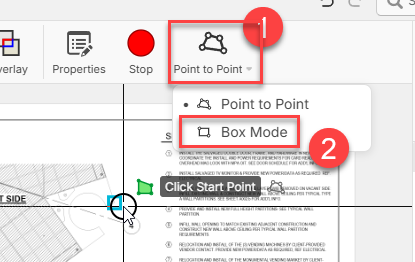

Well I don't see that feature on my end.
Im new here, but updates are automatic correct?
Why am I not seeing properties, stop or point to point?
If you hover over the POINT TO POINT icon you should see a small gray triangle next to the text on the right. Click that and you will get the drop down to choose.

Hey Brian, to add to this, you will only see the properties, stop, and the button in the toolbar to switch tool modes if you are actively doing an area/linear takeoff.
As a side note, you can also use the hotkey "Tab" to switch modes if you have an active takeoff. Another thing, if you are in point-to-point mode, you can simply click and drag to create a box if you don't have any points created yet.
🔥1