











 Inside Track
Collecting Input: Rounding for Dimension Tool
Several users are asking for rounding on the dimension tool. What options would you expect here?
Also, if rounding was enabled, would you expect to only adjust the format of the distance (the label only which is easy) or actually snap the length of the line to rounded increments (this one is more difficult)?
In the example below, I think some users would want "Round to Nearest Inch" to display as: 10' 6"
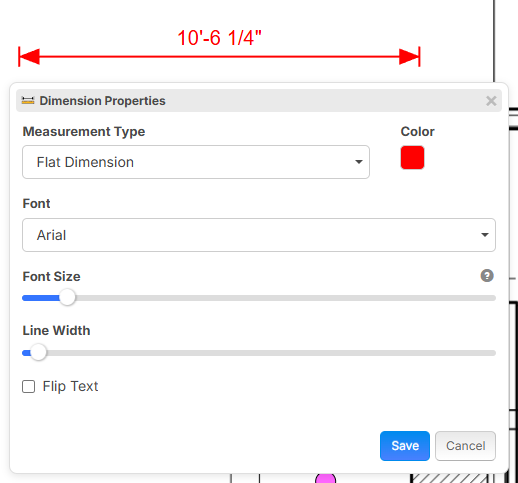

Might be way more difficult to achieve, LOL, but could there be a way to set the entire plan set tools to a specific round (area, linear,and segment)? then leave the dimension as is?
👍1
I would NOT like the dimension to snap to increments. Snapping is cool, but I think with dimensioning it's less cool. If the displayed text rounded to the nearest inch or whatever that would be fine. If it's simple, maybe the option to choose our own level of precision (1/8", 1/4", 1/2", etc). I think the current setup works fine but it would be a cool feature. By no means a high priority.
👍4
Please remove the fractions! Ideally make a default setting that says round to nearest inch and check that box! OST does not do fractions by default as well.
Now I have to throw in another ask to make a hotkey "D" to make a dimension :)
👍5Agree with Shane and Kyle here, in the "estimating" world, not really sure fractions are needed.
👍3
They are needed for scaling though...... Structural and some arch plans need to be manually scaled, and now and then, I have to match e.g., "3/16"
My vote is have an option to choose.
👍9%22%2F%3E%3Ctext%20x%3D%2232%22%20y%3D%2233%22%20text-anchor%3D%22middle%22%20dominant-baseline%3D%22central%22%20font-family%3D%22Arial%2C%20sans-serif%22%20font-size%3D%2226%22%20font-weight%3D%22600%22%20fill%3D%22%23fff%22%3EKP%3C%2Ftext%3E%3C%2Fsvg%3E "Kory Podgaysky")
We use zz for more than just estimating. It's also a communication tool for us and communication needs to be clear and accurate. In our masonry, precast, and concrete world, that means fractions. There are also a lot of times that rounding to the inch is great too. My vote is the choose your level of precision setting.
👍5
Agree with all of the above. Please do not make it actually snap the length of the line to rounded increments. Gotta have the option for fractional accuracy depending on the application/situation/industry.
👍1%22%2F%3E%3Ctext%20x%3D%2232%22%20y%3D%2233%22%20text-anchor%3D%22middle%22%20dominant-baseline%3D%22central%22%20font-family%3D%22Arial%2C%20sans-serif%22%20font-size%3D%2226%22%20font-weight%3D%22600%22%20fill%3D%22%23fff%22%3EJL%3C%2Ftext%3E%3C%2Fsvg%3E "John L")
Look at how bluebeam does this and that's how I think it should be. You can choose how detailed the information is with the precision drop down.
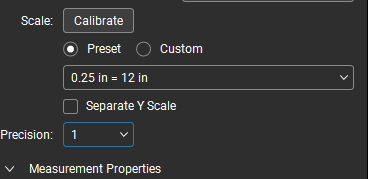
set to 1, it rounds to the nearest whole dimension but the drop down allows you to go all the way to 0.00001 depending on how exact you really want to be
Also if you're looking to make changes to the dimension tool, it would be awesome if you added a unit type drop down like the linear tool has.
👍1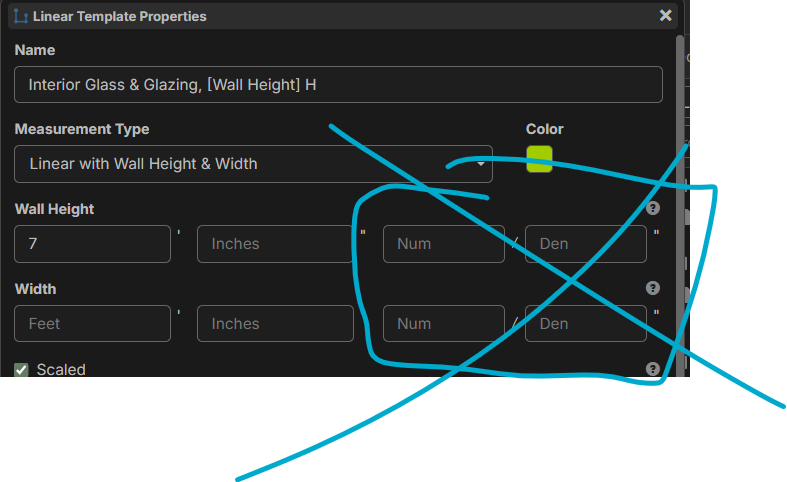

maybe this could be solved by adding a hotkey hold a key to snap in 1ft increments for dimension, could be useful feature for linear as well