











MCP In Development - zzTakeoff Ultimate Feature
We're working on an AI Agent / MCP connection that will be a huge time saver. Below are just a few screenshots. This is just some random examples. In the MCP context it understands our Formula Engine, so it will be very capable of building assemblies and finding/fixing formula errors. It will also be extremely useful in the Dev Tools for building Plugins to customize the software to your needs.
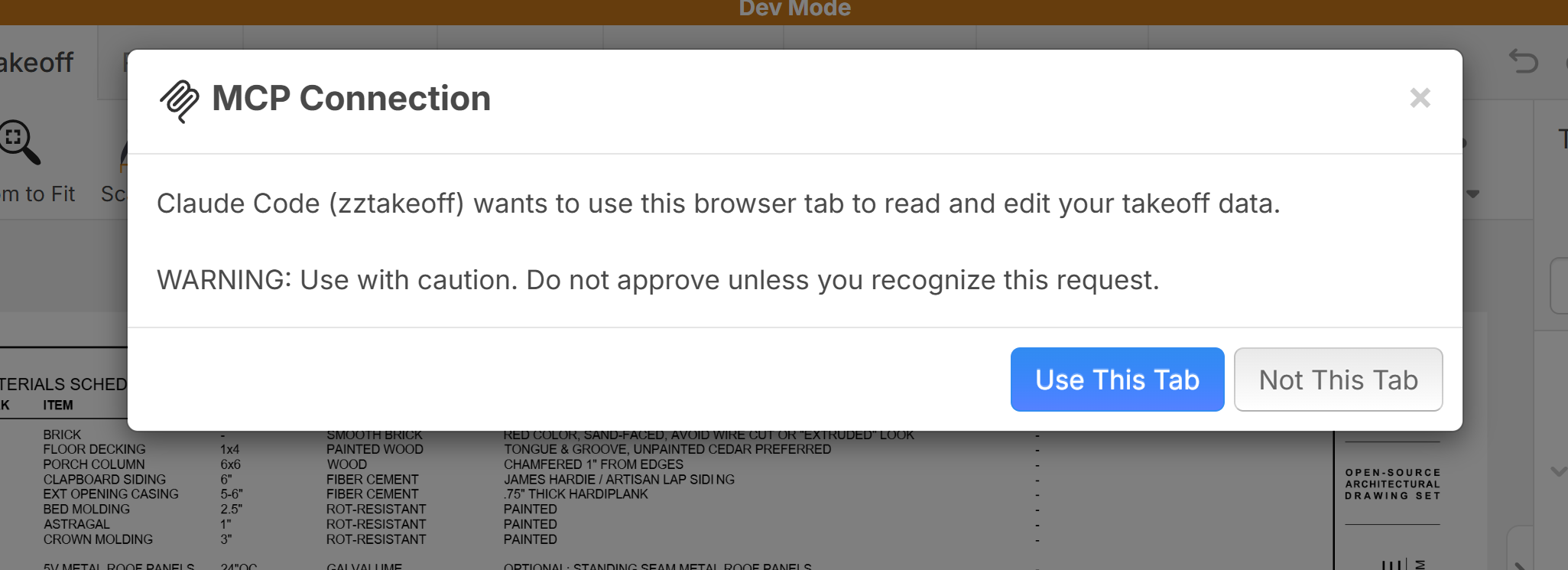
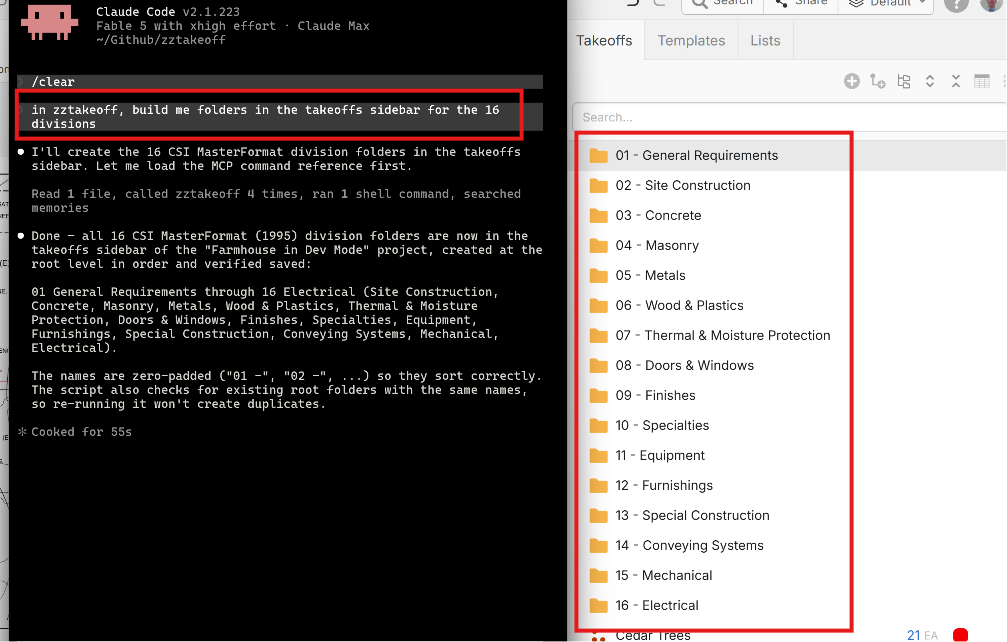
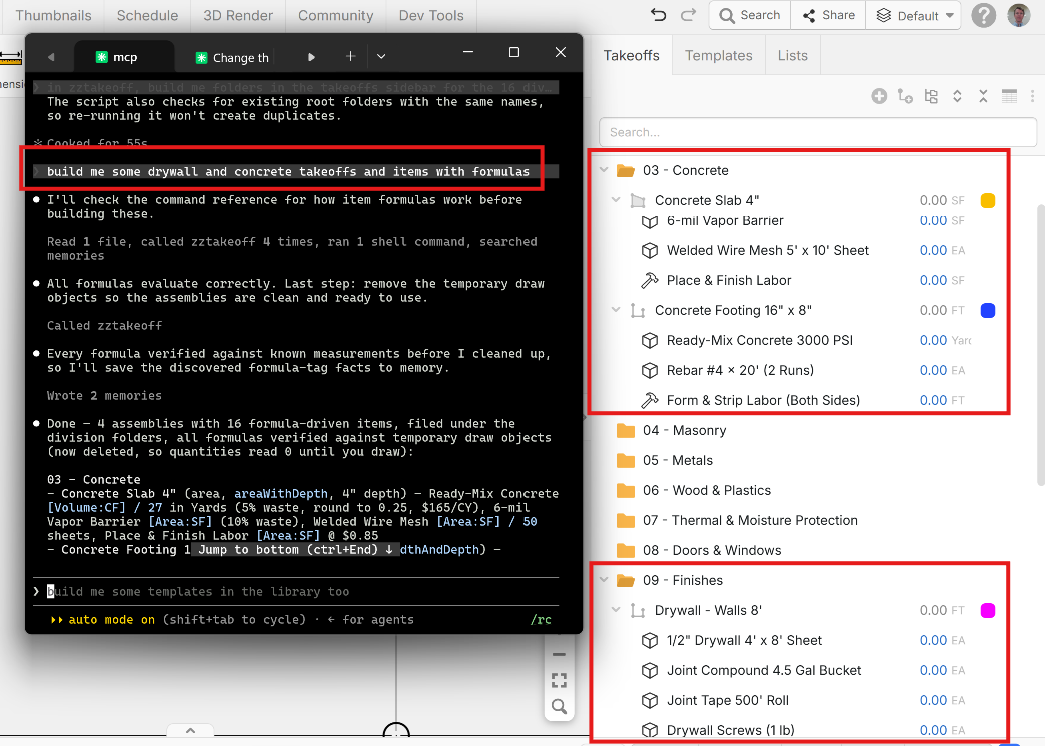
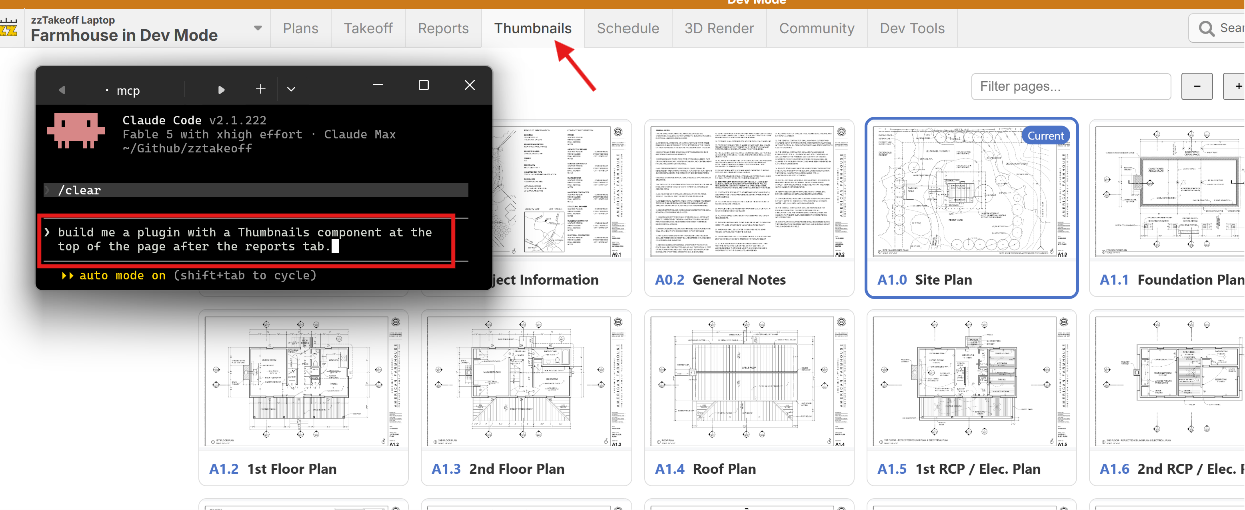
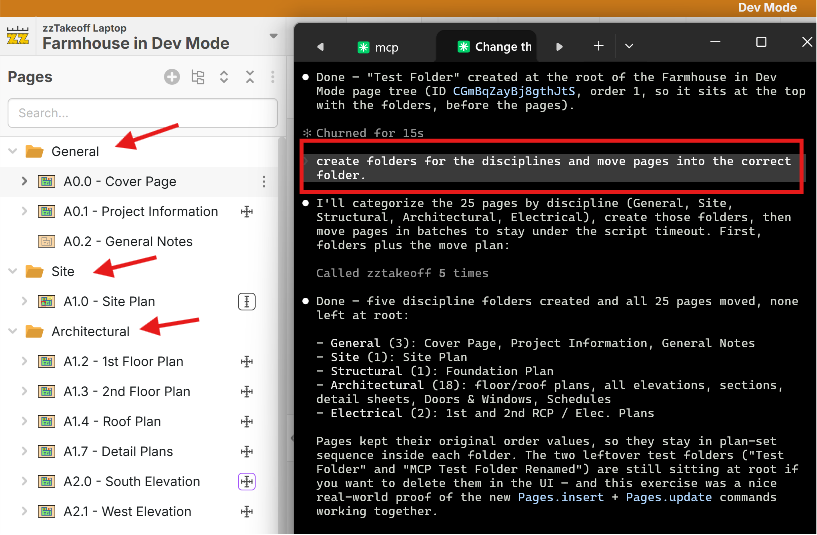

This is why zzTakeoff is so great. Always improving and making things easier for the users!
🚀5
My old man tells me all the time "Dont let the horse get away" I might need to call him and tell him a finally get it. I am over here thinking I got it all tuned out with the formula and assembly building, that I started to tune out of the updates. Once you're on that horse, stay on and be up to date and in tuned, if not, just like a horse, it can get a way pretty quick from you and it will seem impossible to catch up
👍4😁4💯2
We just released our MCP to the Test Server. 🚀🚀
Here is how to connect the Test Server MCP to your AI Agent:
https://test.zztakeoff.com/mcp
MCP is currently most useful for:
•Plugins - Scripts, Components code updates
•Modifying Pages (re-arranging in the sidebar, etc.), Takeoffs, Templates
MCP does not access contents of the page such as text or images yet (we have bandwidth & CPU considerations to deal with first), so the best near term use is mostly for building plugins and templates.
We made some updates to the code syntax for Plugins to be structured better (I apologize, but it may break some plugins on Test Server - we just had to refine things to make the code more consistent and future compatible). Here is an AI prompt to fix. The easiest way to repair them is actually by using the MCP. If you need any help repairing your Plugins, let us know.
🚀1
Can you connect to multiple MCPs at the same time?

Is there a special login we need to have for the test server?

@Tysen, you can request Test Server access here: https://www.zztakeoff.com/request-test-access
@Rulon, I tested on my end, and I was able to use both Claude and ChatGPT at the same time in a single tab.
%22%2F%3E%3Ctext%20x%3D%2232%22%20y%3D%2233%22%20text-anchor%3D%22middle%22%20dominant-baseline%3D%22central%22%20font-family%3D%22Arial%2C%20sans-serif%22%20font-size%3D%2226%22%20font-weight%3D%22600%22%20fill%3D%22%23fff%22%3EBG%3C%2Ftext%3E%3C%2Fsvg%3E "Bruce Guckert")
I added the connector to Claude & ChatGPT which both prompted me to 'connect' to Zz ... bringing me to a Zz login page but it says my credentials are wrong (they're not... i verified).. how do I fix this?
Hey Bruce, did you log in with your TEST credentials (Separate login from your normal zzTakeoff login)? We'll also do some testing on our end to ensure the MCP login page works correctly.
%22%2F%3E%3Ctext%20x%3D%2232%22%20y%3D%2233%22%20text-anchor%3D%22middle%22%20dominant-baseline%3D%22central%22%20font-family%3D%22Arial%2C%20sans-serif%22%20font-size%3D%2226%22%20font-weight%3D%22600%22%20fill%3D%22%23fff%22%3EJ%3C%2Ftext%3E%3C%2Fsvg%3E "Jes")
Does this enhancement mean that soon I'll be able to have AI extract these 100 line item schedules for me and totally build out the count/linear takeoff objects so that their dimensions and everything will all be put inside their takeoff properties for me & ready to go? 🤩
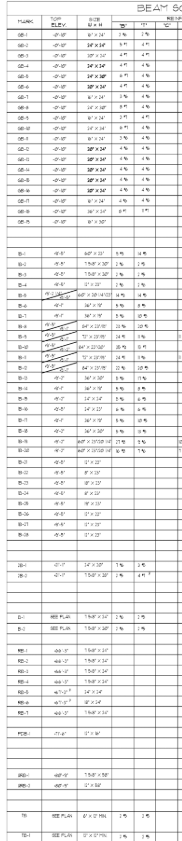
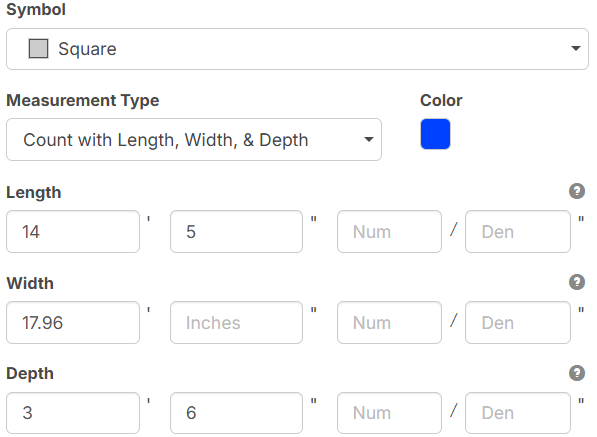
Or would something like that still require a separate extract schedule enhancement?
👍2@Jes Most likely this will be the case. 🚀 It is very powerful. I should have clarified in my original post, but MCP usage it will significantly increase our server traffic, and will most likely be available in zzTakeoff Ultimate as a result. We are doing our best to make everything as affordable as possible. It can be used to extract data from projects, generate scope of work, generate templates, fix formulas, build Plugins with scripts and custom UI for the app and a lot more.
👍2
this is amazing! Super template custom per project is starting to get in reach.
👍1Hi ZZ Team, a quick one, I asked Claude to perform a count take off (via MCP not Claude in Chrome) and it provided feedback that I needed to do the below, which as far as I see on my account is already done. I am also connected to ZZ in Claude as a connector. Claude also said it cant do the take off because it only has read only access, which the below would allow it to write.
zzTakeoff → Settings → Workspace Settings → Security → "Enable MCP Access for AI Agents"
Is this what we are waiting for from ZZ as the Ultimate version or am I missing something on my end? If it's on the ZZ end - cool - otherwise I'm like a dog with a bone to make this work.

I thinkClaudes response to you question:
Can Claude read and write to zzTakeoff? Yes, both. Claude connects through the zzTakeoff integration (the MCP connector) and acts inside the customer's own open zzTakeoff browser tab. It can read everything in the current project (takeoffs, pages, draw objects, templates) and, on write commands, create and modify things — always as the signed-in user, with exactly that account's permissions and plan level. Nothing runs when the tab is closed or they're signed out.
How permission works — three layers, all on the user's side:
- Connecting the integration — the customer adds the zzTakeoff connector to Claude; no access exists until they do.
- Choosing the tab — the first time Claude reaches out in a session, they're asked which open zzTakeoff tab to use. Claude is bound to that one tab.
- Per-action approval — Claude's own permission prompts apply to the tool calls, and zzTakeoff's normal account permissions still gate everything (e.g. plugin editing requires that workspace permission; Pro-level commands require a Pro plan).
Two reassurances worth including for a support answer: writes land as normal zzTakeoff actions, so a well-built script groups them under one undo point — Ctrl+Z reverts the whole batch — and Claude never has standing background access; it works only while the customer's session is open and connected.
If they already see Claude reading and writing their project (as you do), then yes — permission has been granted; the setup steps above are behind them. One caveat from me: I've described how the permission flow behaves from this side — if the customer is asking where the connect button lives in your product UI, you're the better authority on that one!

I think at this point you can count on at least a seat or two from every workspace being an ultimate user with ai traffic happening on those ultimate seats. This stuff is getting more powerful by the day and i cant WAIT to see what some of the more creative people come up with.
@Todd, Claude is telling me this: "One caution: the MCP connection is currently flagged read-only, which would block the create commands. If it errors on write once your tab is up, you'll need a Pro license / write-enabled connection — I'll tell you exactly which command failed."
Hi Bruce,
The dev team may edit this response, but here is what I know about this and what I have been able to produce regarding read AND write in the MCP
and of course help from my friend... Claude
Re: What is the plugins:edit permission?
Short version: it's the permission that lets an AI assistant build and install a working plugin into your workspace without you ever touching a paste box. I did exactly that yesterday, so let me explain what it is and what it actually unlocks.
What it unlocks — a real example
One thing that's always felt that zzTakeoff needed, is there's no live way to update pricing across templates and takeoffs. So I had Claude (connected over the zzTakeoff MCP) build me a component called Price Sync: export cost each to CSV, edit the prices in Excel, re-import with a preview before anything gets written.
The part that matters for this thread is how it got installed. Claude created the plugin draft, inserted a 38,000-character component, and patched it — all through the Plugins.* commands. No copy-paste, no bumping into the component paste ceiling, no manual step at all. I clicked the toolbar button and it was there.
That entire path is gated behind plugins:edit. Without it, none of it happens.
What the permission is
plugins:edit is a workspace-level permission covering the Plugins.* commands — creating plugin drafts and editing their embedded scripts, components, tools, and tool extensions.
It's named in zzTakeoff's scripting API reference, which states that all plugin writes require it and that they target the workspace's editable draft (the * version). Published, frozen versions never change. Plugins.get requires it too, since reading a draft returns full source.
Three separate gates — this is where people get stuck
These are independent, and they get conflated constantly:
- License tier. Currently Scripts need at least Collaborator to run at all. Below Pro Subscription, scripts are read-only — the one exception being list/record writes, which still respect your own lists/records permissions. Mutating commands and access to point/image data require Pro.
- plugins:edit workspace permission. Separate from your license. This is the one that gates plugin authoring specifically.
- Dev Mode availability. A third distinct check. Plugins.open, openScript, and openComponent return false when Dev Mode isn't available to you. Dev Mode also scopes what you can modify: dev libraries only while in Dev Mode, production libraries only while out of it.
You can be sitting on a Pro license and still be unable to author a plugin. That's not a bug, it's these three gates being separate.
How you get it
It's role-based. A workspace owner or admin sets it under Workspace Settings → Members → find the user → pick a new role → Save. Changes take effect immediately.
Being straight with you: the public docs don't name the individual roles, don't say which role carries plugins:edit, and don't mention plugin or scripting permissions anywhere. I only found the permission named inside the scripting API reference itself. So if you go looking for a checkbox, you'll waste an afternoon. Ask zzTakeoff support which role includes plugin editing and skip the hunt.
How to test whether you have it
Here's the trap: the Plugins.* commands are available to AI assistants over MCP only. A plugin's own scripts, components, and tool extensions cannot call them — a plugin can never read or edit plugins. So you cannot test this from the Dev Tools Scripts panel. If you try, the failure will look like a permission problem when it isn't one.
The real test is to have an MCP-connected assistant run Plugins.list(), then Plugins.get() on one of the returned IDs:
- Permission error on get → you don't have plugins:edit
- Full source comes back → you're in
Field notes from actually doing this
A few things I hit that aren't obvious:
- Plugins.insert doesn't hand back a usable _id. The plugin gets created fine, but the returned object didn't give me the ID — I had to pull it from Plugins.list() afterward. Cost me one failed call to figure out.
- Plugins.patchComponent is the right tool for edits. Ordered find/replace against the stored source, so you're not re-sending a 38 KB file every time you change three characters. Same for patchScript.
- Verify what landed. I compared the stored component's length and a checksum against my local copy. Worth doing — it caught a small difference between what I sent and what I intended.
- Watch the caps: 10 draft plugins per workspace, and 10 of each artifact type per plugin. Update existing entries rather than re-inserting.
When you first authorized your MCP, did you check "Full access" or "Read-only"? If you don't remember, you can re-authorize your MCP and choose "Full access" as another thing to rule out.
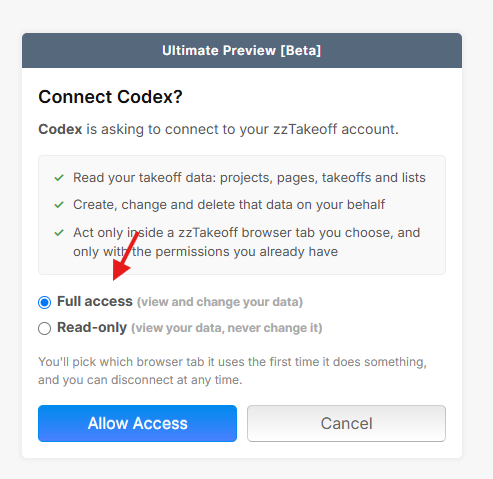
Hi Lorin, is this for the Pro Users, Collaborators? or all of the above?
The MCP is currently only available for Pro users as an Ultimate Preview feature.
Another thing: The workspace owner needs to "Enable MCP Access for AI Agents" in their workspace settings before the MCP can be used in that workspace.
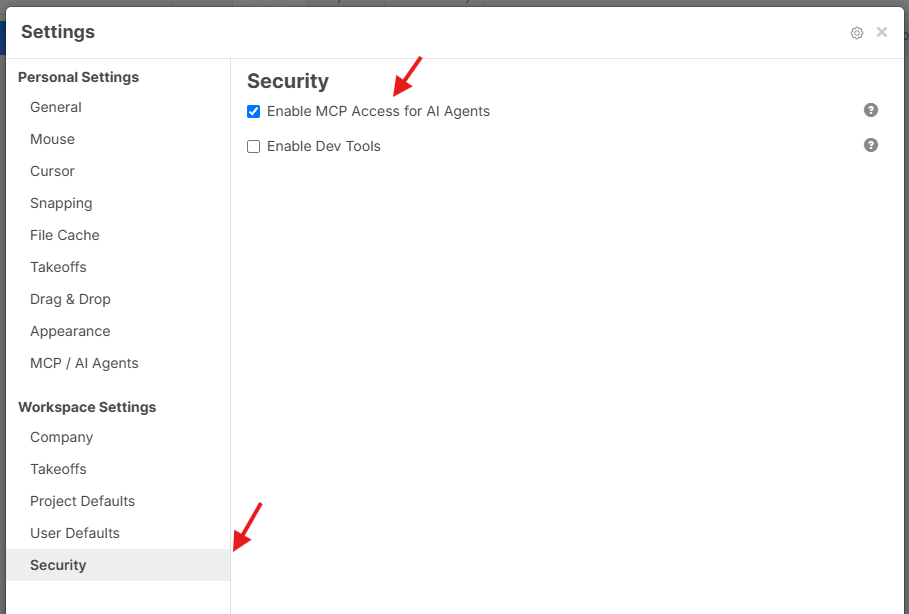
Will we be able to export/import out of the test servers and into our normal templates? I'm creating some amazing assemblies that I would love to be able to implement into my own takeoffs.
@Justin,
Do show an example
@Kyle
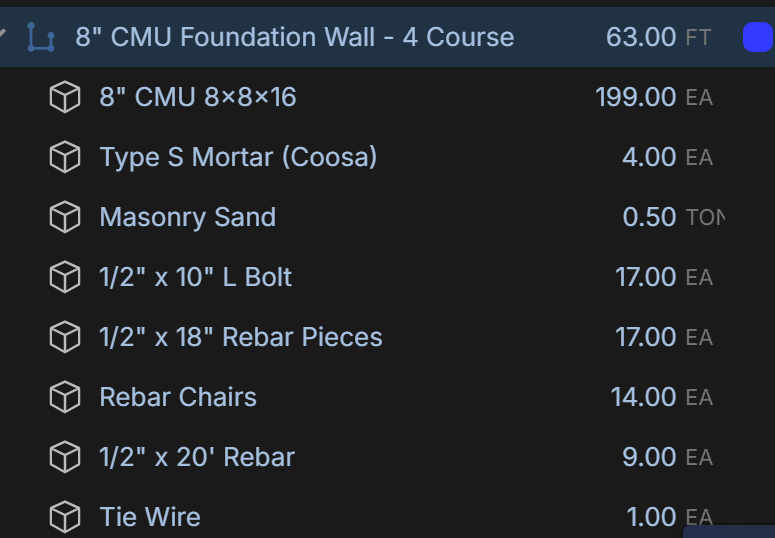
This is one of them that I used calculations I learned from someone doing takeoffs for the past 40 years. From one linear measurement I am able to get the material for the footers and walls. I have it were I can go to the properties of the 8" CMU and change the amount of courses, which recalculates all the material to match. (The building supply store I work at does not supply concrete, so I do not calculate for that in our takeoffs).
👍1@Justin, if you reach out to our support team via our website chat or support@zztakeoff.com, we can copy your templates from the test server to the live server if you let us know the template library and which workspace to copy them to.
❤️1I finally tested out MCP today, and I was impressed!
Claude was able to do what I've always wanted the Extract Schedule tool to do....build a list of count takeoff objects with dimensions already put in for the length, width, depth/height.
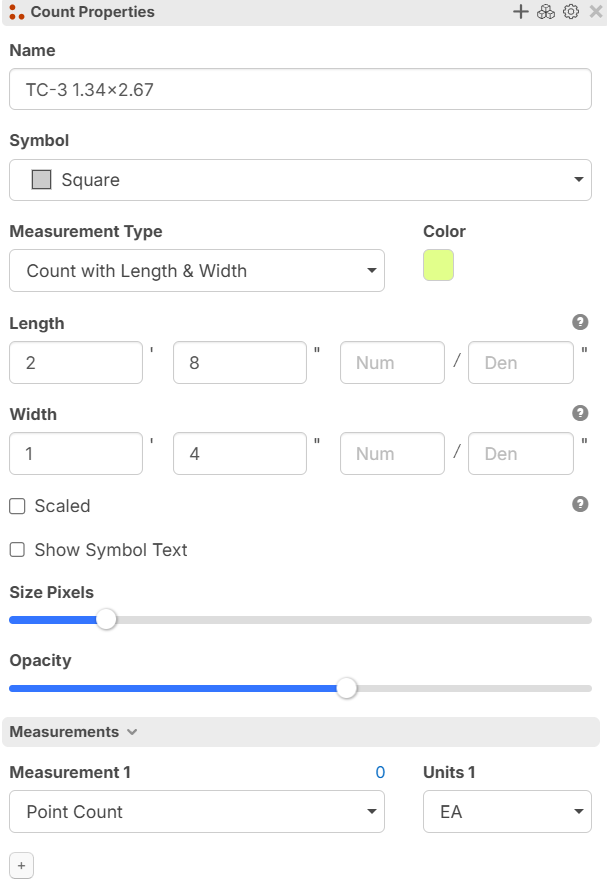
^Claude built that itself for all of the counts on this project I'm working on
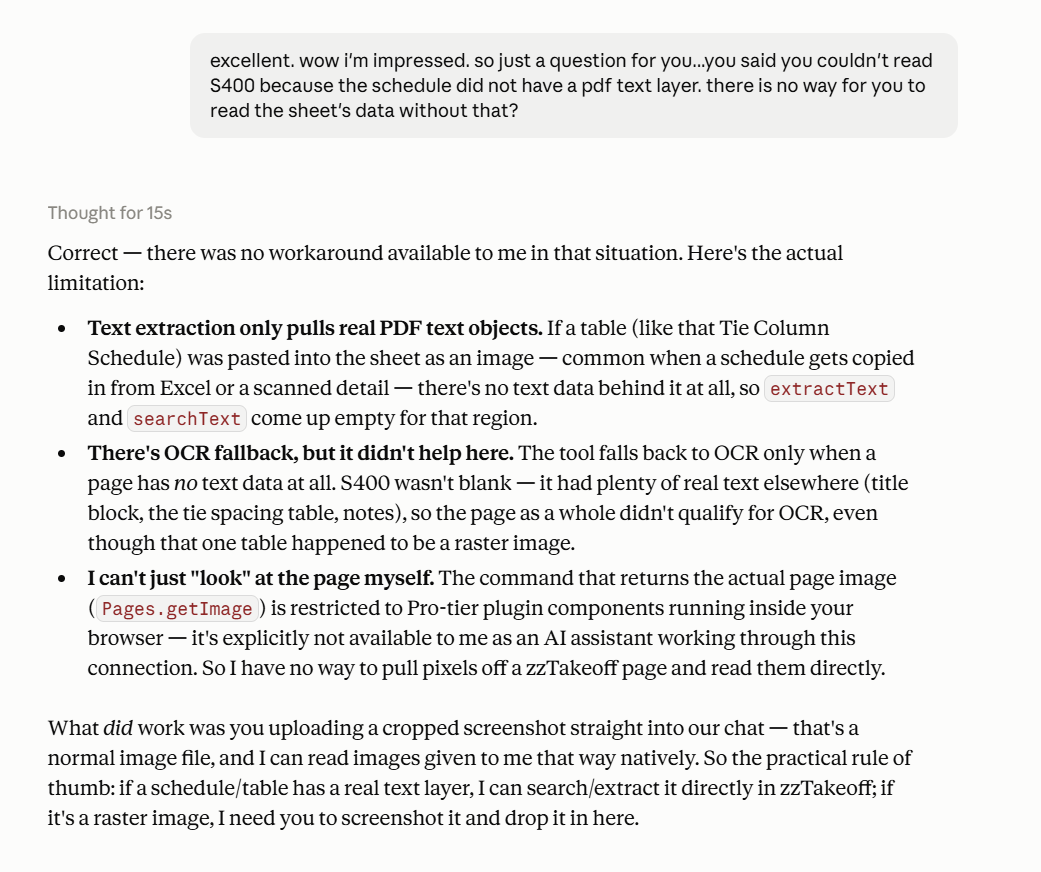
Only problem is that when you have pdfs that lack text layers, or only have text layers on the title blocks (which unfortunately is still majority of the plans I get down here), it stumbles.
So I had to screenshot the schedule into Claude's interface. Once I did that then it built everything for me that way, accurately.
I'll share that below:
Jess are you available for tomorrows podcast at 3pm? We would love to let you show that off!
I can't unfortunately. We have a meeting with a supplier tomorrow around that time and I was going to sneak the podcast onto my screen and listen through my headphones during the meeting 😂
Anyone got a short video on how to get started with the MCP? Is it as simple as adding Claude to your web tab as shown below?? Its not that impressive (well it is if you have never done this) but really slow and all my credits will be gone in a min with this workflow
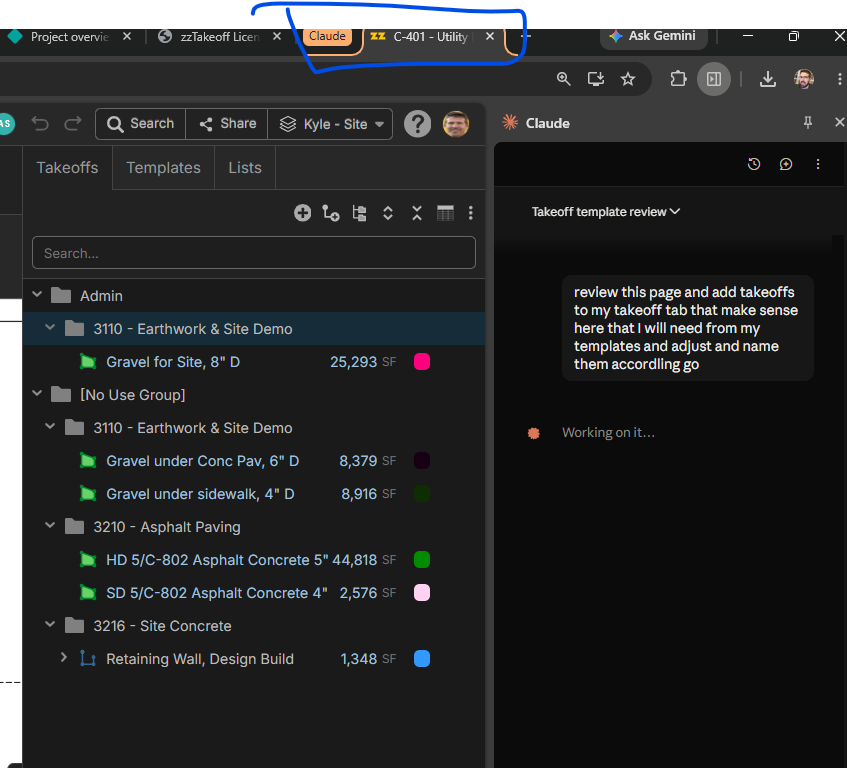

@kyle i havent had time to mess with it yet. but i would expect it would be worthwhile to downgrade the model so you don't burn through your credits so quickly. especially in the beginning.
also, Claude now has a built in browser it seems to work much better than the chrome in claude.
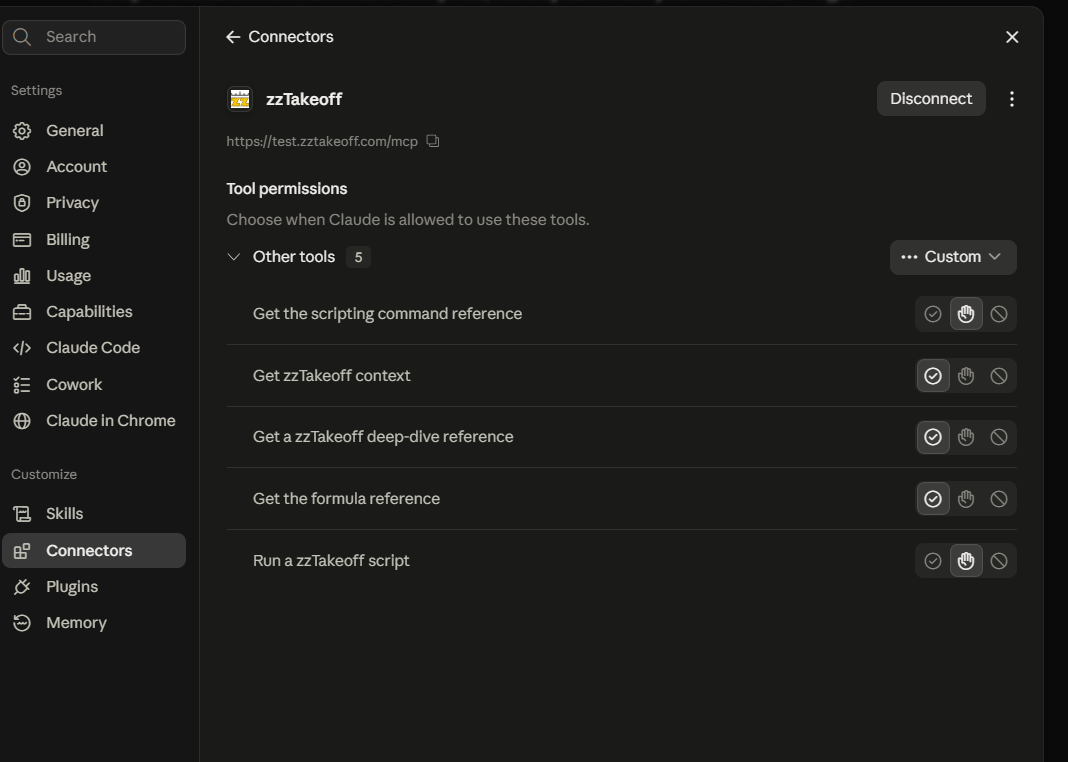
Ahhhh I'm trying to do it in production is why when following Hebers instructions above. I'll try it on test.zztakeoff unless we got it in production, how do I point it there?
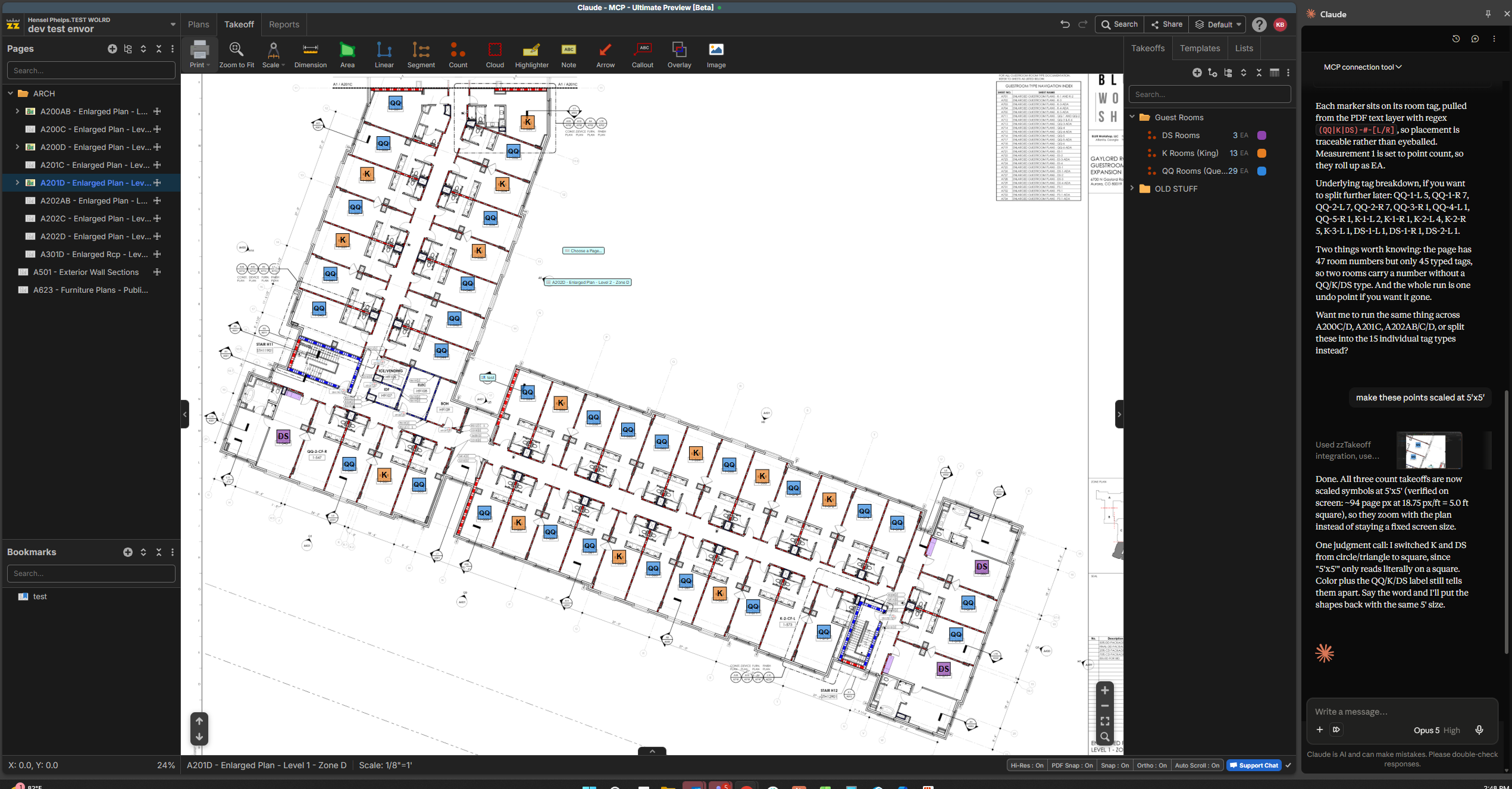
Ok I'm creeped out, its alive!
Made the K QQ and DS takeoffs and counted them for me...granted it missed a couple that were not labeled.
Excuse my french but pretty damn sick! (ignore my cost per LF, I already bid this, just testing the MCP). 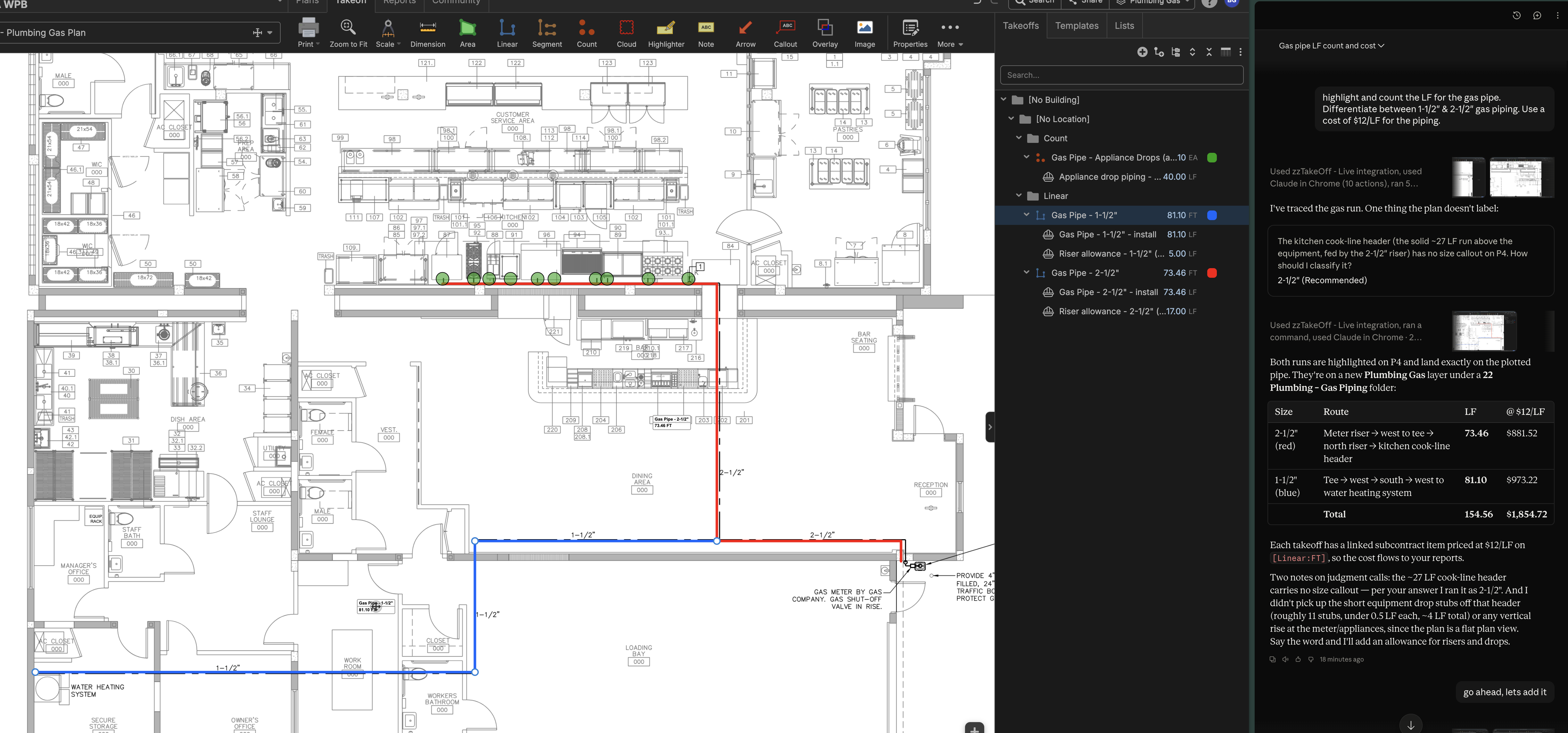
Another test. The first test post was very pointed; this one was vauge. I asked Claude to perform a demolition take off using the entire set + create the demolition layer to perform the task under. It did it and a first pass, already knowing the scope, it appears to have done it well, even asking a clarifying question for an RFI. Claude also assigned the Fire Sprinkler package to the demolition scope for FS without being asked. As a secondary request, I asked Claude to create a high-level scope for a Building Connected demo bid form based off its take off, it did that well, too. THEN, I asked it to perform the concrete take off - it did well, however, it did miss (can't fault it) an RFI where a note says use existing pile caps, install new piles in existing locations (comical... can't make this up)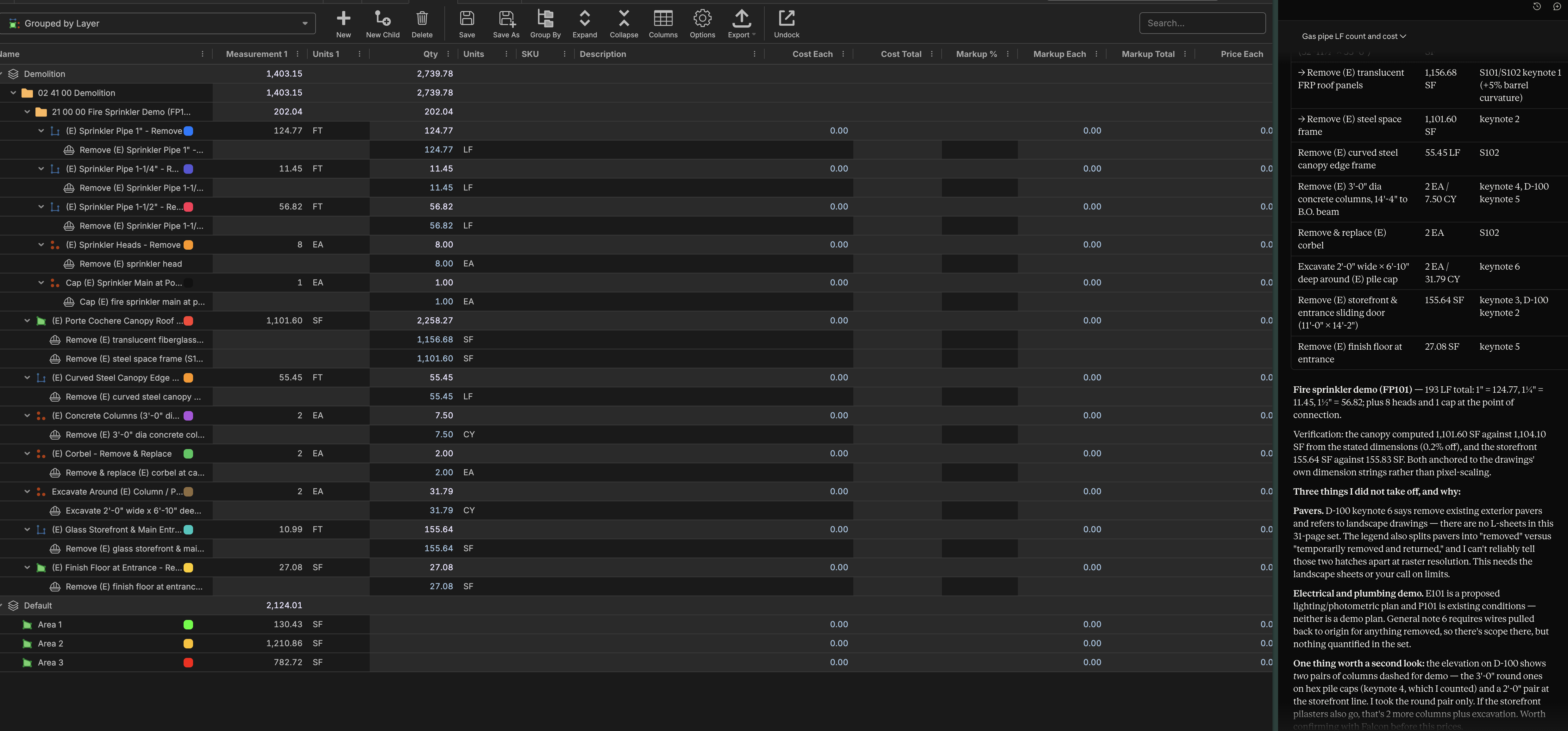
It picked up new pile caps rather than the note that says existing to remain, as I mentioned above, but at least it carried a complete scope of work (LOL)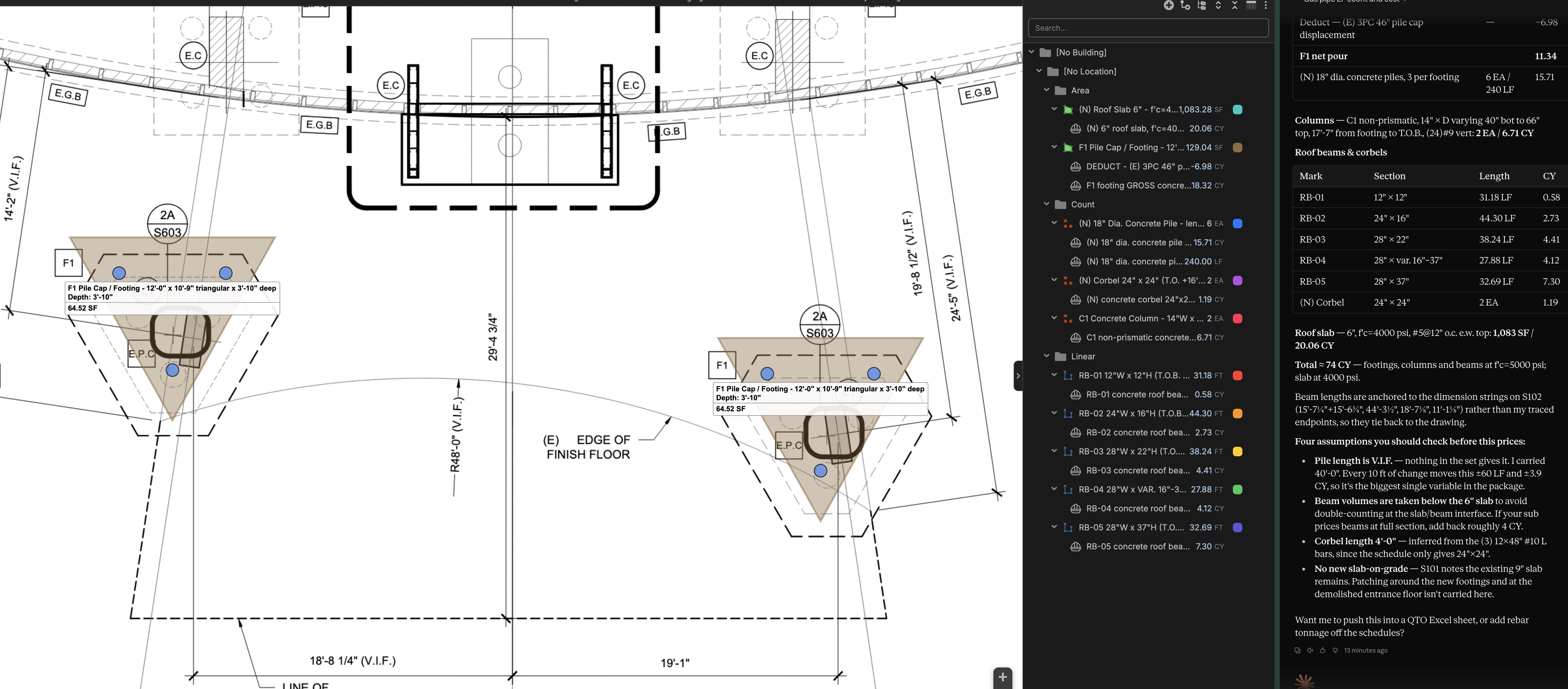
Bruce just curious, do those plans you had it takeoff have a text layer? Claude won't touch the set I'm currently working on since the only searchable text is in the title block
@Jes This will be fixed in our next update. We are going to OCR every page (at extra cost to us) even if the PDF already has text data. Previously we were skipping the OCR step if the PDF has text on a specific page, but that's not reliable enough, and will be even more of an issue as the MCP becomes a core part of using the software. After we OCR we will merge the OCR text data with the PDF text data for a final combined text result (PDF text as priority if they overlap). This should improve search and MCP usage by quite a bit.
🔥4🙏2@Jes I'm not sure, more than happy to check it if you can point me to how..
@Heber
I was in flight of sending this to many estimators, but it did not work since there is no script for duplicating layers. Here is a 3min loom on what I was trying to accomplish to kick of ANY job. When we can do this it will be awesome! LINK
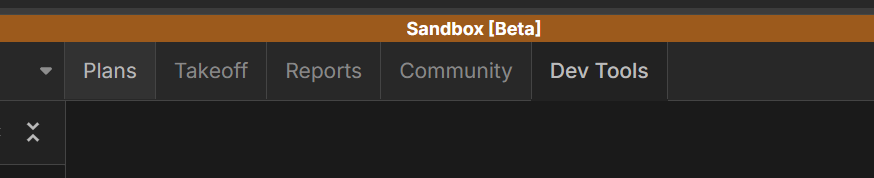
👍1Hey Kyle! In your video, it doesn't look like Claude ever tried to use the zzTakeoff MCP. I've attached some screenshots of what the top bar should look like when the MCP is connected. Something that helps when starting a chat is explicitly saying "use the zzTakeoff MCP".
In Sandbox mode:
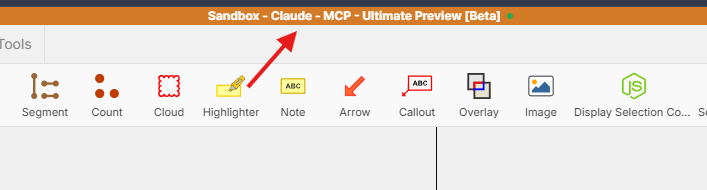
Not in Sandbox mode:

Also, in our next update, we will be moving the PDF hyperlinks into a 'System' layer so you won't need to duplicate the default layer anymore.
😢1Well fail! I saw the banner below and thought I was good..........note to self.....needs to say MCP. Awesome on the system for the layers, that will be wonderful.

Wow i would love how to use this. Alittle lost how to set up.
Hi Joseph, this will get you in and show you how to connect. Let me know if you have any questions.
Instead of MCP being available only in the Ultimate version, we're planning to allow all Pro licenses to have access to MCP and Dev Tools. This should open up the MCP & Dev Tools party for everyone. We will make an official announcement soon (likely next week). We will just have to keep some reasonable rate limits to avoid abuse of the MCP or Dev Tools.
🚀8%22%2F%3E%3Ctext%20x%3D%2232%22%20y%3D%2233%22%20text-anchor%3D%22middle%22%20dominant-baseline%3D%22central%22%20font-family%3D%22Arial%2C%20sans-serif%22%20font-size%3D%2226%22%20font-weight%3D%22600%22%20fill%3D%22%23fff%22%3EJO%3C%2Ftext%3E%3C%2Fsvg%3E "Jeffery Osborn")
With schedule feature, I was able to have ChatGPT create takeoff items and I told it what field to use, rather than using extract schedule, this worked for me, I created the first one and then I tell ChatGPT to create the rest and follow the same setup as the one I created. You also have to make sure you tell AI not to change any of the formatting or formulas in your takeoffs, it did that on me with another test I did and removed formulas and child items from the takeoffs that AI copied.
🚀1👍1