











 Inside Track
Ready to Test: Joist Tool, Beam Tool, Grid Tool, Section Level Properties (Zones, WBS), Labels, Slice, Lasso, etc.
We just deployed a bunch of new features to our Test Server 🙂🚀
For anyone that wants to test, you can request Test Server Access.
Below is a list of new features & updates. This list is a bit technical. When we release, we'll put out a simplified version with screenshots.
Tool Extensions (new framework used for joist, beam, and grid tools)
- A Tool Extension layers specialized behavior on top of a base tool.
- Enable from Properties popover → settings gear → Tool Extensions.
- Joist, Beam, and Grid (below) are the first three.
Joist Tool
- Draw an Area, generate joists at any spacing and direction with an optional rim board.
- Auto-creates material items grouped by joist length; warns if items drift out of sync.
- Parent-area slope flows through to each joist (lengths reflect the true sloped run).
- "Cut from Length" tracks the stock you cut joists from, so material counts roll up by stock length instead of by actual cut length. Per-piece override via right-click; labels show a {stock} suffix when a cut differs from the actual length.
- Right-click commands: Regenerate Joists, Re-Center Labels, Cut from Length, Slice, Delete 0 Qty Joists, Clear Joists.
Beam Tool
- Extends the Segment tool. Each drawn segment becomes a beam (auto-named e.g. (2) 2x8 #2 SYP) labeled with plies and length.
- Supports multiple plies and "Bearing" (extends each end to a support).
- Same auto-item / out-of-sync workflow as Joists.
- "Cut from Length" works here too — track the stock length so beam material rolls up by stock rather than actual cut length, with per-piece overrides via right-click.
Grid Tool
- Extends the Area tool.
- Lay out horizontal/vertical grid lines, count their intersections (interior, edge, corners), and generate tiles per cell.
- Optionally separate partial tiles and add a gap between tile edges.
Section-Level Properties
- Override properties on a single drawn section instead of the whole takeoff.
- Open the popover via Shift+F2, right-click → Section Properties, double-click a section row in the sidebar, or right-click a section row on a report.
- Multi-select shows <Varies> for fields that differ.
- Three calculation modes per formula property:
- Takeoff Level – Same Value at Sections
- Takeoff Level – Split Among Sections
- Section Level – Sum to Takeoff
- Push a takeoff property down to every section via property "…" → Show on Sections.
- Workspace setting required: Settings → Misc → Enable Section-Level Takeoff Properties.
Labels
- A new annotation type that floats over any section and shows its details.
- Add via right-click → Show Label, or auto-show on draw (Settings → Takeoffs).
- Pick what to display — takeoff name, section name, geometry/slope, measurements 1/2/3 (with names), applied items (with how much of each item lives in that section), custom text (formulas allowed).
- Adjust font size, alignment, colors, background, opacity.
- Auto-centers until you drag it.
- Bulk commands: Re-Center Labels, Apply Label to All (copies one label's settings to every other label in the takeoff and auto-creates missing ones), Save as Takeoff Label Default.
Slice Command
- A polyline command in the slash palette.
- Click point-by-point across the page; every visible Area, Linear, or Segment the line crosses is sliced where it crosses.
- Cutouts and children re-route to whichever piece they sit inside; labels duplicate onto each piece.
Lasso Selection
- Alt + drag on empty canvas draws a freehand selection polygon.
- Shift + Alt + drag adds/removes from the current selection.
- Selects only objects fully contained inside.
Search / Create Count Takeoffs
- Check off any search hits and create takeoffs from them in one click — as Count Takeoff, Area Takeoff (rectangular section per hit), or Highlight (yellow boxes only).
- Full keyboard navigation throughout the search popover.
Convert To… (in sidebar)
- Right-click a takeoff in the sidebar → Convert To… to migrate its draw objects to a different takeoff or template.
- When converting all sections across all pages, a new Delete Original Takeoff checkbox makes this a "combine duplicates" workflow.
Export Project Data to Clipboard
- New slash-command.
- Copies the project (record, layers, pages with signed image URLs, takeoffs, draw objects) as clean JSON for external scripts and integrations.
Auto Merge Toggle
- A footer button toggles whether new boxes auto-merge into overlapping siblings (default ON).
- Visible when the Area tool is active or Linear is in box mode.
Symbol Text on Counts
- For non-manual counts using circle/square/octagon/diamond symbols.
- Add letters or numbers inside the symbol to visually code fixture types (A, B1, F2…).
- Font auto-sizes. Renders in the legend swatch too.
Cutouts Can Chop
- A cutout drawn past its parent now auto-converts to a chop, subtracting from every overlapping sibling area on the page.
- Undo entry reads Chop Area instead of New Cutout.
Sloped from Elevation View — extended
- Now available on Linear, Segment, and Dimension (previously Areas only).
- Use when measuring sloped objects on a side-view drawing instead of plan view.
Legend Custom Column Headers
- A new Custom Column Headers checkbox on Legend draw objects lets you rename the Takeoff Name and Measurement 1/2/3 columns.
- Empty fields fall back to defaults.
Custom Properties Page (moved & expanded)
- The Custom Properties manager moved out of Settings into its own dedicated page.
- New flags:
- Allow typing custom values not in the list
- Visible only when in use on a project
- Auto-populate with last entered value
- Exclude from "Group By" options
- Hidden by default
- Per-applies-to defaults (different defaults for Takeoffs vs Items vs Sections).
- Drag-and-drop reordering at three levels.
Properties Popover
- Unsaved-changes prompt when closing with edits: Save / Discard / Cancel.
- Ctrl/Cmd+S anywhere saves (was Enter on the name field only).
- New + Add Properties button in the header — searchable.
- Settings gear gains Tool Extensions and Label Defaults sub-menus.
- Cost Type + Usage share a row for item takeoffs (tighter layout).
- Closing the popover auto-closes any open prompt popovers to prevent flicker.
Takeoff Worksheet & Reports
- Group rollups produce clean numeric or unique-string values instead of pipe-joined strings like "1.95 | 66.43". Slice-aware Sum/Unique aggregations roll up correctly across folders, takeoffs, pages, and items.
- Section Properties right-click option on report rows tied to a specific draw object.
- Tree reports sort by displayed name (folders, takeoffs, item name + usage) instead of internal IDs.
- Layer column inherits from ancestors when grouping by Item Name or Usage.
- Quantity column is safer against circular formulas.
- Number formatting on group rows is now consistent.
Pages & Sidebar
- Old revisions show as expandable children of the current page in page-picker dropdowns. Revision badge with tooltip on the selected page.
- Uploading a new file "as an old revision" no longer demotes the existing current version.
- New-revision workflow defaults to Copy to New Page (safer than Move).
- Sidebar scrolling is less aggressive — already-visible rows no longer re-center on every click.
- Thumbnails only mark a page "has takeoffs" for user-drawn takeoffs (no longer triggered by PDF system annotations).
Hover Hint
- Now shows section name, enabled tool extensions, slope, dimensional properties, section-level overrides, and applied items (capped at 10 with "+N more"). Flips to the other side of the cursor when it would otherwise run off the edge.
Pages & Takeoffs Tree Selection
- Click a row in the Pages or Takeoffs tree to select the matching draw objects on the canvas.
- Ctrl-click adds that row's draw objects to the existing selection (previously cleared).
- Shift-click across multiple rows selects all their draw objects together.
- New Select Sections right-click for item takeoffs with section-level formulas.
- Clickable status icons (e.g. Out of Sync) with tooltips on takeoff sidebar rows.
Performance & Speed
Biggest wins on large projects:
- Saves are O(1) — the save loop now tracks a set of modified IDs instead of iterating every draw object.
- New batch server methods — one server call per 2,000 records. Used by saves, Paste/Duplicate of large selections, Slice, Apply Label to All, PDF hyperlink extraction, Bluebeam/PlanSwift imports, and the Grid/Joist/Beam generators.
- Slice rollups moved off the grid — sliced-takeoff descendants are now cached on each takeoff, so the worksheet reads pre-computed values instead of walking the tree on every render.
- Constant-thickness strokes eliminate full re-renders on every zoom step.
- Spatial grid index speeds up point snapping on dense pages.
- Precomputed bounding boxes for the move handle make multi-selection feel instant.
- Viewport rect cached via observers — no per-mousemove recalculation.
- Constant-thickness strokes for Counts, Areas, Linears, Segments, Pitch, Triangulate, Hyperlink, and Label outlines. Line weight stays the same at any zoom and zooming on busy pages is noticeably faster.
Other Polish
- New green start takeoff sub-icon in the Materials & Labor list — start a takeoff for an item without leaving the popover.
- Paste as New is now an inline As New sub-button next to Paste.
- Cloud: double-click a border to add a new point exactly on the closest segment/arc.
Misc bug fixes
- Item-specific keys (SKU, cost each, formula, waste %) no longer cascade incorrectly from parent to child items.
- Orphaned properties keep their original type/metadata instead of being treated as plain text.
- Alignment operations use only "primary" objects to compute bounds — children ride along without skewing the result.
- Hyperlink middle-click bug fixed — opens in a foreground tab and no longer leaves the canvas stuck in panning mode. Selection now highlights the whole box instead of showing handle nodes.

Great feature updates!
Comments:
I clicked "Show Label" but then there is no subsequent "Hide Label" command to turn them back off.
I clicked show label on an area with a grid, and the labels are wild! Don't need a label for each intersection. I just wanted the label for the slab, but since the grid is part of the tool is turned a label on for all the pieces. Maybe the label can default to the takeoff only, and then the grid has to be selected for labels to show up there?
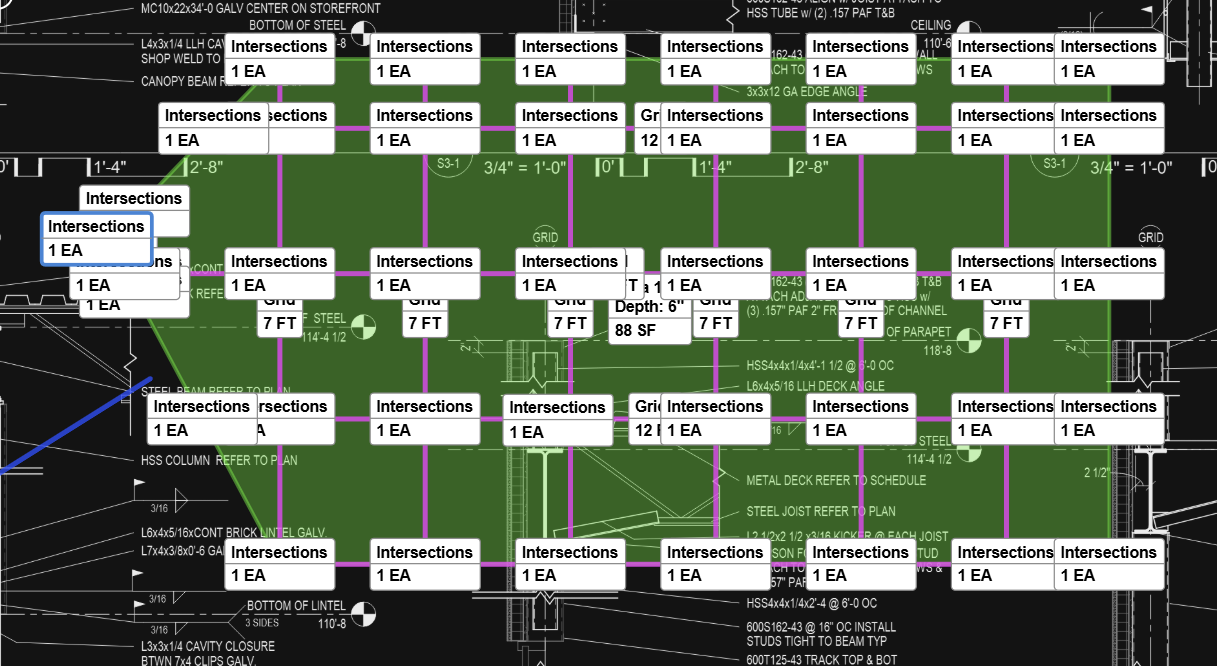

Very excited about Section-Level Properties! I like the naming function too, I think this will be handy.
Symbol Text on Counts! Yes! this is going to be very helpful.
Labels, wasn't watching for this, but very cool too and great features out the gate. Show items is a very nice touch.
👍1🚀1DAK if its possible to copy a project with takeoffs from my main workspace to the test environment?

Wow this is cool! I had a question, how do I auto-update the name formula, then I saw the bottom left option, slick.
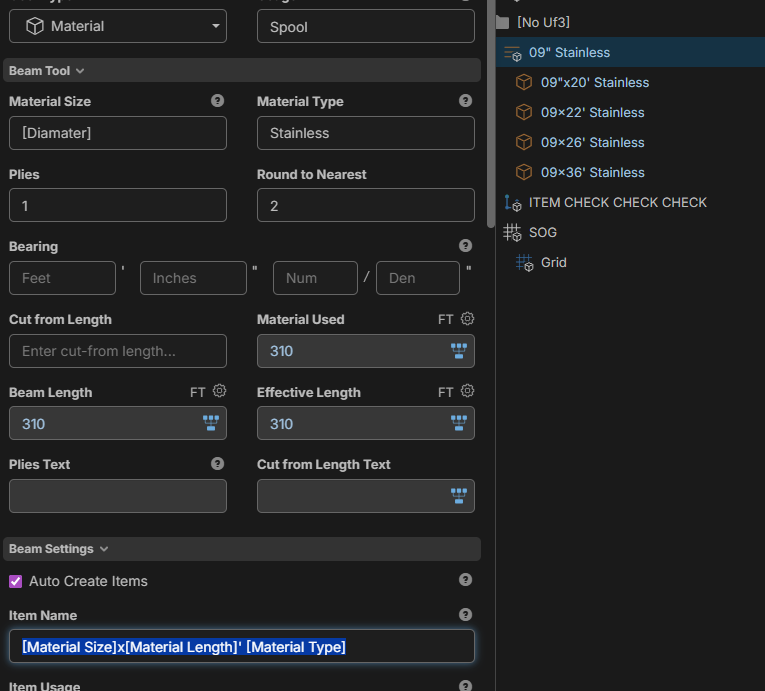

@David Thanks for the feedback. If you want to select only the parent area and not the child grid, you can hold CTRL while you click on the area. That should select only the parent area and will skip selecting "child" area and linear sections. Then with the parent area selected, showing the label will only show for the parent. Currently to remove the labels you can click them and press Delete. We'll work on better ways to manage these.
@Luke If you're still interested, we have a method to copy projects from the WWW Server to the TEST Server. If you want to chat into our support (with the live chat) with the name of the project, we can duplicate it over.
@Kyle Yes, this should open up some decent customizability, since you could build templates specific for different material types. Lots of options here.
@Lance We're testing through this week, and tentatively planning to go live this weekend, but all depends on how testing goes.
👍1
If the intent was the grid tool to be used as ceiling takeoffs, which looks like it could be one of the uses.. after every room the pop-up asked me do I want to grid that room. I keep having to hit no as I want to do my grid at the end of taking off all rooms so the pop-up is a little annoying. Also, it appears that the waste factors do not change in the tiles and the grids. I can change waste Factor to whatever number I want and does not affect the quantities.
👍1Can we open up Group by for Section Level Custom properties for Takeoff tree reports, or would that be too complicated?
I just tested creating breakdowns after the fact on a large project that i had sent over to the Test server, I created two custom Properties one called AREAS and one called BUILDINGS and was able to very easily add the section level properties i wanted to group my information.
one suggestion is to allow a custom property with dropdown mode and no value needed even for first entry. I like the idea of having site specific dropdown options only. Not sure if I select text mode if it would work the same and allow me to select something already used on that project.
just a reminder to add zeros to your numbers everyone if you want something like floor levels to populate in any kind of discernable order.
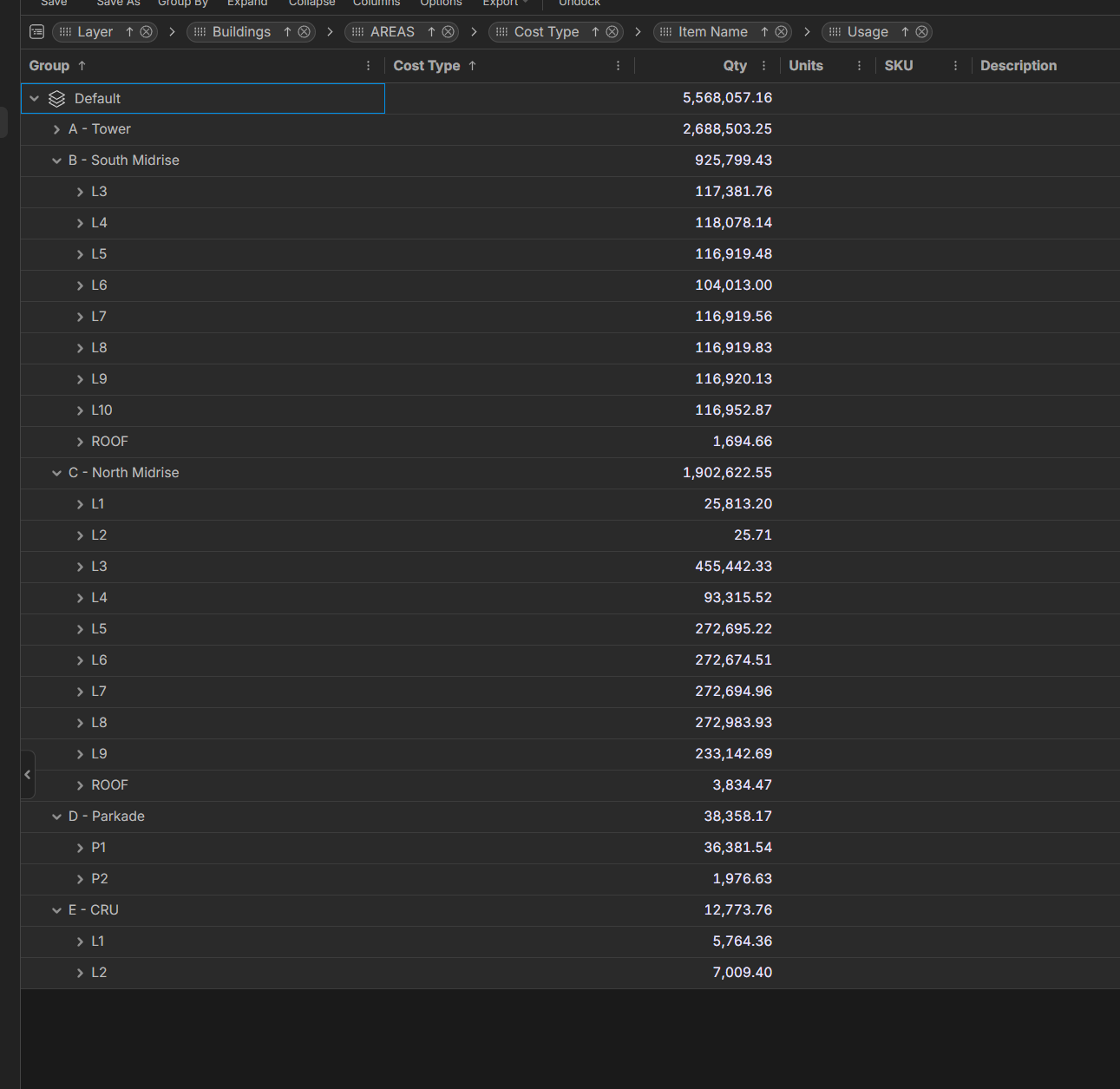
@Luke,
I need to figure out how you did that! Slick you got it to work after you did your takeoff, that is exactly what we are after, I played a little last night on TEST and need to dabble more.
👍2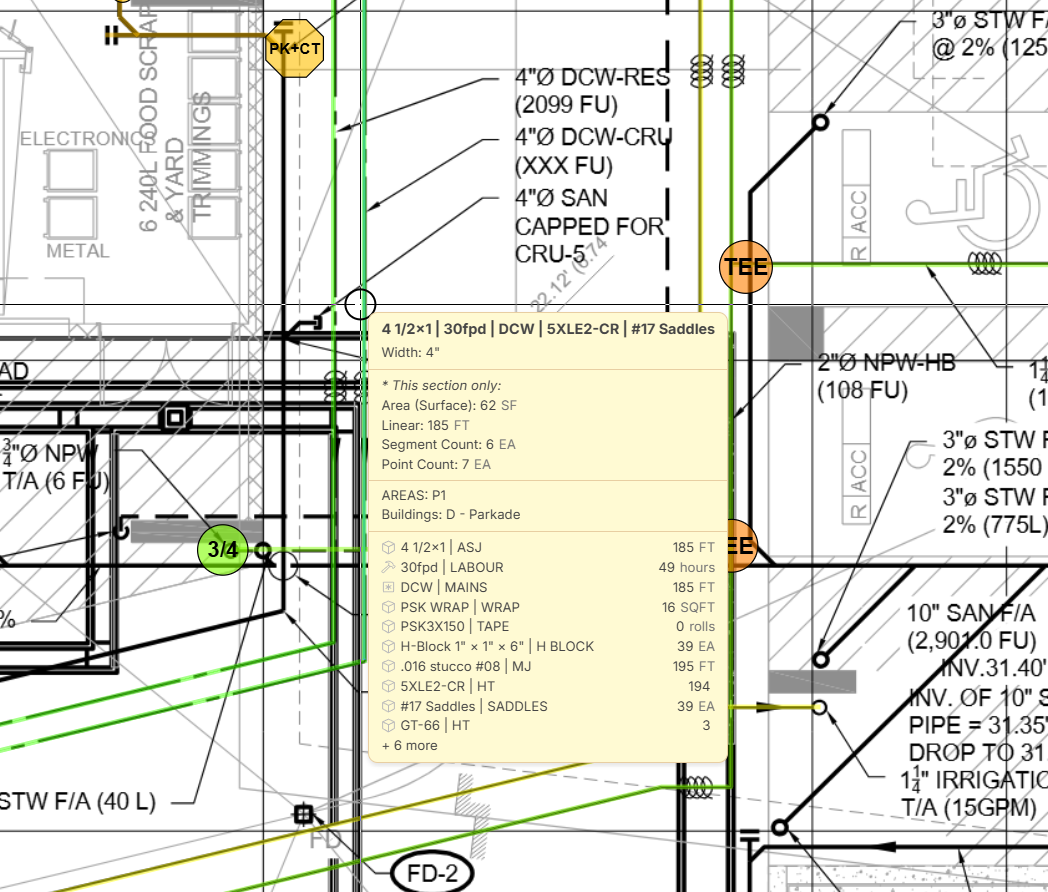
%22%2F%3E%3Ctext%20x%3D%2232%22%20y%3D%2233%22%20text-anchor%3D%22middle%22%20dominant-baseline%3D%22central%22%20font-family%3D%22Arial%2C%20sans-serif%22%20font-size%3D%2226%22%20font-weight%3D%22600%22%20fill%3D%22%23fff%22%3EJ%3C%2Ftext%3E%3C%2Fsvg%3E "Jes")
im pretty sure i found a bug, when mixing some of my section level custom properties with some takeoff level ones in the reports tab. if there's no selection for the takeoff level property it sandwiches those items in the wrong group. I like the idea of not having a [no xxx] and have these populate outside of a grey folder but heres an example why it needs to exist i guess
👍1I'm now dangerous with the pending update. The Section breakouts are getting close. The MVP thats missing is need to see it visually!
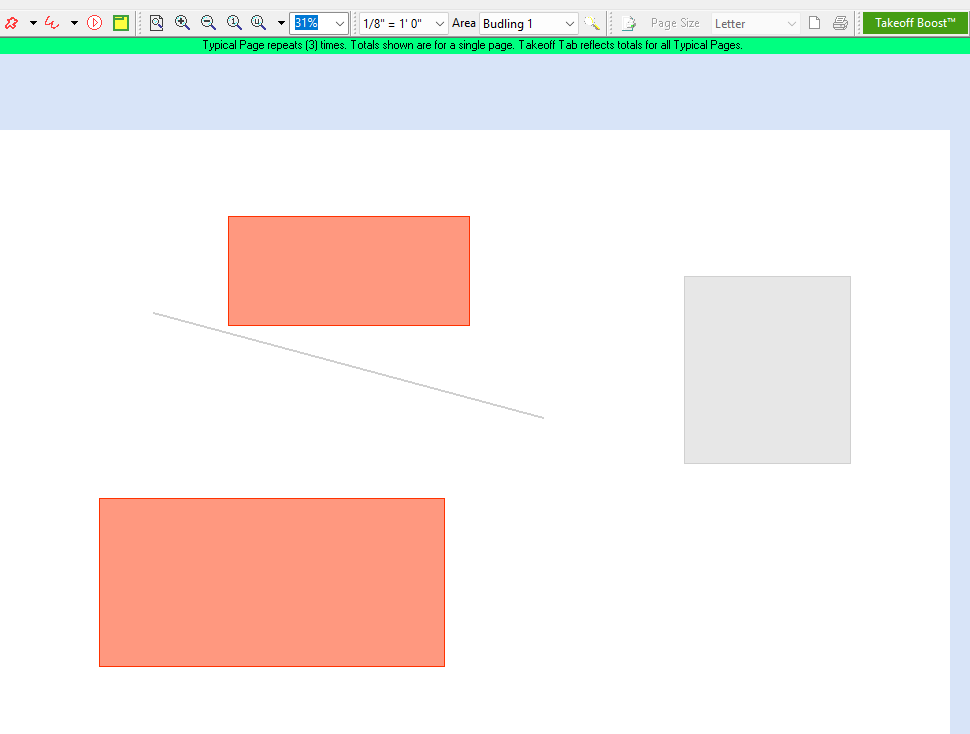
Here is a 3min vid overview on how this works in zzTO and also ideas to make it meet MVP! LINK
OST Screenshot of how areas work outlined in the vid.
@Jes We don't have settings for the newly created count takeoff (from search results) yet, but that could come as an update.
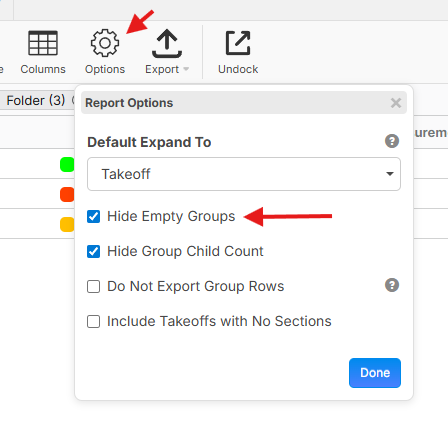
@Luke Do you have a screenshot you can post of the bug above? If it has any confidential info, you could just send to our support chat, and we'll take a look. We also have an option to "Hide Empty Groups" which gets rid of the [No ___] in the reports.
@Kyle Thanks for the video and additional info. We'll work on some ways to visually see the breakdowns better.
Thanks for all the input guys. We'll keep pushing to make zzTakeoff better. 👍🏻🙂🚀

Loving all the updates! Just a couple of things I have found. We will be able to convert our planswifts by changing the properties of our beams to the new zz beam and get the rounding that we are use to, however, the way it is currently set up, we can only do one at a time. It would be great it we could select multiple line items and change the properties of all at the same time. The other thing is the joist tool, I'm not seeing an easy way to double joist like we do in planswift. Not a deal breaker, but would be nice to have that.
👍1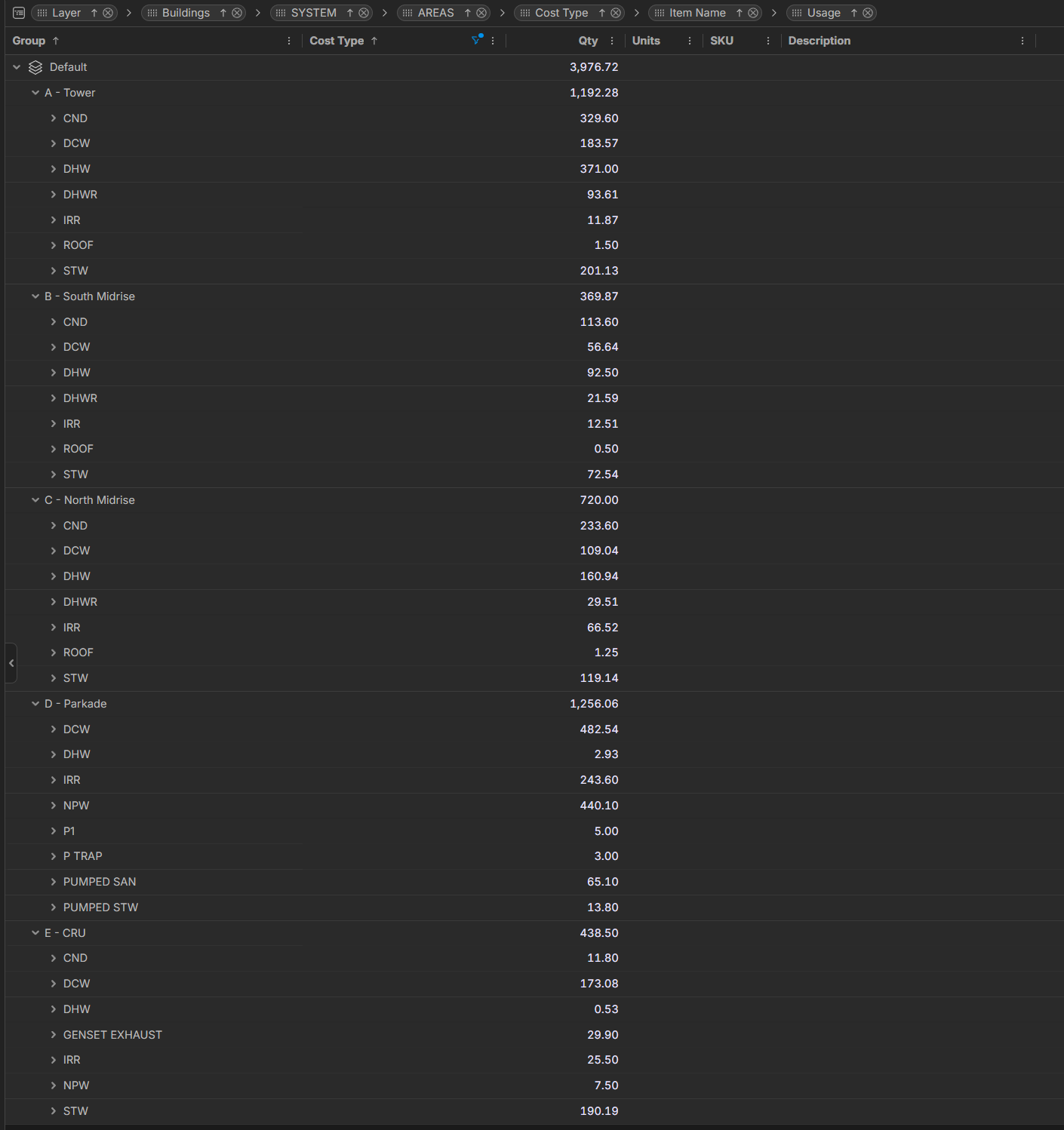
hard to spot. here without context. in grouped by buiildings , ABCD, then SYSTEM , i have one takeoff item count i removed a system selection and it bumped [areas] section level property into [System]
see D - Parkade / P1 - this is an [areas] property that goes back where it should if I give it a [system] property. ort as it turns out i did have hide empty groups selected if i uncheck i get a [no system] and P1 goes where it should as a child in the next group
👍1oh roof too in A B and C buildings same situation
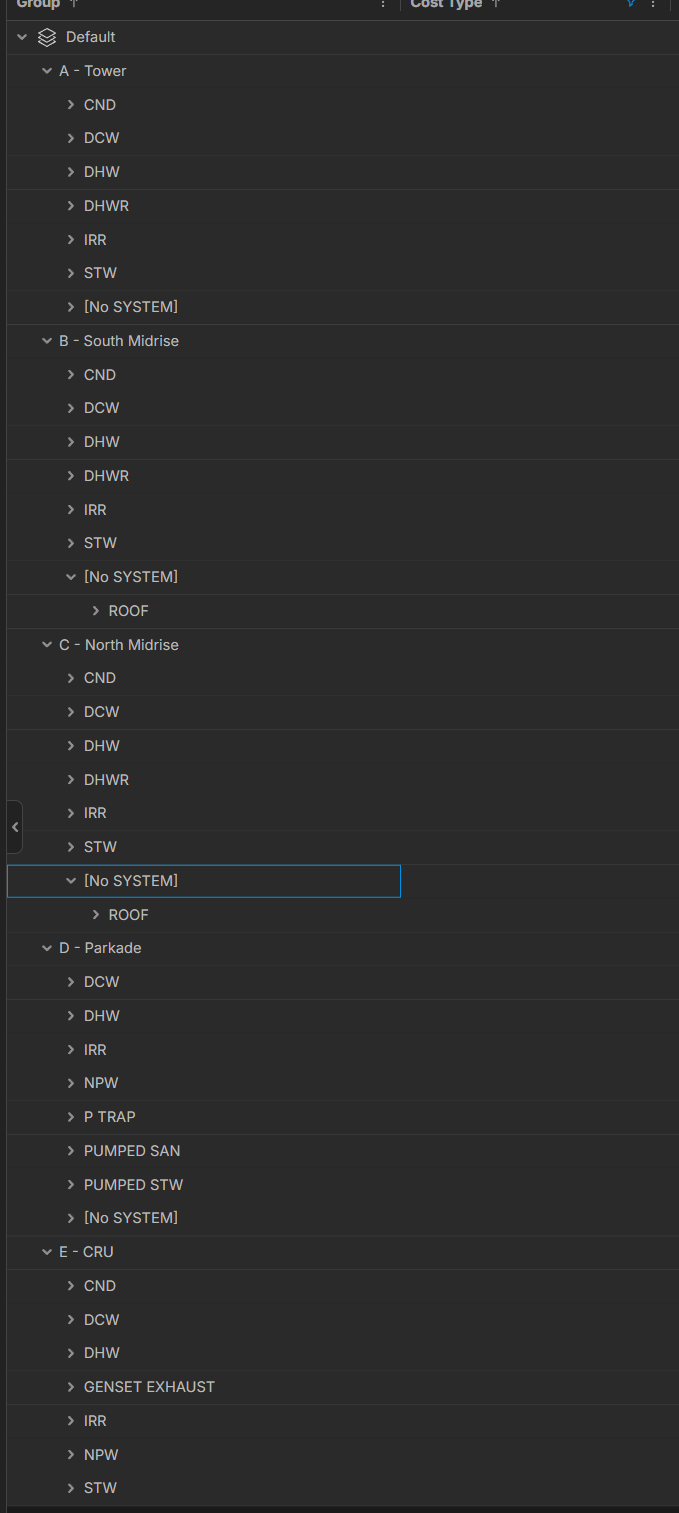
photo of it fixed by unchecking hide empty
👍2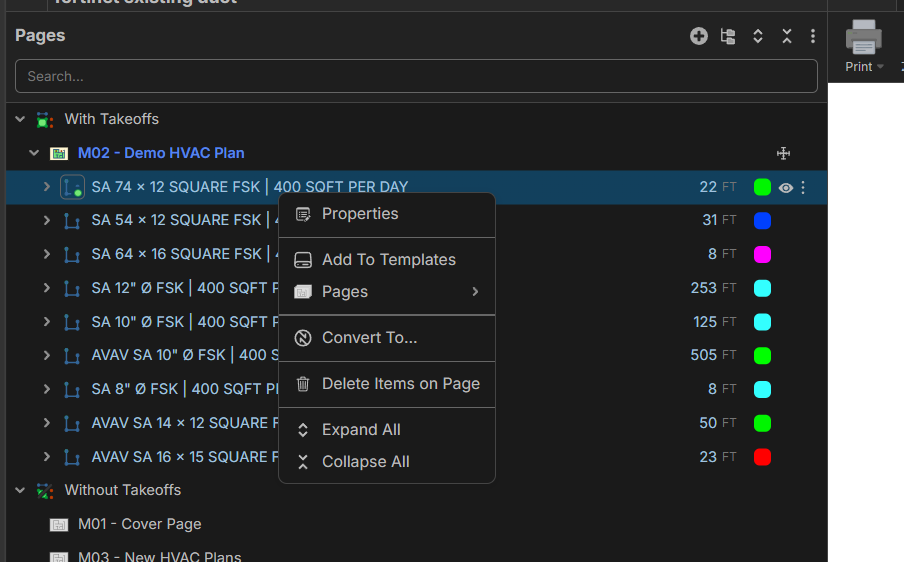
would be very cool if we could also add section level properties here. to all takeoffs on a page or particular takeoff items on a page.
👀1realizing clicking on each higlights everything on the page which makes quick work.
still if i could right click on a page and give it a section property to remember for everything taken off on the page that would be pretty neat.
🎯2I see this update has been deployed. thank you for adding my suggestion on allowing creating drop down mode properties with no default selections.
👍1%22%2F%3E%3Ctext%20x%3D%2232%22%20y%3D%2233%22%20text-anchor%3D%22middle%22%20dominant-baseline%3D%22central%22%20font-family%3D%22Arial%2C%20sans-serif%22%20font-size%3D%2226%22%20font-weight%3D%22600%22%20fill%3D%22%23fff%22%3EJL%3C%2Ftext%3E%3C%2Fsvg%3E "John L")
These labels are annoying folks, can we keep this defaulted to off?
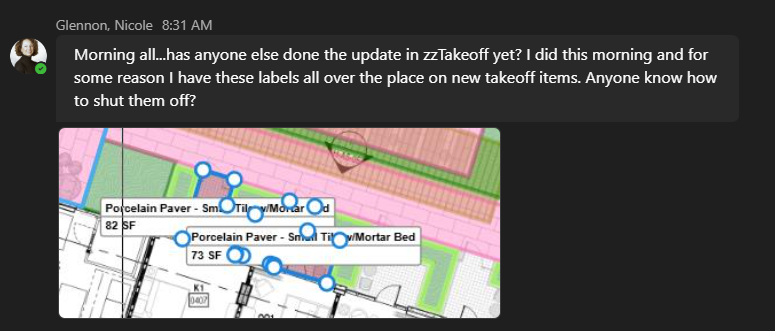

Hey Kyle, if you refresh the page, the labels should be off by default.
🔥1👍2We have just come across a big issue with the beam tool. Works great for the first page, but if we copy and paste the items on another page, it also extends the 6" on each side again. So first page, beams are rounded to 10', second page, beams are rounded to 12'
👍2@Camille We have a patch we expect to release ASAP (today) for this.
👍1❤️1@Camille We just deployed a patch for this. Is it working as expected now for you? (you will have to refresh the page to get the latest).
👍1%22%2F%3E%3Ctext%20x%3D%2232%22%20y%3D%2233%22%20text-anchor%3D%22middle%22%20dominant-baseline%3D%22central%22%20font-family%3D%22Arial%2C%20sans-serif%22%20font-size%3D%2226%22%20font-weight%3D%22600%22%20fill%3D%22%23fff%22%3EDJ%3C%2Ftext%3E%3C%2Fsvg%3E "Doug Jones")
Search / Create Count Takeoffs: Finding items and assigning a takeoff is good. Better would be the capability to select a takeoff (and all sub-assembly parts) from a template.
For example, if I search for all the fire hydrants, then I would like to select the template (for that specific municipality) and the specific hydrant type from that template.
👍3