Inside Track
Tabs at Top for "Templates" and "Lists"
We're planning to add some tabs at the top to manage/edit templates and lists in a full grid, but there would be some possible confusion having duplicate tabs at the top and right sidebar. The tabs on the right will be convenient to easily access and use templates and the tabs at the top would be more for editing in bulk.
Do you think this would be weird and too redundant? Maybe there should just be a button on the right sidebar templates & lists to open as full screen for editing in a grid? Any input welcome.
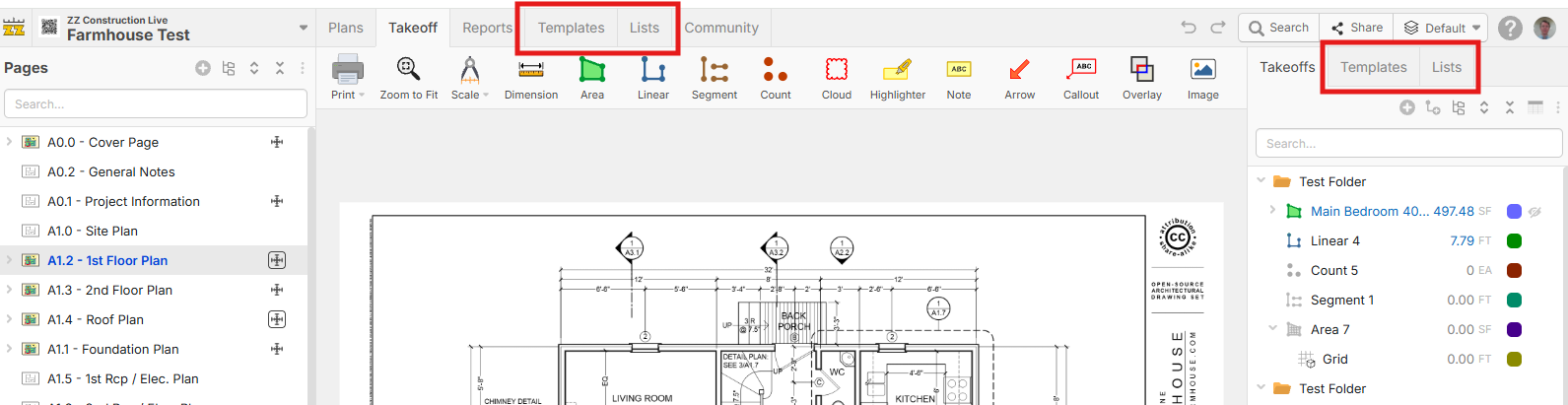
EDIT: maybe these are hidden by default, but users have the option to show them if they bulk edit templates & lists a lot?
%22%2F%3E%3Ctext%20x%3D%2232%22%20y%3D%2233%22%20text-anchor%3D%22middle%22%20dominant-baseline%3D%22central%22%20font-family%3D%22Arial%2C%20sans-serif%22%20font-size%3D%2226%22%20font-weight%3D%22600%22%20fill%3D%22%23fff%22%3EGG%3C%2Ftext%3E%3C%2Fsvg%3E "Gabriel Glenton")
That sounds like a welcoming addition. Having both options sounds good to me. Sometimes you want to go fullscreen with it, sometimes just have it on the side.
👍1
Looks like a good idea, definitely like the idea of hidden by default. With the ability of MCP, I really don't create templates manually any longer, just let Claude do it, but would be a cool option.
👍2
I think that's a wonderful idea but it's really only an admin thing because I see the value. To be honest this is too complicated. Why not just make a little "Click My Face" kind of like we have the custom properties flying button? We may get a button there that only admins get access to.
P.S. The plugins store: when I add more tabs to the company-wide, it's a cluster F that needs to be addressed. If I add a plugin it adds custom properties to the whole company's world. This does not work. I'm concerned that that's not being addressed or I can't isolate my own little workspace. That's the fundamental problem.
🎯1👍1%22%2F%3E%3Ctext%20x%3D%2232%22%20y%3D%2233%22%20text-anchor%3D%22middle%22%20dominant-baseline%3D%22central%22%20font-family%3D%22Arial%2C%20sans-serif%22%20font-size%3D%2226%22%20font-weight%3D%22600%22%20fill%3D%22%23fff%22%3EJ%3C%2Ftext%3E%3C%2Fsvg%3E "Jes")
What I don't like about this is if I need to modify an assembly while looking at something on the takeoff screen, when you move these up top as tabs and you click on them up there, won't that move your screen completely off the takeoff page? I guess with multiple monitors that's not a big deal but I'd prefer an option to have those hidden
👍2
Thanks for the input guys.
@Kyle Regarding the issue on a bunch of tabs, what do you propose as the solution? Plugins that can be installed for a single user instead of workspace wide? One concern with that: suppose you takeoff some things using specific plugin that has custom properties, all other users opening those takeoffs need those custom properties for it to properly display as well. There could be compatibility issues if we allow a user to install a plugin only for a single user. We would then get complaints that user A and user B see different view of the data. Another option is revoking admin privileges from some of the users 😁
@Heber, yeah already kicked some admins lol.
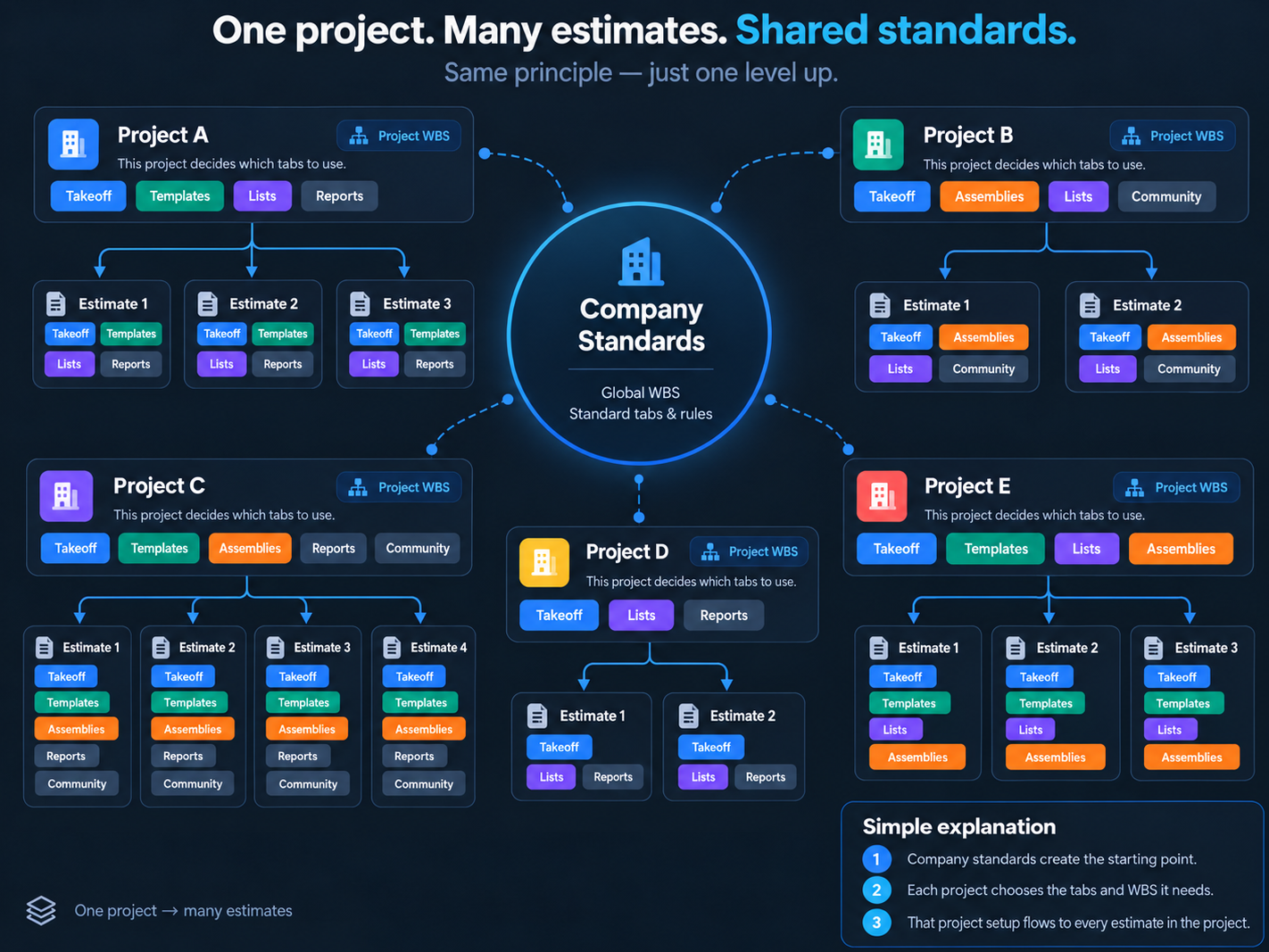
Same principle as one project, many estimates, that's a major concern I keep brining up, just one level up.
Company standards set the baseline. Each project chooses its WBS and tabs. Every estimate under that project inherits that setup.
This is typical in the estimating world how they setup their structure and sad you don't follow this logic. Feels like you need to decide, do you want to be a GC tool, or a trade partner tool?