











Weekend Warriors in Developer Mode!
So How many people are woking this weekend in the Developer Section.
Chat in if you are working in Dev mode and let us know what you are working on!
When you get done and have a working model, put a video or some pics in the Project Showcase and show us what you have built. We get inspiration from others!

I have been working on an estimating plugin! Its still a little rough, but its getting there! 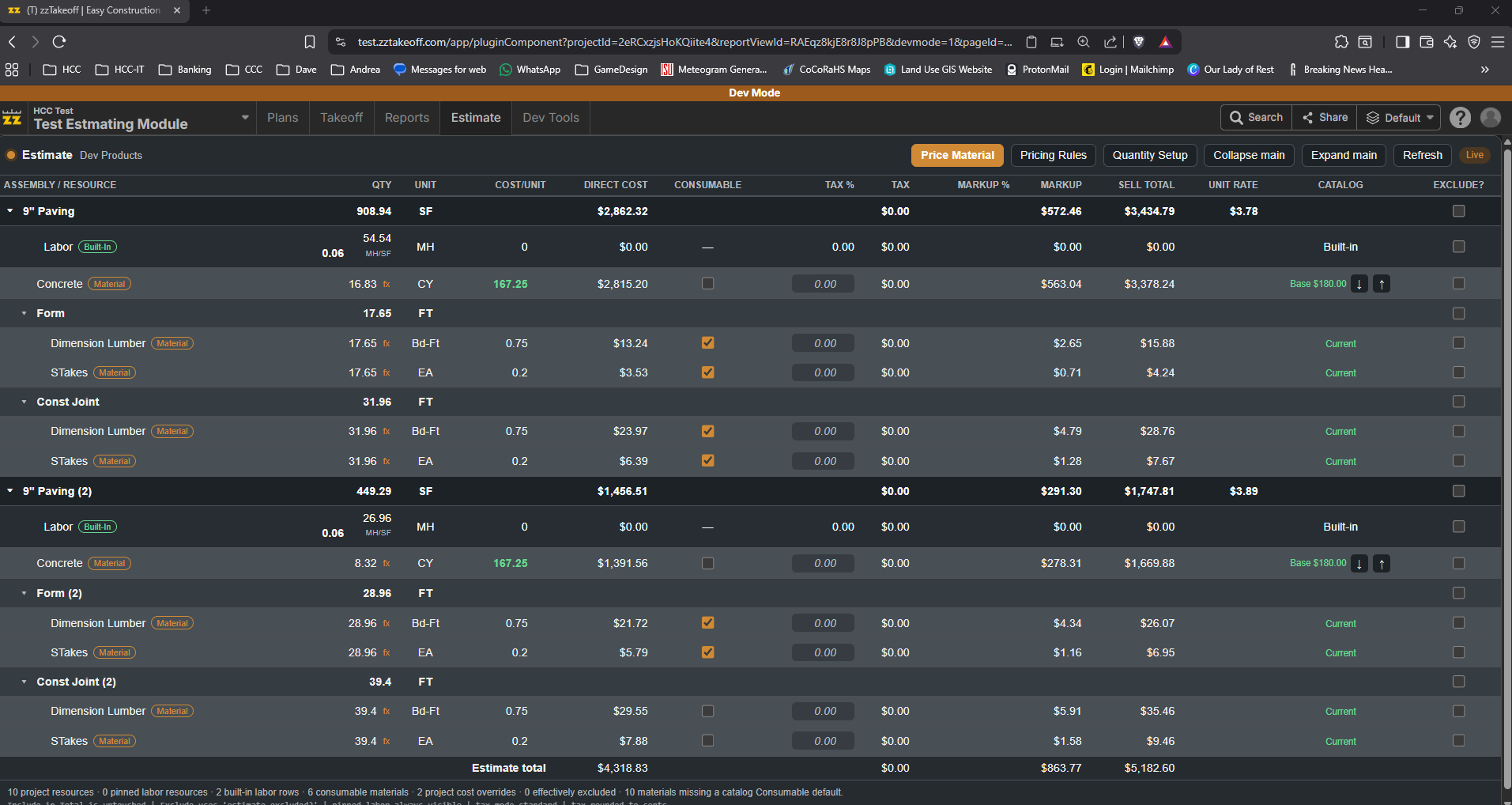

Wow, I knew you would be working on it today! That looks amazing!

Wow, very cool! 🚀🚀
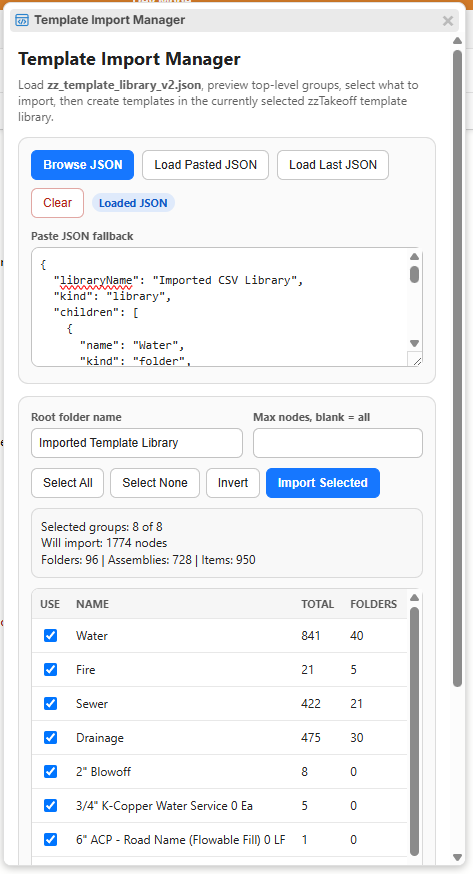
Awesome to see this! thanks... I can't wait to see the MCP in ZZ and see more of what you and our other users a building... You could never do this isn Stack, they would charge you tens of thousands of dollars and you could not build it in PS...
Weekend Warriors!
🚀1
What this program is doing is looking at your current loaded template and allowing you to edit items within it, this will also support exporting your full template, updating it in excel or where ever, then bring it back in and it will only update fields that have been changed or added. If the Devs allow it, as you can see below, this can also tap into your custom properties and allow you to export and import. If allowed, I would add Fail safes to not allow anyone over writting the built in custom properties that only the ZZ software uses.
anyone still coding???? just me? lol
In developer mode, can we have an ability to duplicate a script, Components, Etc.? after you click duplicate, the name would show up and you could add a new Version to it.
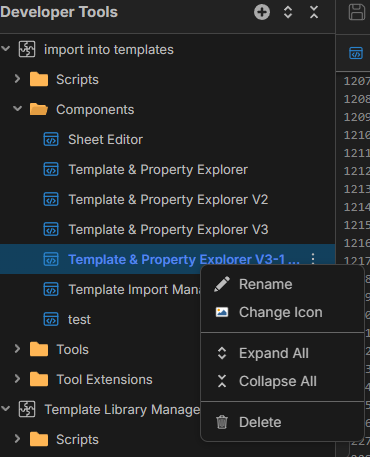
Another thing i would like to see some of VS features added to the code editor. Collapse a code from { to }, and another one I like is Format Document that will line all your code up.
👍1%22%2F%3E%3Ctext%20x%3D%2232%22%20y%3D%2233%22%20text-anchor%3D%22middle%22%20dominant-baseline%3D%22central%22%20font-family%3D%22Arial%2C%20sans-serif%22%20font-size%3D%2226%22%20font-weight%3D%22600%22%20fill%3D%22%23fff%22%3EBR%3C%2Ftext%3E%3C%2Fsvg%3E "Brendon R")

What is Devmode??
can everyone access it?
I have some developments i'd love to work on!
👍1Hi Thomas,
Dev mode is a new feature currently being tested in our Test server, our most recent post on the "Inside Track" forum lists some of the newest features coming your way.
Give it a read and see what is new... even auto count!
🚀1
Worked a little bit on creating a plug in to read the pdf plans structure number, Rim & Invert. Perform a linear TO, then in my custom properties under "Location", insert first structure number- second structure number, I can then click the "Populate Runs" tool and it references the "Location" information I entered, finds and auto populates the "Starting Rim", "Starting Invert", "Ending Rim" & "Ending Invert". Basically now I just need to perform a linear takeoff and give it a "Location" and the tool will Populate the elevations. 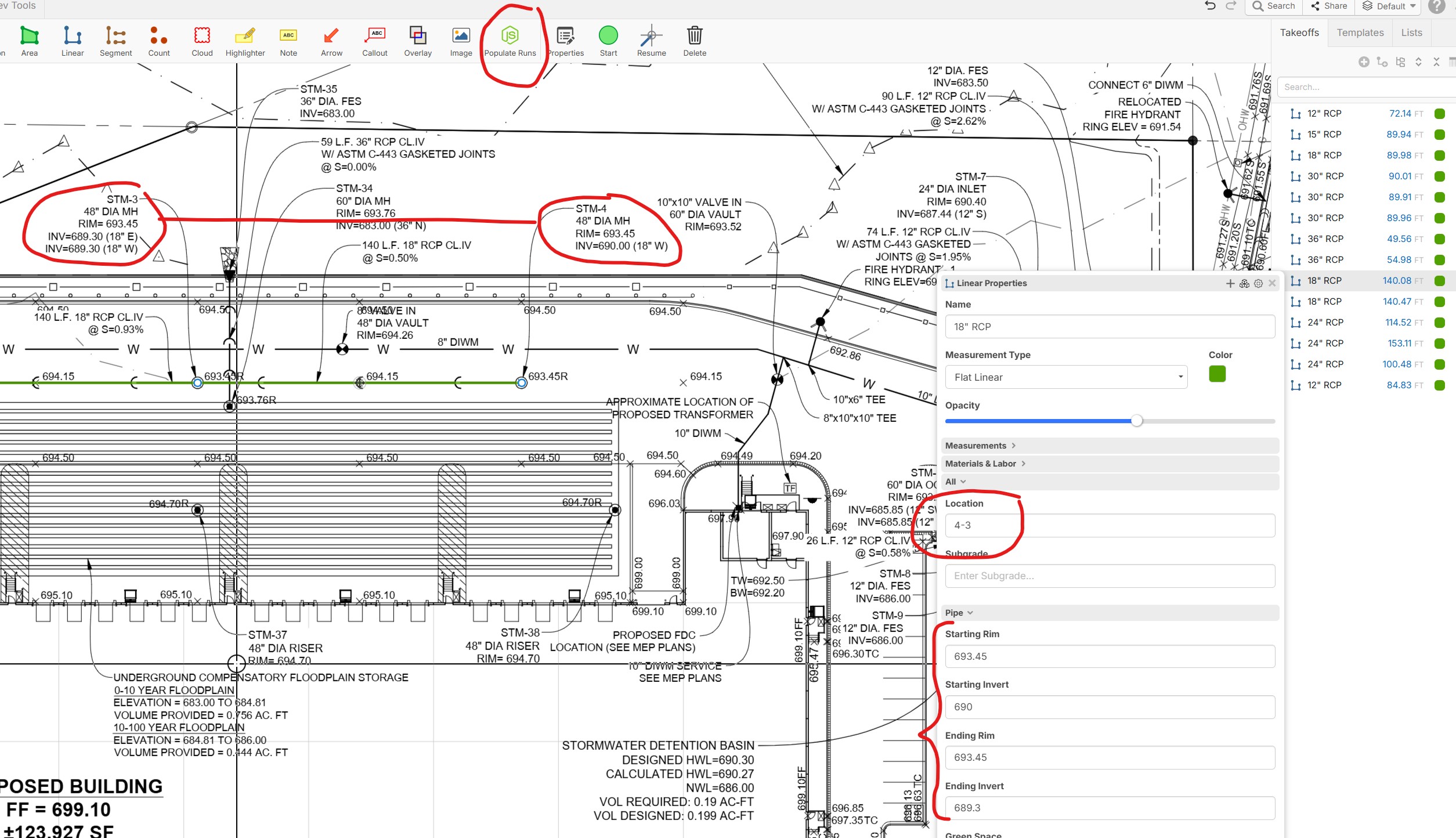
YES!, nice work bryan!
Question, because I could not figure it out this weekend. Is there a way for a component to read files in the "Script"? In a HTML I can make JS files and reference them in the HTML. Does the Dev Tools work the same way??? Do all files live in the same location or are the files only live when they are activated?
👍1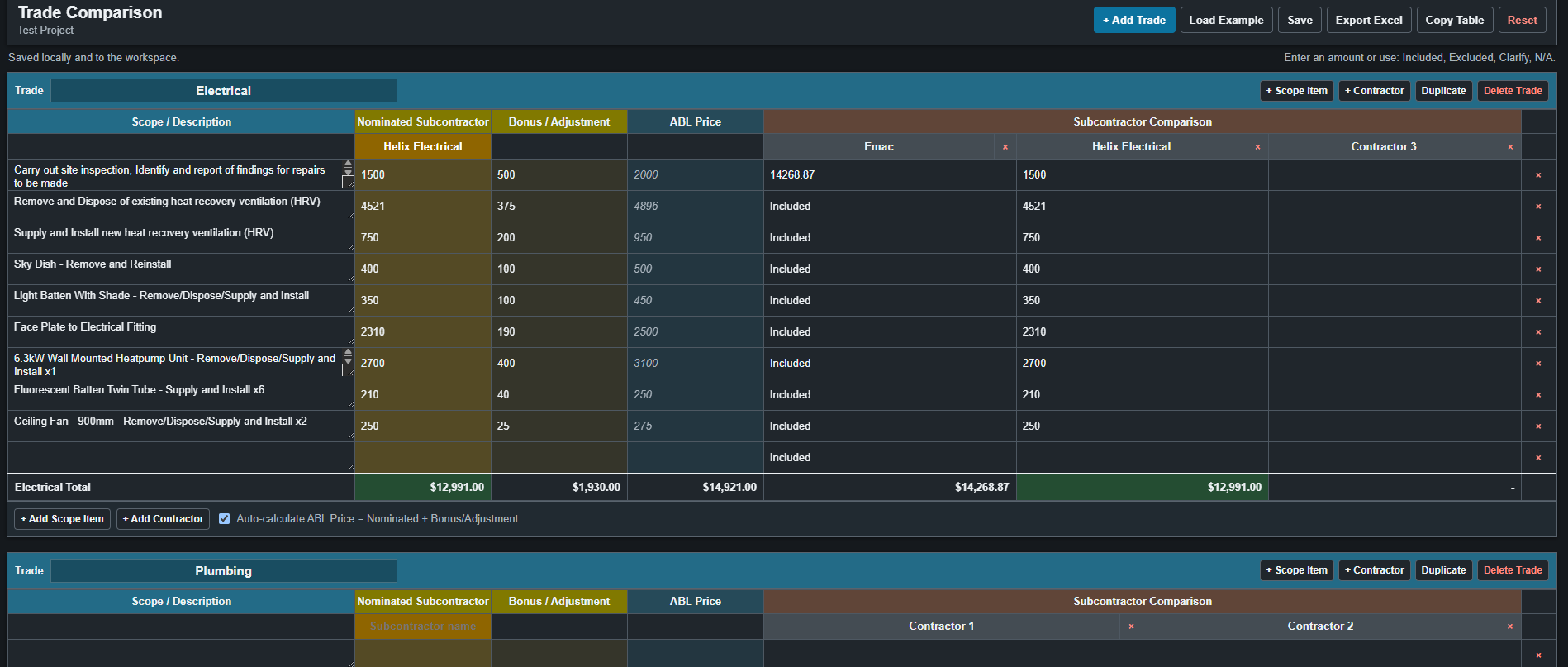
Stop it you are making me look bad! Great work glad you are enjoying the dev tools!
😂2
@David Q love the vid, that is amazing!
can’t wait to dive into this! I got a bid due and any spare personal time I’m building a 240sf deck that I obviously used Zztakeoff for the design and materials, now building it in real life.. 🎺
🚀5😂3Very cool guys! I'm excited to see all the things our users create with the new Dev Tools. 🚀🚀
We're entering a new world for software with Claude, ChatGPT, Grok, Gemini, etc. We would like to help our users enter that world and have a platform to develop in. There will also be options for scripts and components to ask questions to AI in the future as well.
🚀3Will the dev tools be able to sink with a github repository at some point to eliminate the need to copy and paste the code revisions so often?
👍3There is talk a MCP inside of zzTakeoff! I hope that comes some day... no more copy/paste rinse repeat... but It almost sounds too easy.
Is it just my PC or did something happen to the Tool Extensions in dev mode? They are not showing up for me now.
no, they were shown by mistake, and no they took em away until they get the tools and the tool extensions secured..
I was scratching my head also...
%22%2F%3E%3Ctext%20x%3D%2232%22%20y%3D%2233%22%20text-anchor%3D%22middle%22%20dominant-baseline%3D%22central%22%20font-family%3D%22Arial%2C%20sans-serif%22%20font-size%3D%2226%22%20font-weight%3D%22600%22%20fill%3D%22%23fff%22%3EEA%3C%2Ftext%3E%3C%2Fsvg%3E "Eliseo Arellano")
Perhaps this is just pretty simple but we just did a script to create a folder structure with a click of a bottom.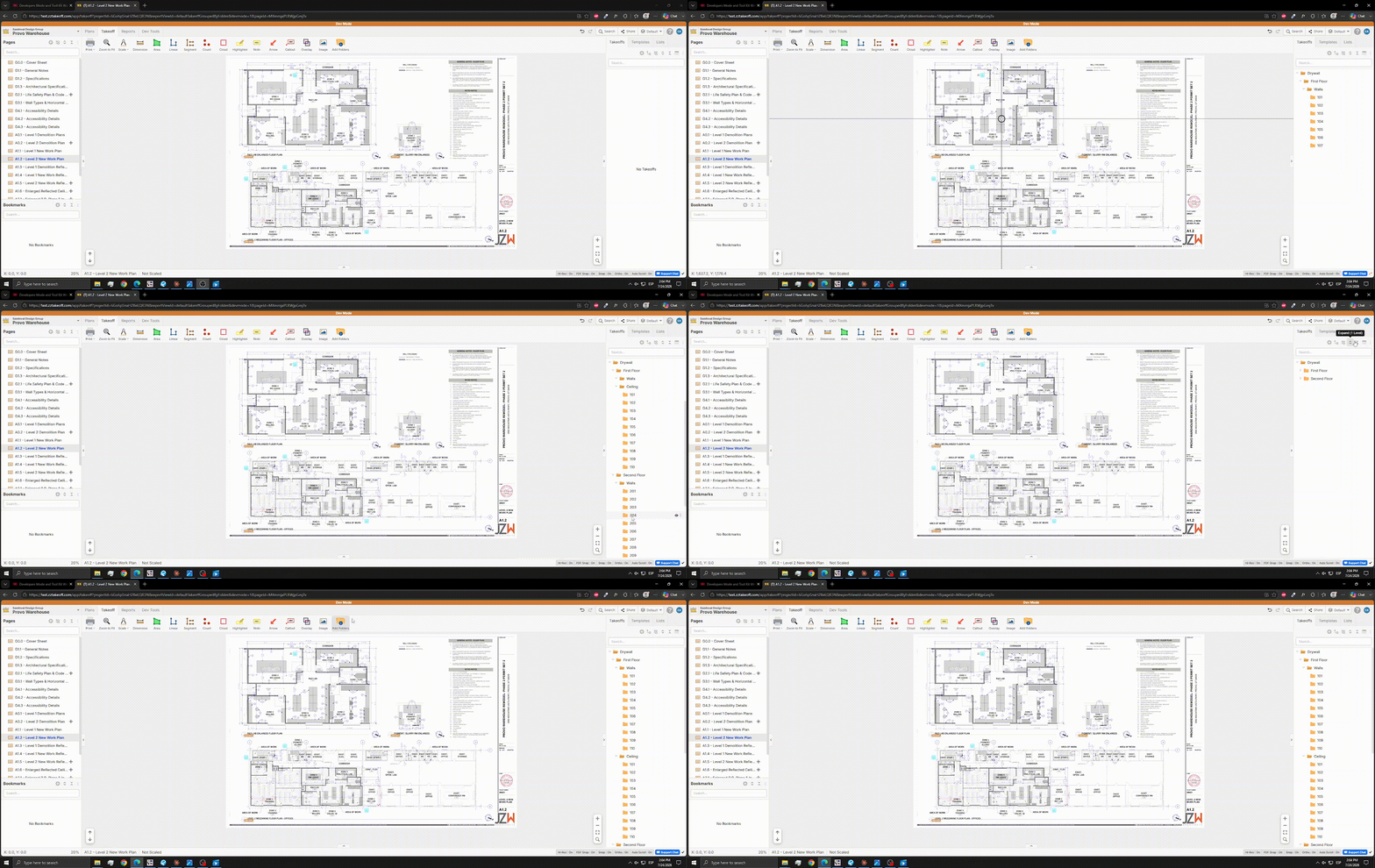

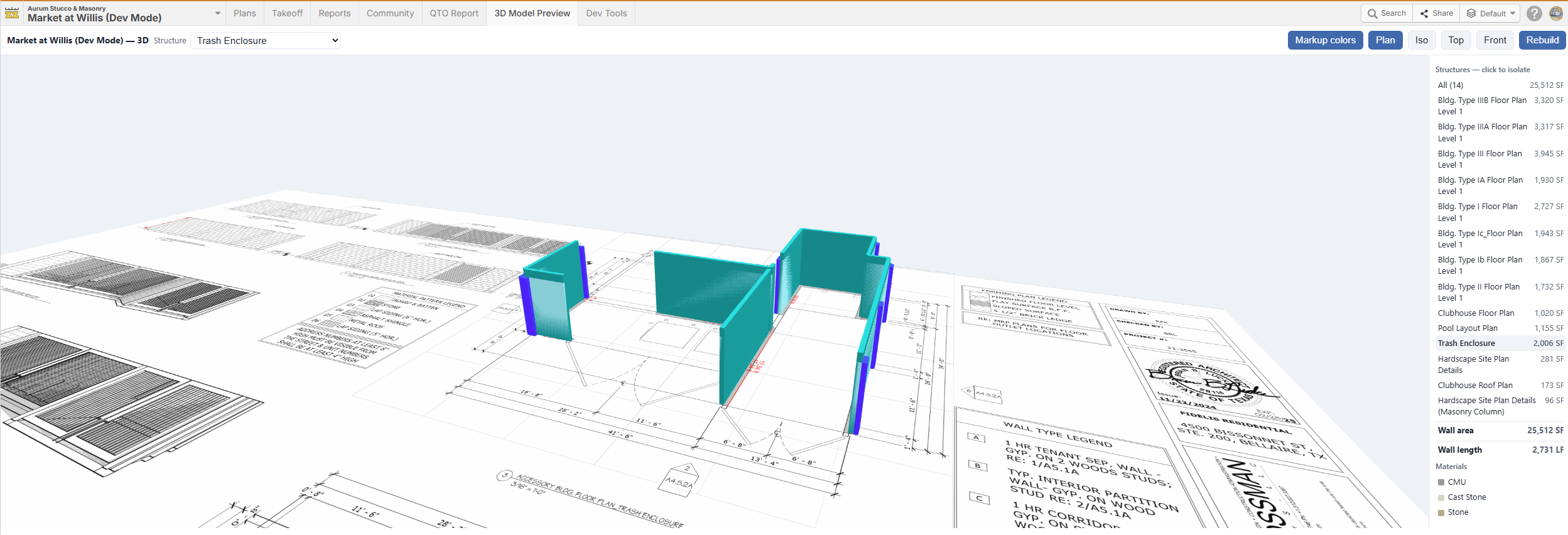
Finally had some spare time to play around with the dev mode plugins and components. A few weeks ago I generated a 3D model with Claude for my markups. Now I can just go straight from zzTakeoff using a component I worked with Claude.
Wondering when the dev tools will be released to officially start working with them.
🚀1Awesome!
I'm looking to get started in DevMode. Has anyone compared Chat GPT and Claude for the AI... I have both subscriptions. Kind of use then for different things, Chat is more brainstorming and ideas driven while Claude is more direct to answers... Any feedback would be appreciated
👍1
I can speak to using Chat GPT. I am a complete greenhorn at this, so I did the research before jumping in...Claude obviously has a great reputation for vibe coding, but Chat's 5.6 release is getting rave reviews. We decided, since we are more familiar with using Chat to start there. A business plan with a Premium seat made a huge impact on our work flow in a matter of hours. Now, a week into this, I have switched to using Chat GPT Codex, not just Work...and again, massive game changer. Codex does an incredible job at maintaining context for prompt iteration. I rarely have to undo any "poor choices" as it were Chat has made. I find it to be quite intuitive and the response time much faster. Simply finishing a complex prompt with "do you understand" allows me in seconds to see it's rational breakdown and interpretation before giving in the command to implement the prompt. In summary, Chat Codex working alongside ZZ makes this NEWB capable of incredible work.
💯3🚀2👍2
Hey y'all! It's awesome what you've all made.
I'm pretty new to AI usage. I was able to make a tool that does a more thorough version of the "extract schedule" tool, but am stuck with things that are more complicated.
A couple things I'm hoping for some help with are:
1. A tool that can detect page overlaps and stictch drawings together (Making a box or 3d model like what was shown in the show and tell would be awesome, but I probably have to crawl before I run)
2. How do you actually create a button in the main button window at the top of the screen? Claude said it couldn't do it.
3. For the advanced stuff you're all making are there any critical tools I'm missing? Or are you able to do what you want solely with zztakeoff and AI?
I watched the show and tell podcast and would really love to get my skills/logic towards the level of some on the call.
Thanks!
@Isaac or anyone else
Your 3D model preview tab is slick. My question tho is I would want to see that tab on every job, and I'm betting you have to run AI to get that to show up and is not just natively working correct? So really all these tools we are building are hard to scale if they rely on AI... Or am I off base here?
👍2@Kyle For the most part with these 3D render plugins users are using AI to create the plugin but no AI required after the code is built for the plugin. This applies to many types of plugins such as 3D renders, reports, dashboards, etc.
👍2@Kyle
As Heber mentions, I used AI to configure the component the first time. Below is an example of the current flow when you change projects.
Ok so.......this all sounds wonderful!
@zzTakeoff Team,
Any chance you have a 3D viewer plugin for anyone to use? Love to get this in the hands of our people so they can see their drawing in 3D and could deploy it now.
👀1🚀1%22%2F%3E%3Ctext%20x%3D%2232%22%20y%3D%2233%22%20text-anchor%3D%22middle%22%20dominant-baseline%3D%22central%22%20font-family%3D%22Arial%2C%20sans-serif%22%20font-size%3D%2226%22%20font-weight%3D%22600%22%20fill%3D%22%23fff%22%3EJ%3C%2Ftext%3E%3C%2Fsvg%3E "Jes")
@Kyle Sometimes in my AI chat sessions when I start a new chat/task, I end up with a moron that tells me with great confidence it can't do this or that in zz and is completely wrong. Reminds me of some people I've had the unfortunate luck of associating with in real life. One time Claude told me I couldn't get a component it just finished writing to pop up on the main interface, and the gearbox to do so is literally on the right corner. 😝
😂1@Kyle We have some examples that we will put out soon. Users will be able to install them as well as customize them if they want.
@Jes "I'm sorry Dave, I'm afraid I can't do that."
🔥2🤣2