











 Product Updates
New Update: Hyperlinks, Imperial + Metric Scales, Gray Folders in Pages & Project, Auto Box Mode for Linear, etc.
We just released a new update for zzTakeoff based on user feedback 🙂
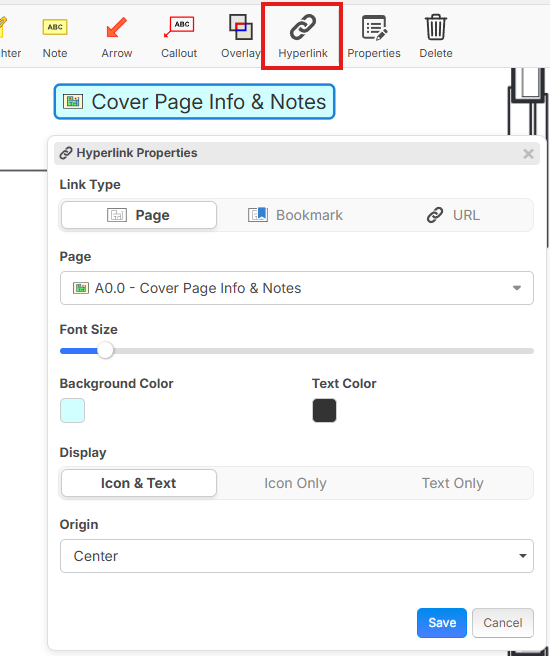
Hyperlink Tool
You can add hyperlinks to your pages with the ability to link to a Page, Bookmark, or External URL. You can also drag & drop a page or bookmark from the left sidebar onto the page to auto create a hyperlink on the page. Note: you can hold Shift + dragging a page from the left sidebar onto the plan image to create an overlay.
Imperial and Metric Scales in the Same Project
For example, you can scale in Metric and draw an area and get SF output. You can also use [Area:SF] and [Area:M²] in formulas regardless of which measurement system was used and it will auto convert.
We're also experimenting with Metric scale indicator showing in blue to help distinguish. We're open to feedback on this.

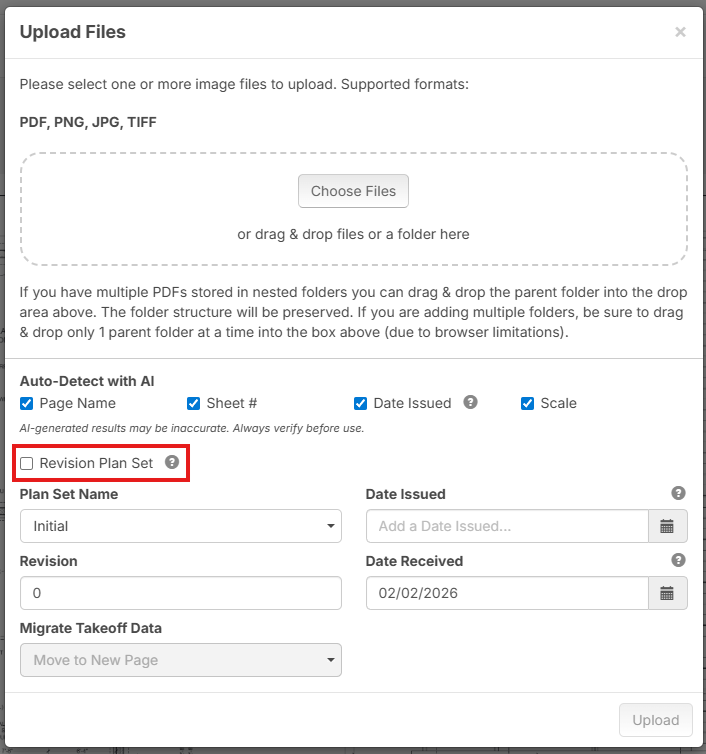
Revision Plan Set
Due to some confusion with plan versioning, it will not try to match new versions of pages to old versions of pages (and move takeoff data), unless the user checks the "Revision Plan Set" checkbox:
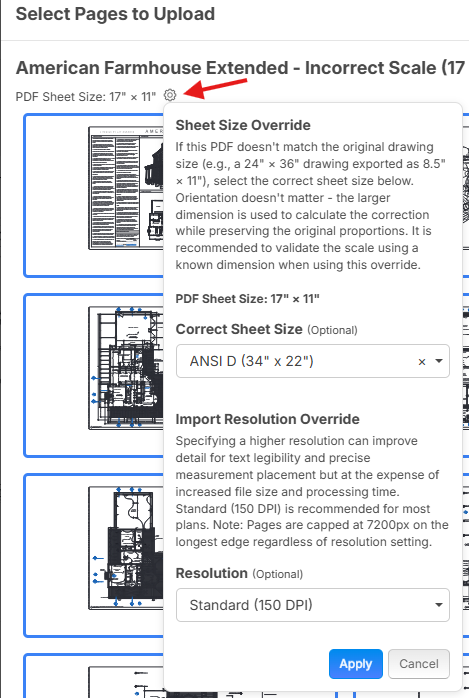
Page Size Override
When uploading PDF files, you can now see the detected page size and click the gear to override that page size. For example, if you're importing plans that got downsized to 11"x8.5" or similar, you can now upsize them to proper size such as Arch D 36"x24". You have better control over DPI settings. This will help with some pages coming in blurry due to the PDF page size being too small.
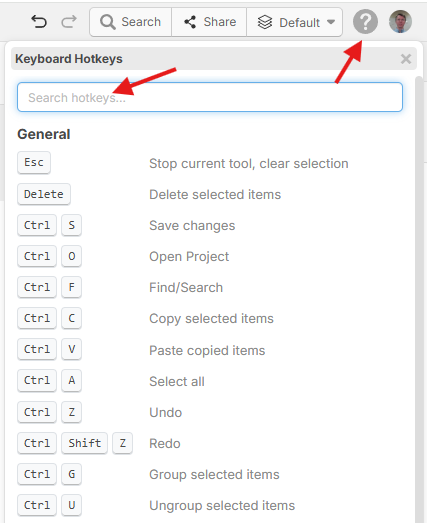
Hotkey List - Updated & Searchable
More up to date and easier to use.
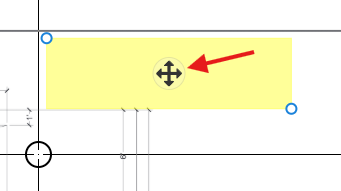
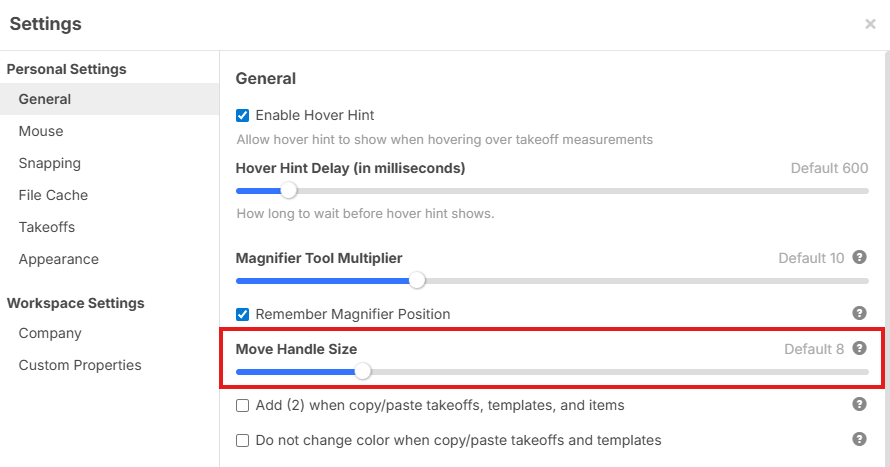
Setting for Move Handle Size
You can make it much bigger if you wish.
Location of move handle size setting:
Remember which Layer was Last Opened
Now when you re-open a project, it will automatically go to the layer you last had opened. This should help avoid users getting confused by the software opening the "Default" layer when a project first opens (if the user is not using that layer for their takeoffs).

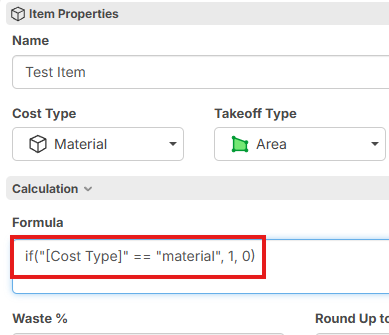
Text Comparisons in Formulas
Previously the formulas could only compare numbers.
Example: "[Cost Type]" == "material" will now be true if you're on a Material Item. Lots of expanded uses in formulas now. This is a simple example, but more useful when you use with WBS properties, etc.
Human Verified Scale Indicator
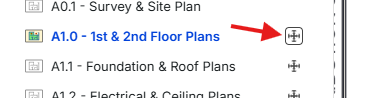
You can click the scale icon to get an option to verify the scale (which is often set by AI, but many users want a way to know if a human has double checked the scale).

It will show the border around the scale icon if it has been human verified:
Search Visible by Default
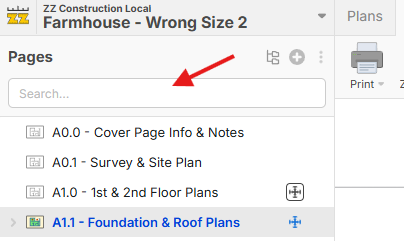
In the sidebars for Pages, Takeoffs, & Templates (as well as Open Project popup), the search (previously more condensed by default) is now visible by default.
Auto Box Mode for Linear
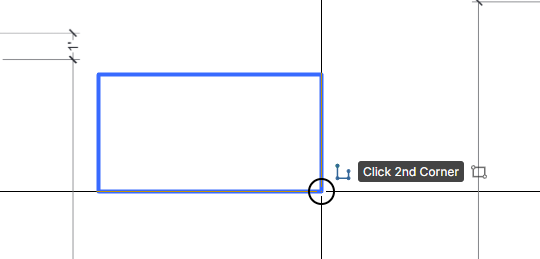
Some users were requesting click & drag for automatic box mode on linear. Some users prefer click & drag to draw individual segments, so this is a setting.
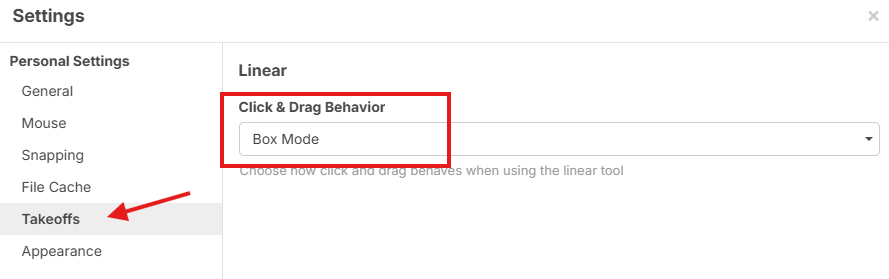
Setting location for Auto Box Mode on Linear
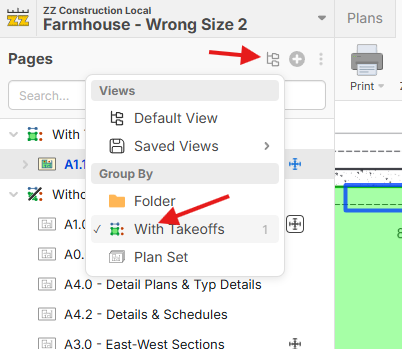
Pages - Group by "With Takeoffs" or "Without Takeoffs"
Many users were requesting the ability to have pages with takeoffs at the top. Now it's easy. This is the beginning of gray folders for pages (custom page properties coming soon).
Gray Folder Grouping in Projects
Now you have more control over your view in the Open Project popup.
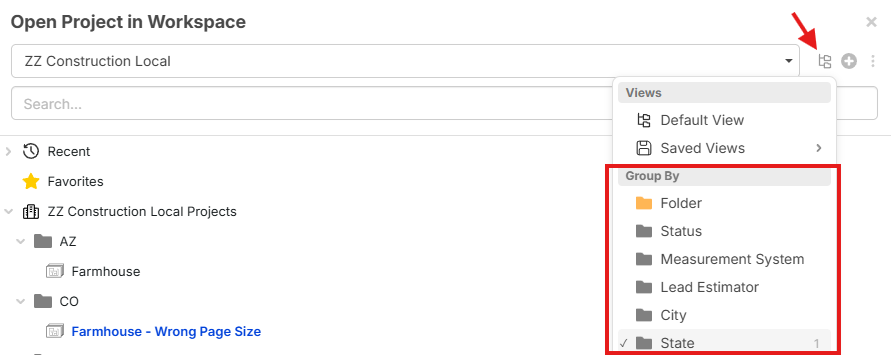
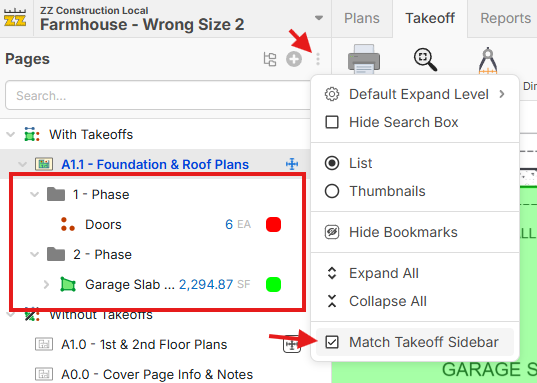
Gray Folder Grouping to Match Takeoffs Sidebar
If you group your takeoffs by specific properties in the right sidebar, you can now make the left sidebar match.
Misc. Updates
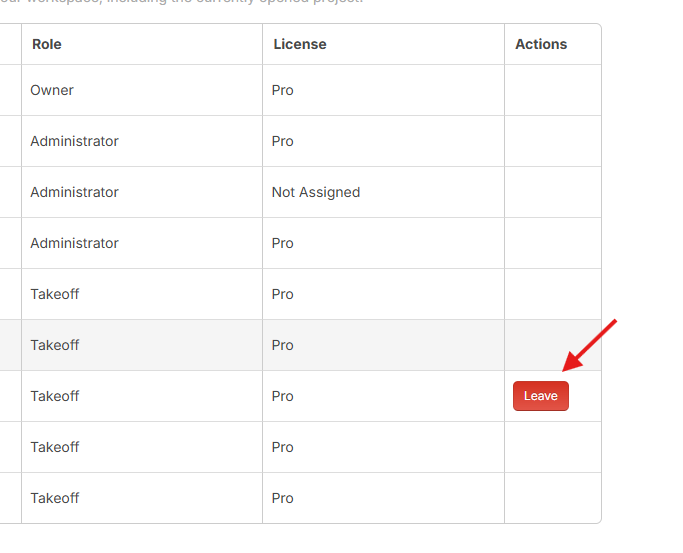
- Users Can "Remove" themselves from a workspace with the "Leave" button (previously had to be removed by an administrator)
- AI uses Higher Resolution when detecting page name, sheet #, scale, etc. Improved accuracy.
Bug Fixes
- Filter icon in report column headers now allows you to click to adjust or clear the filter
- "Convert To..." is now working properly in the "Paste" toolbar (visible after pasting objects)
- Manual Takeoff sections now filter properly when reports are filtered to a specific layer
- Dragging & dropping items to adjust parent/child relationship in "gray folders" is working properly now
Thank you all for your feedback and involvement in the community to help improve zzTakeoff. 🚀

Awesome updates! Where is the "Leave" button located to leave a workspace? Can't seem to find it.

Great update, thanks team!

This is great, thanks ZZ team!
%22%2F%3E%3Ctext%20x%3D%2232%22%20y%3D%2233%22%20text-anchor%3D%22middle%22%20dominant-baseline%3D%22central%22%20font-family%3D%22Arial%2C%20sans-serif%22%20font-size%3D%2226%22%20font-weight%3D%22600%22%20fill%3D%22%23fff%22%3EVT%3C%2Ftext%3E%3C%2Fsvg%3E "Victor Tengowski")
I love the hyperlink update. Can we have a setting that would allow users to open the hyperlink in a new tab or window?
👍1
@Rulon It's on the "Users" page. It will be on the right side column. If you're an admin, it will just say "Remove", but if you don't have admin privileges, you can just "Leave" the workspace.
@Victor This could be a great option. For now you can middle click the hyperlink it to have it open in a new tab.
👍2
Hyperlink is total awesome sauce. Ya'll cant stop me from hyperlinking. Sometimes I hyperlink just for the fun of it.
The only thing that would make it more awesome is if you could just add the hyperlink to a note. So I could write a note like. This roof plan doesn't match the elevation, include hyperlink. double click whamo blamo your'e looking at the elevations.
😂4🚀1
Team, Love where we are headed with the hyperlinks!
Can we get an option to change the text name?
I will have several hyperlinks on one page, and I would love to label them, so I don't just see a generic name. I would like to see C4.1, C4.0, C2.0, or some other random version. Maybe detail 13?
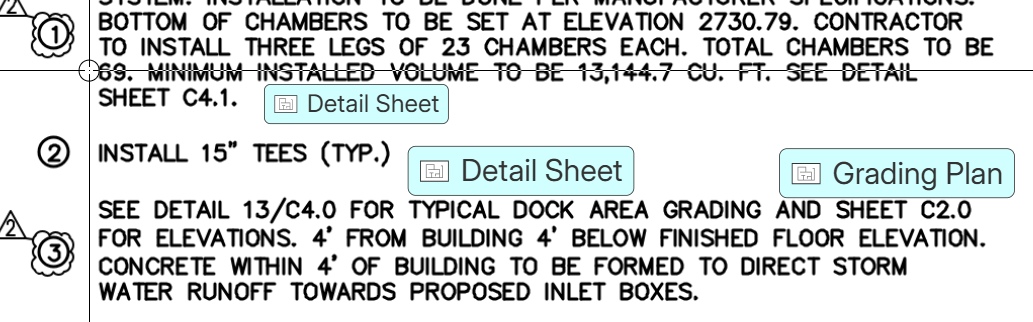
Also, when I click the "carrot" on Hyperlink to add a new link, it brings up the pop-up box as it should. I choose a page, then when I select "start," I click to place the hyperlink. The dialogue box comes back up, and I have to re-select the page. Can you modify this so I am only selecting the page once, and the dialogue box stays closed?
👍5
OK I vote we go back to the days when updates were only installed every year. I cant keep up. (sarcasm)
😁1😂2
%22%2F%3E%3Ctext%20x%3D%2232%22%20y%3D%2233%22%20text-anchor%3D%22middle%22%20dominant-baseline%3D%22central%22%20font-family%3D%22Arial%2C%20sans-serif%22%20font-size%3D%2226%22%20font-weight%3D%22600%22%20fill%3D%22%23fff%22%3EJG%3C%2Ftext%3E%3C%2Fsvg%3E "Justin Guevara")
You guys rock! We appreciate ya'll very much!

Love all of this. Was already completely sold on the software but with each new update it just gets better
%22%2F%3E%3Ctext%20x%3D%2232%22%20y%3D%2233%22%20text-anchor%3D%22middle%22%20dominant-baseline%3D%22central%22%20font-family%3D%22Arial%2C%20sans-serif%22%20font-size%3D%2226%22%20font-weight%3D%22600%22%20fill%3D%22%23fff%22%3EJ%3C%2Ftext%3E%3C%2Fsvg%3E "Jes")
@Justin H
If you bookmark the page you want to create a hyperlink to, you can name it anything you want and it will show up that way as the hyperlink. But yeah I guess it would be more seamless if you could name it something right there on the spot.
I like using bookmarks because majority of the time I'm zooming into one particular section detail on the page, and when you bookmark it, it saves your exact zoom position on the page, whereas if you just hyperlink to the page you have to scroll over to the section again
@Jes, I agree that the bookmark function is nice in the regard that it will "zoom" to the specific spot. Is there a way to also create the bookmark within the hyperlink so that I don't have to create a list of bookmarks and then go link them? I have seen other programs that it will autohyperlink the details. So it will search the legend and find  , and then it will search the sheet, find the detail, and then essentially create a bookmark.
I don't think you can do it on the fly the way you're saying yet, so yeah, currently it's a bunch of extra steps to do it with bookmarks.
And I bet auto hyperlinks will be the next phase of this feature that zz will eventually add now that they are allowing AI to auto detect things on pages.
@Ben Now you can live in hyperlink heaven!
@Justin @Jes We can easily add this option to override the "Name" of the hyperlink with whatever text you want. Maybe we could also have an option as well to automatically use the Sheet # instead of the page name (smaller hyperlink without the need to explicitly type the sheet #). Eventually (not too far in the future) we will have these hyperlinks auto generated with AI. Building this hyperlink tool is just some underlying foundation for it.
Thanks for all the support and feedback guys. We will keep pushing.
👍5😁1🔥1🎯1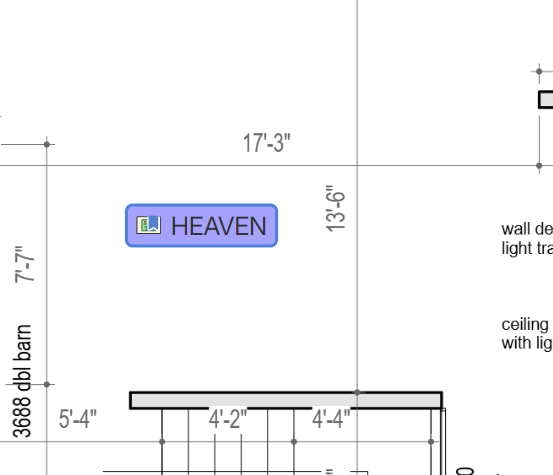
I created a hyperlink improvements post in the Inside Track (with some updates based on feedback here) for anyone that wants to comment there for specific improvements.
Please check out the humor and memes story about the desktop beast! LINK
🚀2
%22%2F%3E%3Ctext%20x%3D%2232%22%20y%3D%2233%22%20text-anchor%3D%22middle%22%20dominant-baseline%3D%22central%22%20font-family%3D%22Arial%2C%20sans-serif%22%20font-size%3D%2226%22%20font-weight%3D%22600%22%20fill%3D%22%23fff%22%3ERJ%3C%2Ftext%3E%3C%2Fsvg%3E "Rulon Jessop")
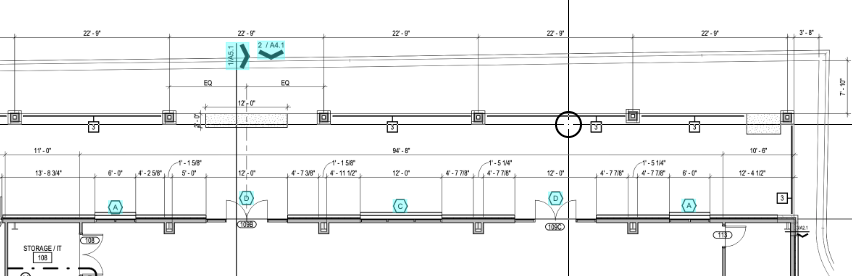
I don't know how I did it, but I made hyper links on all the details. I didn't add them manually. Is there a way to do it automatically?
👍1@Rulon @Ben With the new update, if the original PDF has hyperlinks already in it, they will come in now as hyperlinks in zzTakeoff. 😊 We still have some improvements to make them work better across multiple layers, etc. but it should be a good step forward. If you have any suggestions to improve it, or wish they worked differently, just let us know.
We are still working on using some AI to auto detect and create them if the original PDF doesn't have them.
@Eric Sometimes that happens if they are hyperlinks to the current page that you are already on. I've seen that sometimes on some plans.
👍4
Guys, have we done away with the hyperlinks feature? I haven't seen it in my tool bar for quite a while now...

@Shane, the place where I can find it is by hitting the "/" or the "spacebar" and going to tools.